
ESP32-Based Smart Weather Station with BME280, BH1750, and OLED Display
View and Edit Project In Cirkit Designer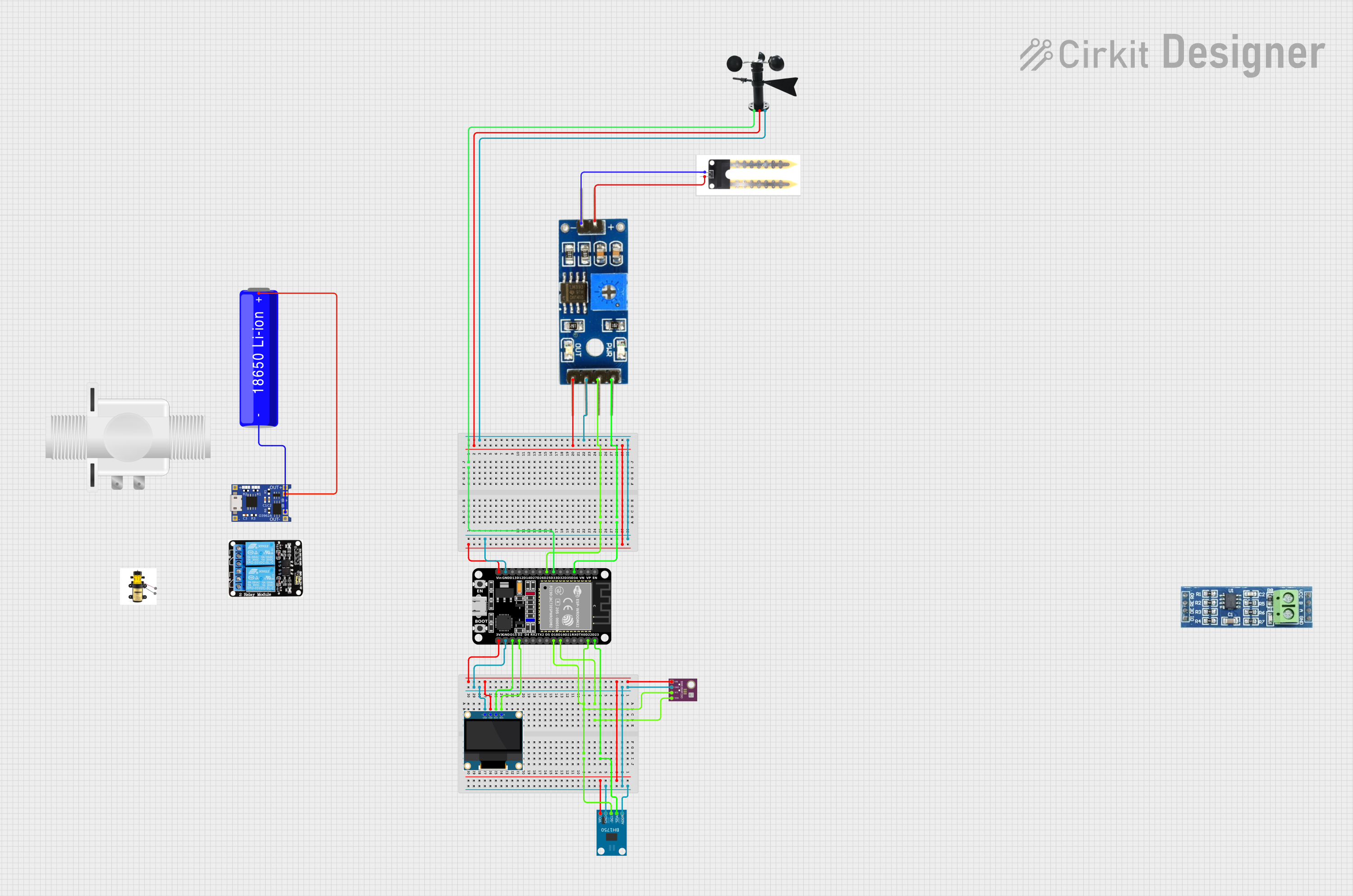
Smart Weather Station Circuit Documentation
Summary
This document provides a detailed overview of a smart weather station circuit. The circuit interfaces with various sensors and an OLED display to measure and display environmental parameters such as temperature, humidity, pressure, and light intensity. The core of the circuit is an ESP32 microcontroller, which communicates with the sensors and the display.
Component List
BME/BMP280
- Description: Environmental sensor for measuring temperature, humidity, and pressure.
- Pins: GND, SCL, SDA, VIN
Wind Vane
- Description: Sensor for measuring wind direction.
- Pins: A0, VCC, GND
0.96" OLED
- Description: Display module for showing sensor readings.
- Pins: GND, VDD, SCK, SDA
BH1750
- Description: Light intensity sensor.
- Pins: VCC, GND, SCL, SDA, ADDR
TP4056
- Description: Lithium-ion battery charger module.
- Pins: OUT-, B-, B+, OUT+, IN-, IN+
18650 Li-ion Battery
- Description: Rechargeable lithium-ion battery.
- Pins: -, +
RS485
- Description: Communication module for RS485 protocol.
- Pins: VCC, RO, RE, GND, B, A, DE, DI
ESP32 (30 pin)
- Description: Microcontroller for processing and communication.
- Pins: EN, VP, VN, D34, D35, D32, D33, D25, D26, D27, D14, D12, D13, GND, Vin, D23, D22, TX0, RX0, D21, D19, D18, D5, TX2, RX2, D4, D2, D15, 3V3
Soil Moisture Module
- Description: Module for measuring soil moisture.
- Pins: positive, negative, Analog, Digital, Ground, VCC
Soil Moisture Sensor
- Description: Sensor for detecting soil moisture.
- Pins: positive, negative
5v 2-Relay JD-VCC
- Description: Relay module for controlling high-power devices.
- Pins: JD-VCC, VCC, GND, IN1, IN2, NO, COM, NC
Pump
- Description: Water pump for irrigation.
- Pins: +, -
Plastic Solenoid Valve
- Description: Valve for controlling water flow.
- Pins: pin1, pin2
Wiring Details
BME/BMP280
- GND connected to ESP32 GND
- SCL connected to ESP32 D18
- SDA connected to ESP32 D19
- VIN connected to ESP32 3V3
Wind Vane
- A0 connected to ESP32 D33
- VCC connected to ESP32 Vin
- GND connected to ESP32 GND
0.96" OLED
- GND connected to ESP32 GND
- VDD connected to ESP32 3V3
- SCK connected to ESP32 D15
- SDA connected to ESP32 D2
BH1750
- VCC connected to ESP32 3V3
- GND connected to ESP32 GND
- SCL connected to ESP32 D22
- SDA connected to ESP32 D23
- ADDR connected to ESP32 GND
TP4056
- B- connected to 18650 Li-ion Battery -
- B+ connected to 18650 Li-ion Battery +
18650 Li-ion Battery
- - connected to TP4056 B-
- + connected to TP4056 B+
Soil Moisture Module
- positive connected to Soil Moisture Sensor positive
- negative connected to Soil Moisture Sensor negative
- Analog connected to ESP32 D34
- Digital connected to ESP32 D25
- Ground connected to ESP32 GND
- VCC connected to ESP32 Vin
Soil Moisture Sensor
- positive connected to Soil Moisture Module positive
- negative connected to Soil Moisture Module negative
Code Documentation
/*
 * Smart Weather Station
 * This Arduino sketch interfaces with a BME280 sensor, BH1750 sensor, and an
 * OLED display to create a smart weather station. The BME280 sensor measures
 * temperature, humidity, and pressure. The BH1750 sensor measures light
 * intensity. The OLED display shows the sensor readings.
 */

#include <Wire.h>
#include <Adafruit_Sensor.h>
#include <Adafruit_BME280.h>
#include <Adafruit_GFX.h>
#include <Adafruit_SSD1306.h>
#include <BH1750.h>

#define SCREEN_WIDTH 128
#define SCREEN_HEIGHT 64
#define OLED_RESET    -1
Adafruit_SSD1306 display(SCREEN_WIDTH, SCREEN_HEIGHT, &Wire, OLED_RESET);
Adafruit_BME280 bme;
BH1750 lightMeter;

void setup() {
  Serial.begin(115200);
  Wire.begin();

  if (!bme.begin(0x76)) {
    Serial.println("Could not find a valid BME280 sensor, check wiring!");
    while (1);
  }

  if (!lightMeter.begin(BH1750::CONTINUOUS_HIGH_RES_MODE)) {
    Serial.println("Could not find a valid BH1750 sensor, check wiring!");
    while (1);
  }

  if (!display.begin(SSD1306_SWITCHCAPVCC, 0x3C)) {
    Serial.println("SSD1306 allocation failed");
    while (1);
  }
  display.display();
  delay(2000);
  display.clearDisplay();
}

void loop() {
  display.clearDisplay();
  display.setTextSize(1);
  display.setTextColor(SSD1306_WHITE);
  display.setCursor(0, 0);

  display.print("Temp: ");
  display.print(bme.readTemperature());
  display.println(" *C");

  display.print("Humidity: ");
  display.print(bme.readHumidity());
  display.println(" %");

  display.print("Pressure: ");
  display.print(bme.readPressure() / 100.0F);
  display.println(" hPa");

  display.print("Light: ");
  display.print(lightMeter.readLightLevel());
  display.println(" lx");

  display.display();
  delay(2000);
}
This code initializes the BME280 sensor, BH1750 sensor, and the OLED display. It reads the temperature, humidity, pressure, and light intensity from the sensors and displays the readings on the OLED display. The loop function continuously updates the display with new sensor readings every 2 seconds.