
Arduino UNO-Based Temperature and Humidity Display with DHT22 and TM1637
View and Edit Project In Cirkit Designer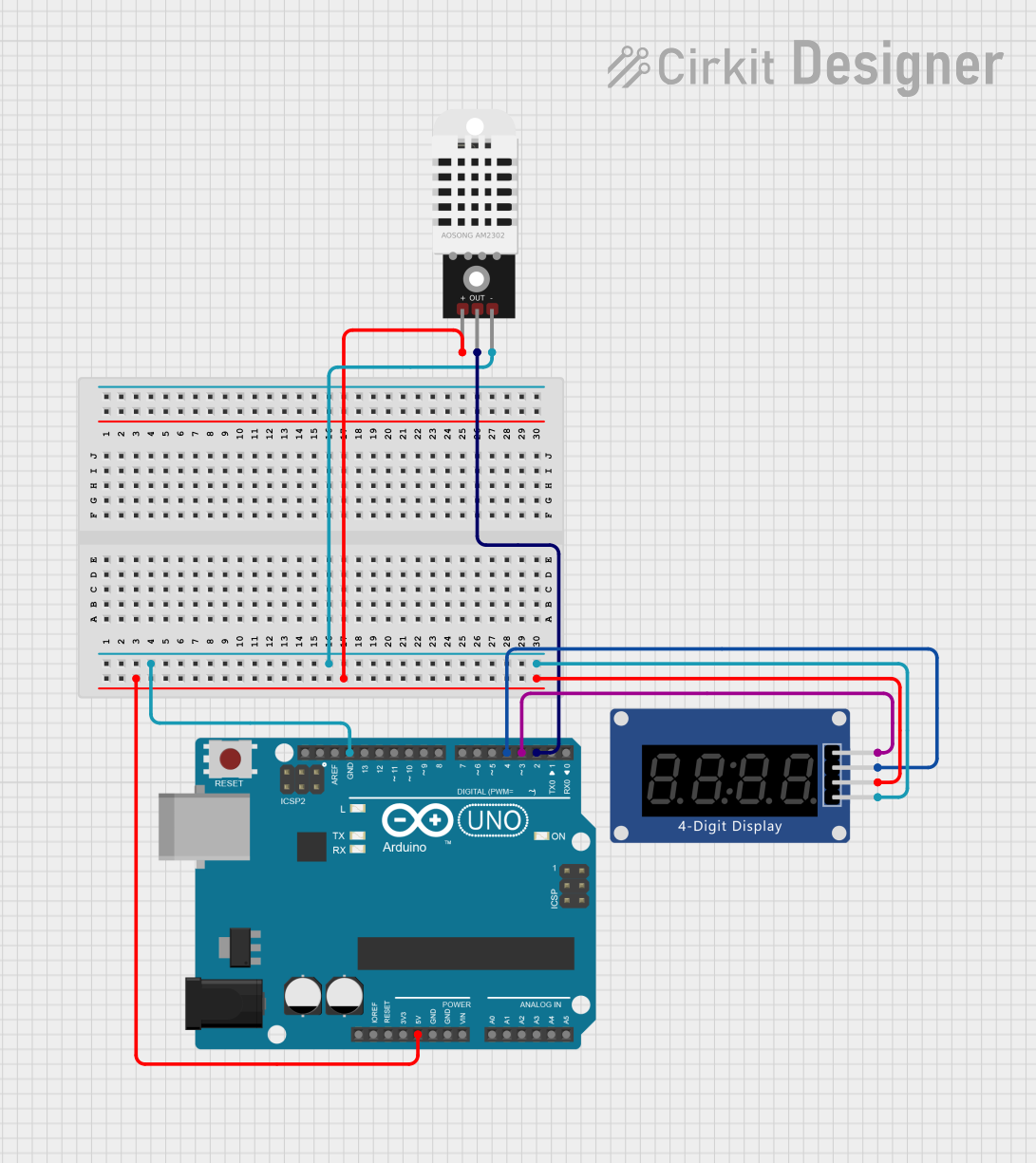
Circuit Documentation
Summary
This circuit involves an Arduino UNO microcontroller interfaced with a DHT22 temperature and humidity sensor and a TM1637 seven-segment display. The Arduino UNO reads temperature and humidity data from the DHT22 sensor and displays the temperature and humidity values on the TM1637 display.
Component List
DHT22
- Description: Temperature and Humidity Sensor
- Pins: +, Out, -
Arduino UNO
- Description: Microcontroller Board
- Pins: UNUSED, IOREF, Reset, 3.3V, 5V, GND, Vin, A0, A1, A2, A3, A4, A5, SCL, SDA, AREF, D13, D12, D11, D10, D9, D8, D7, D6, D5, D4, D3, D2, D1, D0
Seven Segment Display (TM1637)
- Description: Wokwi Compatible Seven Segment Display
- Pins: CLK, DIO, VCC, GND
Wiring Details
DHT22
- +: Connected to Arduino UNO 5V
- Out: Connected to Arduino UNO D2
- -: Connected to Arduino UNO GND
Arduino UNO
- 5V: Connected to DHT22 + and TM1637 VCC
- GND: Connected to DHT22 - and TM1637 GND
- D2: Connected to DHT22 Out
- D3: Connected to TM1637 CLK
- D4: Connected to TM1637 DIO
Seven Segment Display (TM1637)
- VCC: Connected to Arduino UNO 5V
- GND: Connected to Arduino UNO GND
- DIO: Connected to Arduino UNO D4
- CLK: Connected to Arduino UNO D3
Code Documentation
#include "dht.h"
#include "TM1637.h"

//{0,1,2,3,4,5,6,7,8,9,10,11,12,13,14,15};
//0~9,A,b,C,d,E,F

#define dht_pin 2 // Pin sensor is connected to
#define CLK 3 // Pins for TM1637
#define DIO 4

TM1637 tm1637(CLK, DIO);
dht DHT;

void setup() {
  tm1637.init();
  tm1637.set(BRIGHT_TYPICAL);
  // BRIGHT_TYPICAL = 2, BRIGHT_DARKEST = 0, BRIGHTEST = 7;

  delay(1500); // Delay to let system boot
}

void loop() {
  // Start of Program
  DHT.read11(dht_pin);

  int temp = DHT.temperature;
  int humidity = DHT.humidity;

  int digitoneT = temp / 10;
  int digittwoT = temp % 10;

  int digitoneH = humidity / 10;
  int digittwoH = humidity % 10;

  tm1637.display(1, digitoneT);
  tm1637.display(2, digittwoT);
  tm1637.display(3, 12);  // put a C at the end

  delay(3000);

  tm1637.display(1, 23);
  tm1637.display(2, digitoneH);
  tm1637.display(3, digittwoH);

  // Wait 3 seconds before accessing sensor again.
  // Fastest should be once every two seconds.
  delay(3000);
}
This code initializes the DHT22 sensor and the TM1637 display. In the setup() function, the TM1637 display is initialized and set to a typical brightness level. The loop() function reads the temperature and humidity from the DHT22 sensor, processes the data, and displays it on the TM1637 display. The display alternates between showing the temperature and humidity every 3 seconds.