
Arduino UNO Based Multi-Sensor Temperature Data Logger with OLED Display and SD Card Storage
View and Edit Project In Cirkit Designer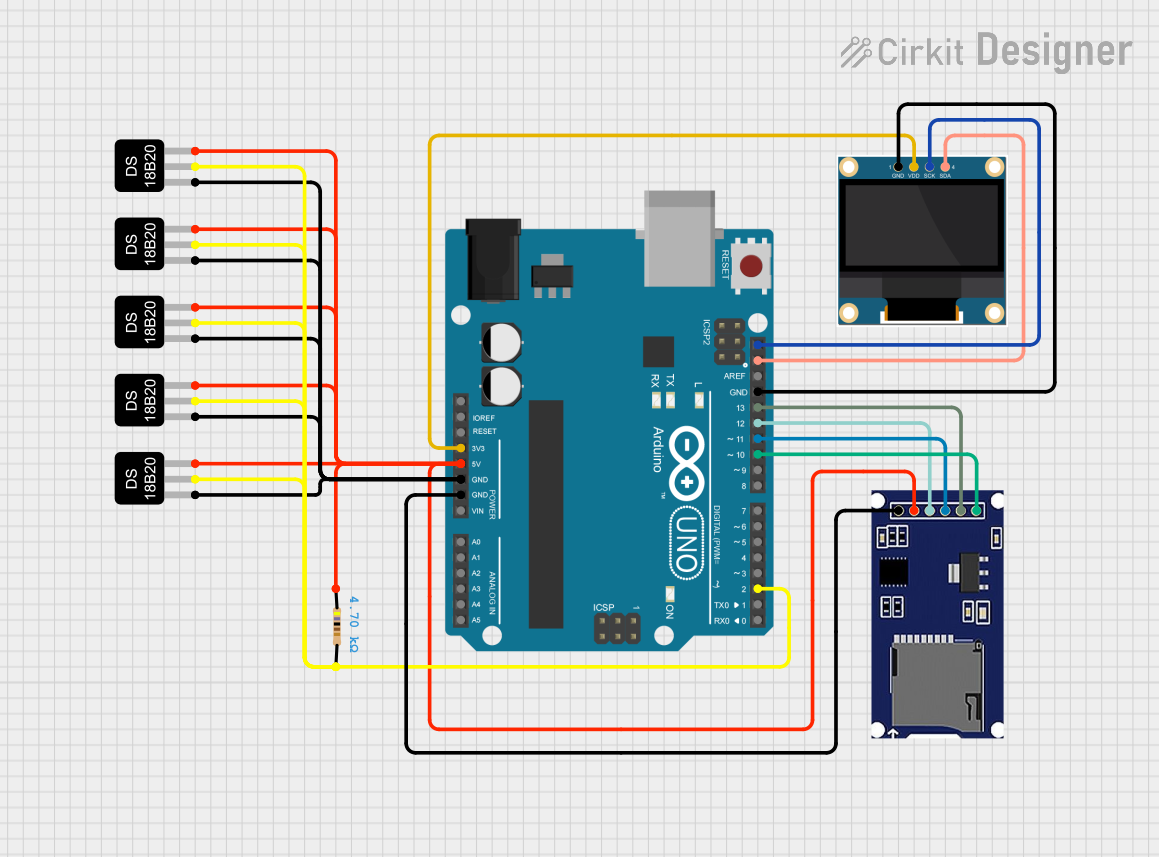
Circuit Documentation
Summary
This circuit is designed to read temperature data from multiple DS18B20 temperature sensors, display the data on a 0.96" OLED screen, and log the data to an SD card using an Arduino UNO microcontroller. The Arduino UNO manages the data acquisition from the temperature sensors, controls the OLED display via I2C communication, and writes the temperature data to a file on the SD card through the SPI interface.
Component List
Arduino UNO
- Microcontroller board based on the ATmega328P
- It has 14 digital input/output pins, 6 analog inputs, a 16 MHz quartz crystal, a USB connection, a power jack, an ICSP header, and a reset button.
DS18B20 Temperature Sensor (Wokwi Compatible)
- Digital temperature sensor that provides 9-bit to 12-bit Celsius temperature measurements.
- Communicates over a 1-Wire bus that by definition requires only one data line (and ground) for communication with a central microprocessor.
Resistor
- A passive two-terminal electrical component that implements electrical resistance as a circuit element.
- In this circuit, a 4.7kΩ resistor is used, likely as a pull-up for the 1-Wire data line.
0.96" OLED
- A small display screen that uses OLED technology.
- It is capable of displaying text, images, and animations.
SD Module
- A module that allows an Arduino board to read and write data to and from an SD card.
- It operates over the SPI interface.
Wiring Details
Arduino UNO
3.3Vconnected to OLED VDD5Vconnected to VCC of all DS18B20 sensors, SD module, and one side of the resistorGNDconnected to GND of all DS18B20 sensors, OLED, and SD moduleSCLconnected to OLED SCKSDAconnected to OLED SDAD13connected to SD module SCKD12connected to SD module MISOD11connected to SD module MOSID10connected to SD module CSD2connected to DQ of all DS18B20 sensors and the other side of the resistor
DS18B20 Temperature Sensors
VCCconnected to Arduino 5V (through a resistor for one sensor)GNDconnected to Arduino GNDDQconnected to Arduino D2 (through a 4.7kΩ resistor)
Resistor
- One side connected to Arduino 5V
- The other side connected to DQ of all DS18B20 sensors
0.96" OLED
GNDconnected to Arduino GNDVDDconnected to Arduino 3.3VSCKconnected to Arduino SCLSDAconnected to Arduino SDA
SD Module
CSconnected to Arduino D10SCKconnected to Arduino D13MOSIconnected to Arduino D11MISOconnected to Arduino D12VCCconnected to Arduino 5VGNDconnected to Arduino GND
Documented Code
/*
 * This Arduino sketch reads temperature data from multiple DS18B20 sensors,
 * displays the data on an OLED screen, and logs the data to an SD card.
 */

#include <OneWire.h>
#include <DallasTemperature.h>
#include <Wire.h>
#include <Adafruit_GFX.h>
#include <Adafruit_SSD1306.h>
#include <SPI.h>
#include <SD.h>

#define ONE_WIRE_BUS 2
#define SCREEN_WIDTH 128
#define SCREEN_HEIGHT 64
#define OLED_RESET -1
#define SD_CS_PIN 10

OneWire oneWire(ONE_WIRE_BUS);
DallasTemperature sensors(&oneWire);
Adafruit_SSD1306 display(SCREEN_WIDTH, SCREEN_HEIGHT, &Wire, OLED_RESET);
File dataFile;

void setup() {
  Serial.begin(9600);
  sensors.begin();
  if(!display.begin(SSD1306_I2C_ADDRESS, OLED_RESET)) {
    Serial.println(F("SSD1306 allocation failed"));
    for(;;);
  }
  display.display();
  delay(2000);
  display.clearDisplay();
  if (!SD.begin(SD_CS_PIN)) {
    Serial.println("Card failed, or not present");
    return;
  }
  dataFile = SD.open("datalog.txt", FILE_WRITE);
  if (!dataFile) {
    Serial.println("Error opening datalog.txt");
  }
}

void loop() {
  sensors.requestTemperatures();
  display.clearDisplay();
  display.setTextSize(1);
  display.setTextColor(SSD1306_WHITE);
  display.setCursor(0,0);
  for (int i = 0; i < sensors.getDeviceCount(); i++) {
    float tempC = sensors.getTempCByIndex(i);
    display.print("Sensor ");
    display.print(i);
    display.print(": ");
    display.print(tempC);
    display.println(" C");
    if (dataFile) {
      dataFile.print("Sensor ");
      dataFile.print(i);
      dataFile.print(": ");
      dataFile.print(tempC);
      dataFile.println(" C");
    }
  }
  display.display();
  if (dataFile) {
    dataFile.flush();
  }
  delay(2000);
}
This code initializes the sensors, display, and SD card on startup and enters a loop where it reads temperatures from the sensors, displays them on the OLED, and logs them to the SD card.