
Arduino Leonardo Vibration-Detected Alert System with Piezo Buzzer
View and Edit Project In Cirkit Designer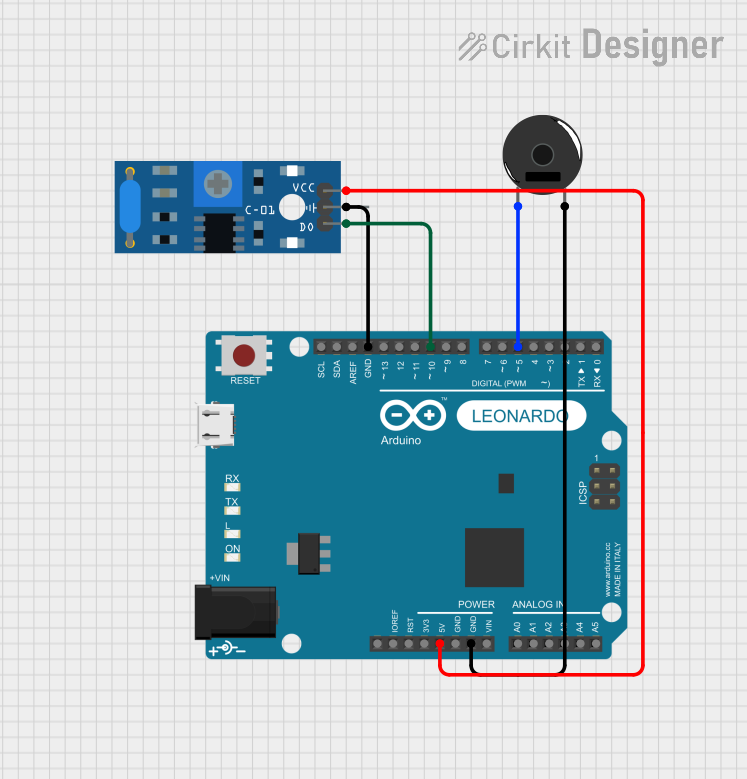
Circuit Documentation
Summary
This circuit is designed to detect vibrations using the SW-420 Vibration Sensor and alert through a Piezo Buzzer. The Arduino Leonardo (Rev3b) serves as the central processing unit, reading the sensor's output and controlling the buzzer accordingly. When the vibration sensor detects movement, the Arduino activates the buzzer to emit a sound.
Component List
Arduino Leonardo (Rev3b)
- Description: A microcontroller board based on the ATmega32u4.
- Purpose: Acts as the central controller for the circuit, reading sensor data and driving the buzzer.
- Pins: D0/RX, D1/TX, D2/SDA, D3 PWM/SCL, D4/A6, D5 PWM, D6 PWM/A7, D7, n.c., IOREF, RESET, 3V3, 5V, GND, VIN, A0, A1, A2, A3, A4, A5, D8/A8, D9 PWM/A9, D10 PWM/A10, D11 PWM, D12/A11, D13 PWM, AREF, SDA, SCL.
Piezo Buzzer
- Description: An electronic device that emits sound when an electrical signal is applied.
- Purpose: To provide an audible alert when the vibration sensor is triggered.
- Pins: pin 1, pin 2.
SW-420 Vibration Sensor
- Description: A sensor that detects vibrations and outputs a digital signal.
- Purpose: To detect any vibrations and send a signal to the Arduino.
- Pins: vcc, Ground, Digital output.
Wiring Details
Arduino Leonardo (Rev3b)
- D5 PWM: Connected to Piezo Buzzer pin 1.
- 5V: Connected to SW-420 Vibration Sensor vcc.
- GND: Connected to Piezo Buzzer pin 2 and SW-420 Vibration Sensor Ground.
- D10 PWM/A10: Connected to SW-420 Vibration Sensor Digital output.
Piezo Buzzer
- pin 1: Connected to Arduino Leonardo (Rev3b) D5 PWM.
- pin 2: Connected to Arduino Leonardo (Rev3b) GND.
SW-420 Vibration Sensor
- vcc: Connected to Arduino Leonardo (Rev3b) 5V.
- Ground: Connected to Arduino Leonardo (Rev3b) GND.
- Digital output: Connected to Arduino Leonardo (Rev3b) D10 PWM/A10.
Documented Code
// Define the pins for the piezo buzzer and the vibration sensor
int piezoPin = 5;      // Pin for the piezo buzzer
int switchPin = 10;    // Pin for the SW-420 switch

void setup() {
    pinMode(piezoPin, OUTPUT);   // Set piezo pin as output
    pinMode(switchPin, INPUT);   // Set switch pin as input
}

void loop() {
    // Read the state of the switch
    int switchState = digitalRead(switchPin);

    // If the switch is moved (assuming HIGH when moved)
    if (switchState == HIGH) {
        digitalWrite(piezoPin, HIGH); // Turn on the buzzer
    } else {
        digitalWrite(piezoPin, LOW);  // Turn off the buzzer
    }
}
Filename: sketch.ino
Description: This Arduino sketch is written to control a Piezo Buzzer based on the input from a SW-420 Vibration Sensor. The setup() function initializes the buzzer and sensor pins. The loop() function continuously checks the state of the vibration sensor and turns the buzzer on or off accordingly.