
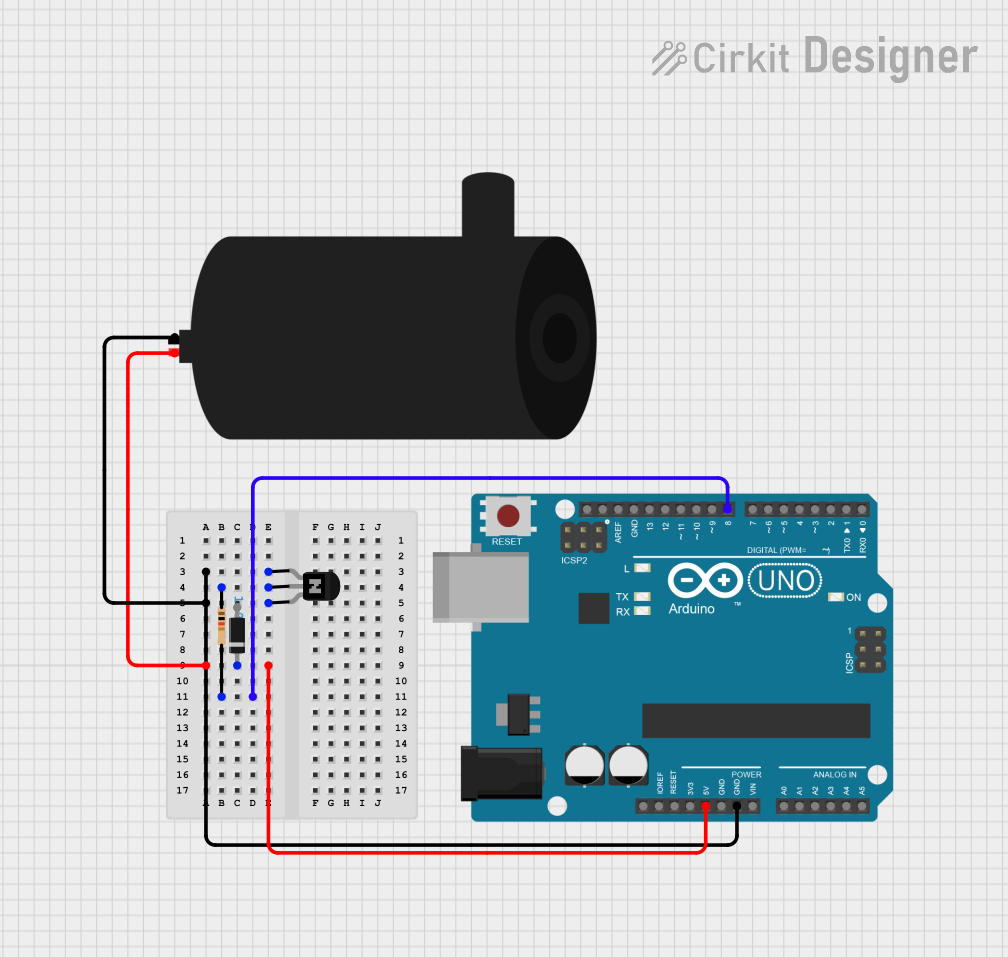
Circuit Documentation
Summary of the Circuit
This circuit is designed to control a water pump using an Arduino UNO microcontroller. The pump is switched on and off by the Arduino through an NPN transistor acting as a switch. A resistor is used to limit the current to the transistor's base, and a diode is included to protect against reverse current when the pump is turned off. The Arduino is programmed to turn the pump on for a fixed duration and then turn it off for a shorter period in a continuous loop.
Component List
Arduino UNO
- Description: A microcontroller board based on the ATmega328P.
- Purpose: Acts as the control unit for the circuit, driving the transistor to switch the water pump on and off.
NPN Transistor (EBC)
- Description: A bipolar junction transistor with emitter, base, and collector pins.
- Purpose: Serves as a switch to control the power to the water pump.
Resistor
- Description: A passive two-terminal electrical component that implements electrical resistance.
- Value: 1000 Ohms
- Purpose: Limits the current flowing into the base of the NPN transistor.
Diode
- Description: A semiconductor device that allows current to flow in one direction only.
- Purpose: Protects the circuit from reverse current when the pump is switched off.
Water Pump
- Description: An electromechanical device designed to move water.
- Purpose: The load in the circuit that is being controlled by the Arduino.
Wiring Details
Arduino UNO
- 5V connected to the anode of the Diode and positive of the water pump.
- GND connected to the emitter of the NPN Transistor.
- D8 connected to one end of the Resistor (pin2).
NPN Transistor (EBC)
- Base connected to the other end of the Resistor (pin1).
- Collector connected to the negative of the water pump.
- Emitter connected to GND of the Arduino UNO.
Resistor
- Pin1 connected to the base of the NPN Transistor.
- Pin2 connected to D8 on the Arduino UNO.
Diode
- Cathode connected to the positive of the water pump and 5V of the Arduino UNO.
- Anode not connected in the provided net list.
Water Pump
- Positive connected to the cathode of the Diode and 5V of the Arduino UNO.
- Negative connected to the collector of the NPN Transistor.
Documented Code
// Filename: sketch.ino

const int pumpPin = 8; // Pin connected to the base of the transistor through a resistor

void setup() {
  pinMode(pumpPin, OUTPUT); // Set the pump pin as an output
}

void loop() {
  digitalWrite(pumpPin, HIGH); // Turn the pump on
  delay(6000); // Wait for 6 seconds (on time)
  digitalWrite(pumpPin, LOW); // Turn the pump off
  delay(2500); // Wait for 2.5 seconds (off time)
}
Description: The code sets up the Arduino to control the water pump via a digital pin (D8). The pump is turned on for 6 seconds and then turned off for 2.5 seconds in a continuous loop.