
Arduino UNO-Based Smart Agriculture System with GSM and LCD Display
View and Edit Project In Cirkit Designer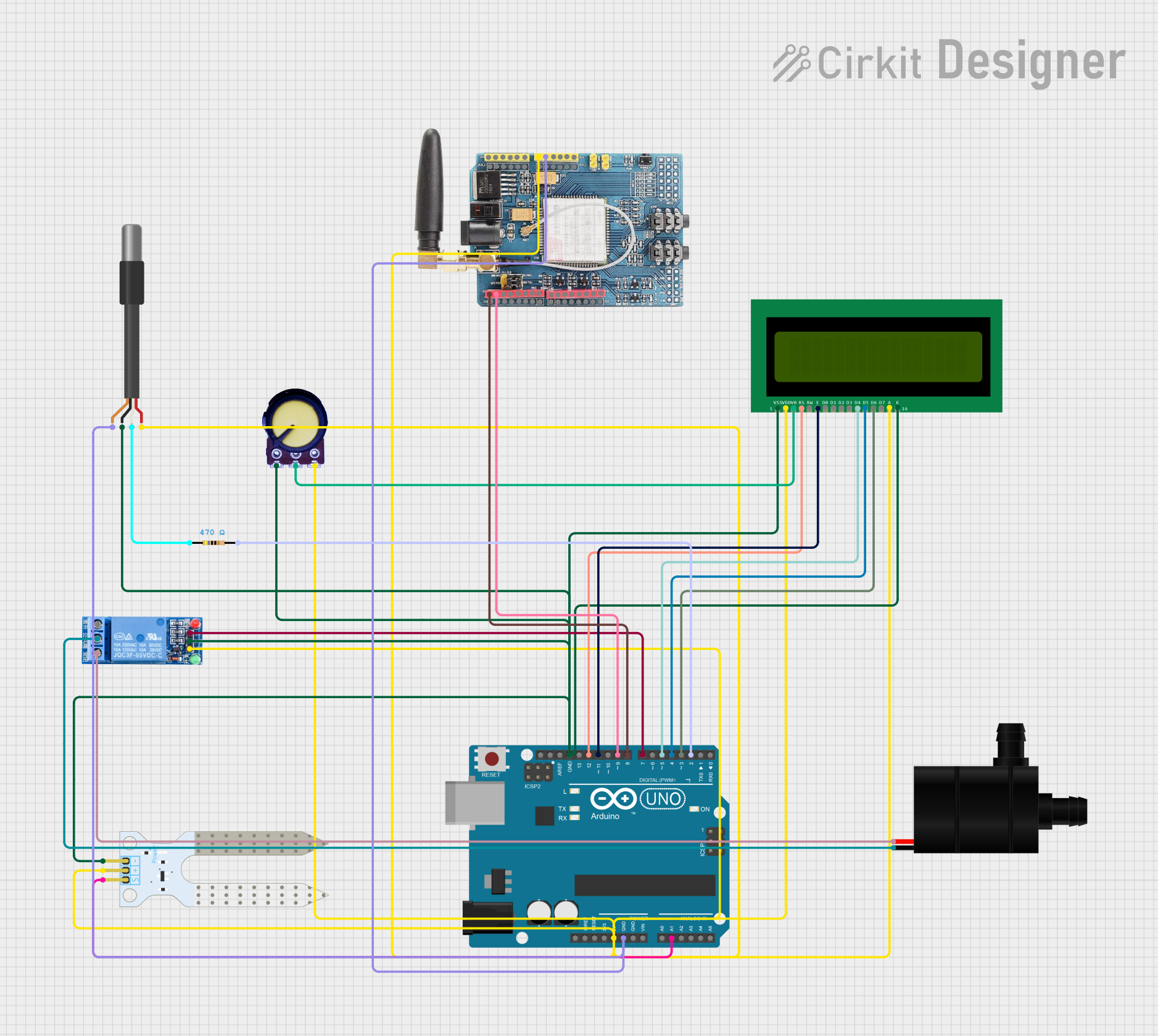
Circuit Documentation
Summary
This document provides a detailed overview of a smart agriculture system designed to monitor soil moisture and temperature, control a water pump, and communicate data via a GSM module. The system uses an Arduino UNO as the main microcontroller, interfacing with various sensors and modules to achieve its functionality.
Component List
Arduino UNO
- Description: Main microcontroller used for processing and control.
- Pins: UNUSED, IOREF, Reset, 3.3V, 5V, GND, Vin, A0, A1, A2, A3, A4, A5, SCL, SDA, AREF, D13, D12, D11, D10, D9, D8, D7, D6, D5, D4, D3, D2, D1, D0
1 Channel Relay 5V
- Description: Relay module used to control the water pump.
- Pins: VCC, GND, IN, NC, COM, NO
16X2 LCD
- Description: LCD display used to show temperature and soil moisture readings.
- Pins: VSS, VDD, V0, RS, RW, E, D1, D0, D2, D3, D4, D6, D5, D7, A, K
Water Pump
- Description: Pump used for irrigation.
- Pins: VCC, GND
Soil Moisture Sensor
- Description: Sensor used to measure soil moisture levels.
- Pins: VCC, GND, SIG
GSM SIM900
- Description: GSM module used for communication.
- Pins: A5, A4, A3, A2, A1, A0, 5V, GND, 3.3V, RESET, D0, D1, D2, D3, D4, D5, D6, D7, D8, D9, D10, D11, D12, D13, AREF
Potentiometer
- Description: Used to adjust the contrast of the LCD.
- Pins: GND, Output, VCC
DS18B20 1-Wire Temperature Sensor Probe Cable
- Description: Temperature sensor used to measure ambient temperature.
- Pins: shield, GND, DQ, VDD
Resistor
- Description: 470 Ohms resistor used in the circuit.
- Pins: pin1, pin2
- Properties: Resistance: 470 Ohms
Wiring Details
Arduino UNO
5V connected to:
- Soil Moisture Sensor (VCC)
- 1 Channel Relay 5V (VCC)
- DS18B20 Temperature Sensor (VDD)
- Potentiometer (VCC)
- 16X2 LCD (VDD, A)
- GSM SIM900 (5V)
GND connected to:
- DS18B20 Temperature Sensor (shield)
- GSM SIM900 (GND)
- Soil Moisture Sensor (GND)
- 1 Channel Relay 5V (GND)
- Potentiometer (GND)
- 16X2 LCD (VSS, K)
A1 connected to:
- Soil Moisture Sensor (SIG)
D12 connected to:
- 16X2 LCD (RS)
D11 connected to:
- 16X2 LCD (E)
D9 connected to:
- GSM SIM900 (D1)
D8 connected to:
- GSM SIM900 (D0)
D7 connected to:
- 1 Channel Relay 5V (IN)
D5 connected to:
- 16X2 LCD (D4)
D4 connected to:
- 16X2 LCD (D5)
D3 connected to:
- 16X2 LCD (D6)
D2 connected to:
- Resistor (pin2)
1 Channel Relay 5V
COM connected to:
- Water Pump (GND)
NO connected to:
- Water Pump (VCC)
Potentiometer
- Output connected to:
- 16X2 LCD (V0)
DS18B20 Temperature Sensor
- DQ connected to:
- Resistor (pin1)
Code Documentation
Arduino UNO Code
#include <LiquidCrystal.h>
#include <OneWire.h>
#include <DallasTemperature.h>
#include <SoftwareSerial.h>

// Pin definitions
const int relayPin = 7;
const int soilMoisturePin = A1;
const int tempSensorPin = 2;
const int gsmRxPin = 8;
const int gsmTxPin = 9;

// LCD pin definitions
const int rs = 12, en = 11, d4 = 5, d5 = 4, d6 = 3, d7 = 2;
LiquidCrystal lcd(rs, en, d4, d5, d6, d7);

// GSM module setup
SoftwareSerial gsm(gsmRxPin, gsmTxPin);

// Temperature sensor setup
OneWire oneWire(tempSensorPin);
DallasTemperature sensors(&oneWire);

void setup() {
  // Initialize serial communication
  Serial.begin(9600);
  gsm.begin(9600);

  // Initialize LCD
  lcd.begin(16, 2);
  lcd.print("Smart Agri System");

  // Initialize relay pin
  pinMode(relayPin, OUTPUT);
  digitalWrite(relayPin, LOW);

  // Initialize temperature sensor
  sensors.begin();
}

void loop() {
  // Read soil moisture
  int soilMoistureValue = analogRead(soilMoisturePin);

  // Read temperature
  sensors.requestTemperatures();
  float temperatureC = sensors.getTempCByIndex(0);

  // Display values on LCD
  lcd.setCursor(0, 1);
  lcd.print("                "); // Clear second row
  lcd.setCursor(0, 1);
  lcd.print("Temp: ");
  lcd.print(temperatureC);
  lcd.print("C Soil: ");
  lcd.print(soilMoistureValue);

  // Send data via GSM
  gsm.print("Temperature: ");
  gsm.print(temperatureC);
  gsm.print("C, Soil Moisture: ");
  gsm.println(soilMoistureValue);

  // Send SMS with soil moisture and temperature values
  sendSMS("Temp: " + String(temperatureC) + "C, Soil: " + String(soilMoistureValue));

  // Check for GSM commands to control water pump
  if (gsm.available()) {
    String command = gsm.readString();
    command.trim();
    if (command == "PUMP ON") {
      digitalWrite(relayPin, HIGH); // Turn on water pump
      sendSMS("Water pump turned ON");
    } else if (command == "PUMP OFF") {
      digitalWrite(relayPin, LOW); // Turn off water pump
      sendSMS("Water pump turned OFF");
    }
  }

  // Wait before next loop
  delay(2000);
}

void sendSMS(String message) {
  gsm.print("AT+CMGF=1\r"); // Set SMS to text mode
  delay(1000);
  gsm.print("AT+CMGS=\"+1234567890\"\r"); // Replace with your phone number
  delay(1000);
  gsm.print(message);
  delay(1000);
  gsm.write(26); // ASCII code for CTRL+Z to send SMS
  delay(2000); // Increase delay for SMS completion
}
DS18B20 Temperature Sensor Code
void setup() {
  // put your setup code here, to run once:
}

void loop() {
  // put your main code here, to run repeatedly:
}
This documentation provides a comprehensive overview of the smart agriculture system, including component descriptions, wiring details, and the embedded code used in the Arduino UNO.