
Circuit Documentation
Summary of the Circuit
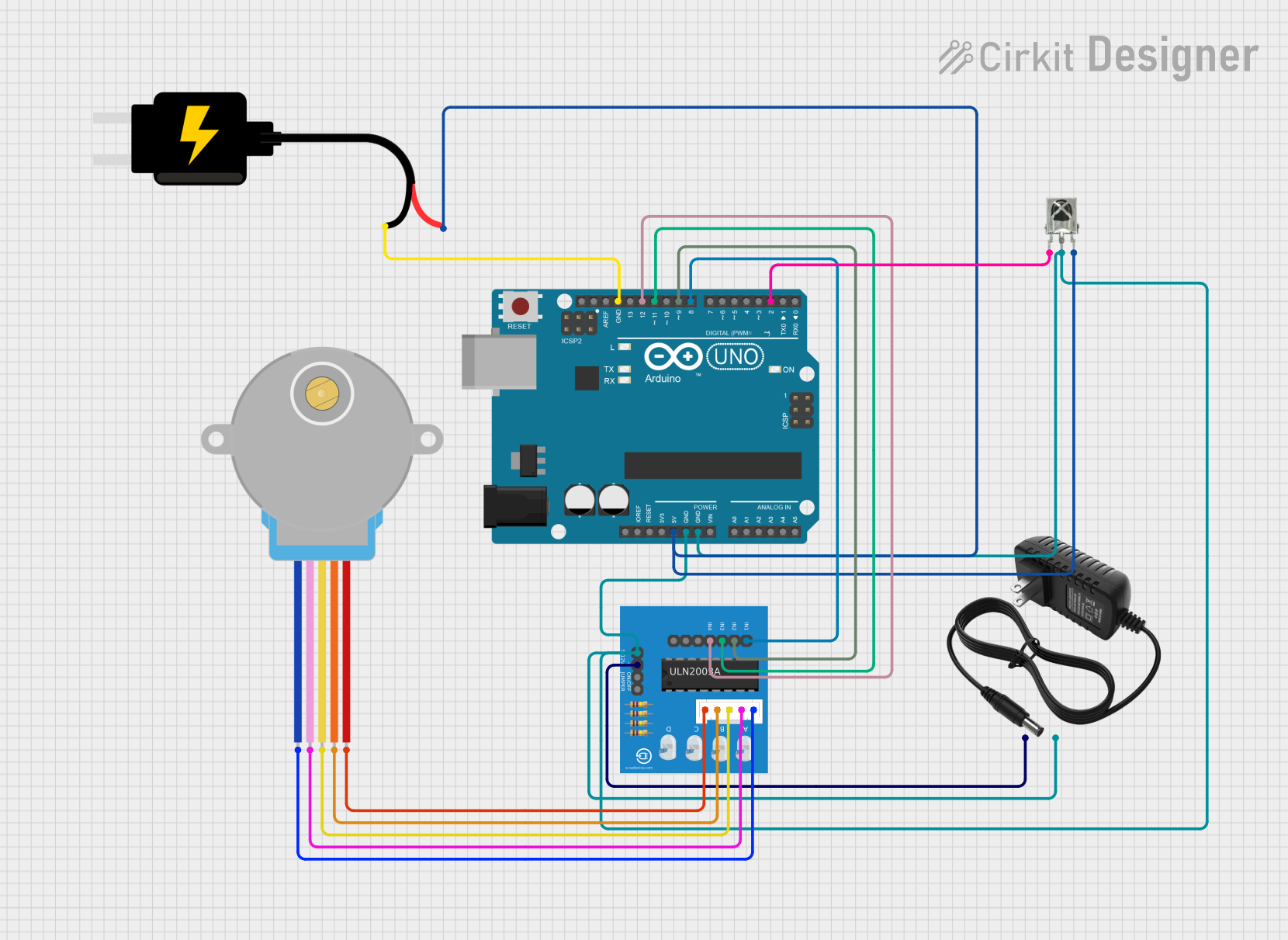
This circuit is designed to control a 28BYJ-48 stepper motor using an Arduino UNO microcontroller. The motor's movements are dictated by signals received from an IR remote, which are captured by a VS1838B IR receiver. The Arduino UNO is powered by a 5V DC source, and the ULN2003A breakout board is used to drive the stepper motor with signals from the Arduino. The stepper motor is powered by a separate 12V power supply.
Component List
Arduino UNO
- Microcontroller board based on the ATmega328P
- It has 14 digital input/output pins, 6 analog inputs, a 16 MHz quartz crystal, a USB connection, a power jack, an ICSP header, and a reset button.
28BYJ-48 Stepper Motor
- A small, 5-line, 4-phase stepper motor that can be driven by ULN2003A.
12V Power Supply
- Provides the necessary power to the stepper motor.
ULN2003A Breakout Board
- A driver board that allows for easy interfacing between the Arduino UNO and the stepper motor.
DC Source 5V
- Provides power to the Arduino UNO and the IR receiver.
VS1838B IR Receiver
- An infrared receiver that captures signals from an IR remote control.
Wiring Details
Arduino UNO
5Vconnected to the 5V output of the DC Source 5V.GNDconnected to the ground of the 12V power supply and the ground of the DC Source 5V.D12connected toIn 4on the ULN2003A breakout board.D11connected toIn 3on the ULN2003A breakout board.D9connected toIn 2on the ULN2003A breakout board.D8connected toIn 1on the ULN2003A breakout board.D2connected to theOUTpin of the VS1838B IR Receiver.
28BYJ-48 Stepper Motor
BLUEwire connected toBLUE wireon the ULN2003A breakout board.PINKwire connected toPINK wireon the ULN2003A breakout board.YELLOWwire connected toYELLOW wireon the ULN2003A breakout board.ORANGEwire connected toORANGE wireon the ULN2003A breakout board.REDwire connected toRED wireon the ULN2003A breakout board.
12V Power Supply
+connected to+5Von the ULN2003A breakout board.-connected to0Von the ULN2003A breakout board and the ground of the Arduino UNO.
ULN2003A Breakout Board
In 1toIn 4connected to corresponding digital pins on the Arduino UNO.0Vconnected to the ground of the 12V power supply.+5Vconnected to the positive terminal of the 12V power supply.BLUE wiretoRED wireconnected to corresponding wires of the 28BYJ-48 Stepper Motor.
DC Source 5V
VCCconnected to the5Vpin on the Arduino UNO and theVCCpin on the VS1838B IR Receiver.GNDconnected to theGNDpin on the Arduino UNO.
VS1838B IR Receiver
OUTconnected toD2on the Arduino UNO.GNDconnected to the ground of the Arduino UNO.VCCconnected to the5Voutput of the DC Source 5V.
Documented Code
Arduino UNO Code (sketch.ino)
void setup() {
  // put your setup code here, to run once:

}

void loop() {
  // put your main code here, to run repeatedly:

}
Stepper Motor Control Code (sketch.ino)
/*
 * This Arduino Sketch controls a 28BYJ-48 stepper motor using an IR remote.
 * The IR receiver reads signals from the remote, and the stepper motor
 * moves accordingly.
 */

#include <IRremote.h>
#include <Stepper.h>

const int RECV_PIN = 2; // IR receiver pin
const int STEPS_PER_REV = 2048; // Steps per revolution for 28BYJ-48

// Define stepper motor connections
const int IN1 = 8;
const int IN2 = 9;
const int IN3 = 11;
const int IN4 = 12;

// Initialize the stepper library
Stepper stepper(STEPS_PER_REV, IN1, IN3, IN2, IN4);

IRrecv irrecv(RECV_PIN);
decode_results results;

void setup() {
  Serial.begin(9600);
  irrecv.enableIRIn(); // Start the IR receiver
  stepper.setSpeed(10); // Set stepper motor speed (RPM)
}

void loop() {
  if (irrecv.decode(&results)) {
    Serial.println(results.value, HEX); // Print the received value
    switch (results.value) {
      case 0xFFA25D: // Example IR code for forward
        stepper.step(STEPS_PER_REV / 4); // Move stepper forward
        break;
      case 0xFF629D: // Example IR code for backward
        stepper.step(-STEPS_PER_REV / 4); // Move stepper backward
        break;
      // Add more cases for other IR codes as needed
    }
    irrecv.resume(); // Receive the next value
  }
}
This code snippet is responsible for receiving IR signals and controlling the stepper motor's movements based on the received signals. The Stepper library is used to simplify the control of the stepper motor, and the IRremote library is used to decode the signals from the IR remote.