
Arduino-Based Metal Detection and Sorting System with LCD Display and Servo Motor
View and Edit Project In Cirkit Designer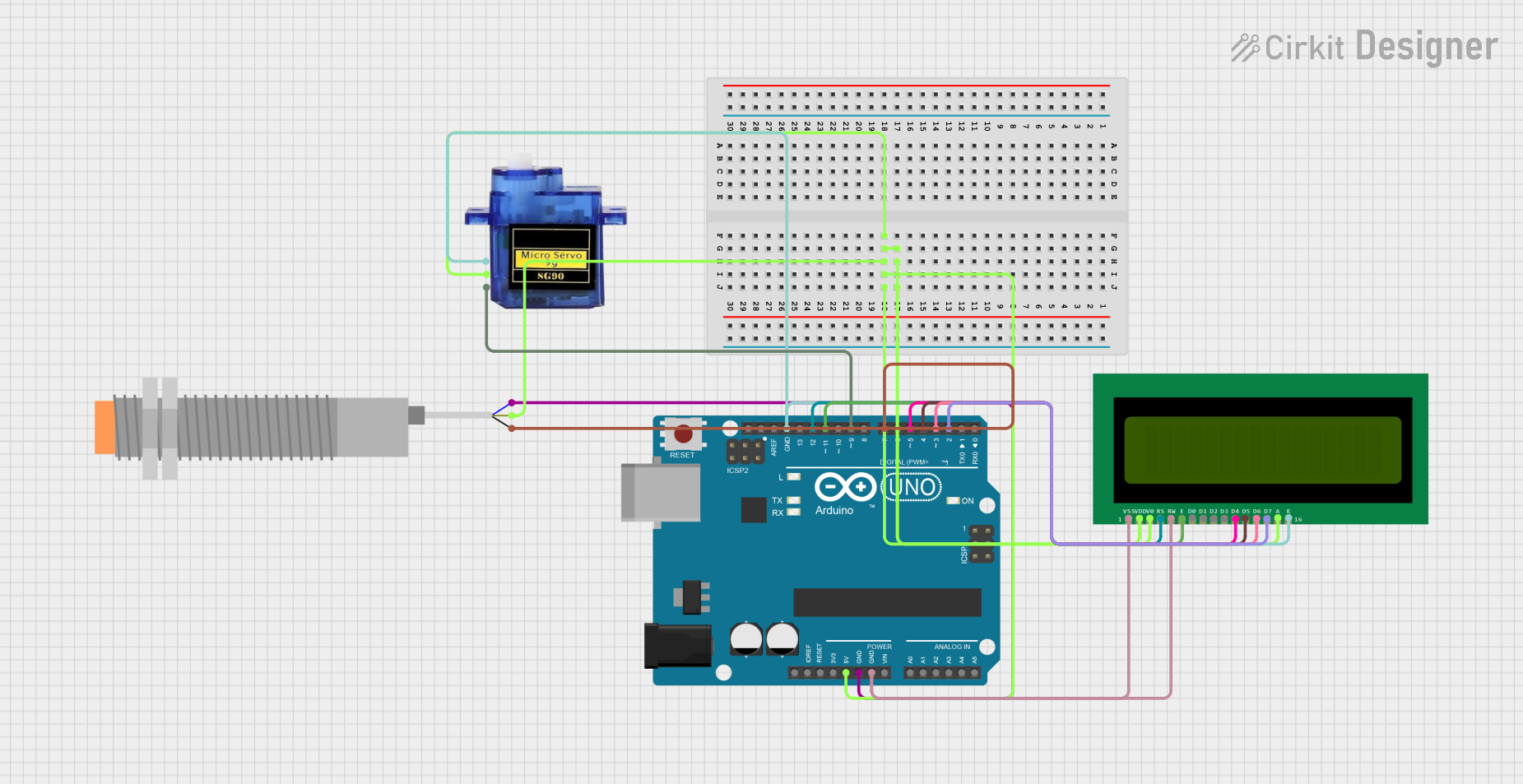
Circuit Documentation
Summary
This circuit is designed to detect metal objects using an inductive proximity sensor and sort them using a micro servo motor. The system is controlled by an Arduino UNO microcontroller, which also interfaces with a 16x2 LCD to display status messages.
Component List
Arduino UNO
- Description: A microcontroller board based on the ATmega328P.
- Pins: UNUSED, IOREF, Reset, 3.3V, 5V, GND, Vin, A0, A1, A2, A3, A4, A5, SCL, SDA, AREF, D13, D12, D11, D10, D9, D8, D7, D6, D5, D4, D3, D2, D1, D0
Micro servo 9G
- Description: A small servo motor used for precise control of angular position.
- Pins: GND, +5V, PWM
LJ18A3-H-ZBX Inductive Proximity Sensor
- Description: A sensor used to detect metal objects without physical contact.
- Pins: VO (BLU), VI (BRN), SIG (BLK)
16X2 LCD
- Description: A 16x2 character LCD display used to show status messages.
- Pins: VSS, VDD, V0, RS, RW, E, D1, D0, D2, D3, D4, D6, D5, D7, A, K
Wiring Details
Arduino UNO
- 5V: Connected to VDD, A, and V0 of the 16X2 LCD, +5V of the Micro servo 9G, and VI (BRN) of the LJ18A3-H-ZBX Inductive Proximity Sensor.
- GND: Connected to VSS and RW of the 16X2 LCD, GND of the Micro servo 9G, K of the 16X2 LCD, and VO (BLU) of the LJ18A3-H-ZBX Inductive Proximity Sensor.
- D12: Connected to RS of the 16X2 LCD.
- D11: Connected to E of the 16X2 LCD.
- D9: Connected to PWM of the Micro servo 9G.
- D7: Connected to SIG (BLK) of the LJ18A3-H-ZBX Inductive Proximity Sensor.
- D5: Connected to D4 of the 16X2 LCD.
- D4: Connected to D5 of the 16X2 LCD.
- D3: Connected to D6 of the 16X2 LCD.
- D2: Connected to D7 of the 16X2 LCD.
Micro servo 9G
- GND: Connected to GND of the Arduino UNO.
- +5V: Connected to 5V of the Arduino UNO.
- PWM: Connected to D9 of the Arduino UNO.
LJ18A3-H-ZBX Inductive Proximity Sensor
- VO (BLU): Connected to GND of the Arduino UNO.
- VI (BRN): Connected to 5V of the Arduino UNO.
- SIG (BLK): Connected to D7 of the Arduino UNO.
16X2 LCD
- VSS: Connected to GND of the Arduino UNO.
- VDD: Connected to 5V of the Arduino UNO.
- V0: Connected to 5V of the Arduino UNO.
- RS: Connected to D12 of the Arduino UNO.
- RW: Connected to GND of the Arduino UNO.
- E: Connected to D11 of the Arduino UNO.
- D4: Connected to D5 of the Arduino UNO.
- D5: Connected to D4 of the Arduino UNO.
- D6: Connected to D3 of the Arduino UNO.
- D7: Connected to D2 of the Arduino UNO.
- A: Connected to 5V of the Arduino UNO.
- K: Connected to GND of the Arduino UNO.
Documented Code
#include <Servo.h>
#include <LiquidCrystal.h>

// Pin Definitions
const int sensorPin = 7;  // Proximity sensor input pin
const int servoPin = 9;   // Servo motor control pin
Servo metalServo;         // Servo motor object for sorting

// LCD Setup (using 4-bit mode)
LiquidCrystal lcd(12, 11, 5, 4, 3, 2);

// Variables
int sensorState = 0;  // Variable to store the state of the sensor

void setup() {
  // Initialize sensor input pin
  pinMode(sensorPin, INPUT);

  // Initialize servo motor on pin 9
  metalServo.attach(servoPin);
  metalServo.write(0);  // Start servo in the initial position (0 degrees)

  // LCD initialization
  lcd.begin(16, 2);  // Initialize 16x2 LCD
  lcd.print("Waiting for metal...");

  delay(1000);
}

void loop() {
  // Read the state of the proximity sensor
  sensorState = digitalRead(sensorPin);

  if (sensorState == HIGH) {  // Metal detected
    lcd.clear();
    lcd.print("Metal detected!");

    // Move the servo to sort the metal waste
    metalServo.write(90);  // Move the servo to 90 degrees (separate metal)
    delay(2000);            // Wait for 2 seconds to allow sorting

    // Return the servo to initial position
    metalServo.write(0);

    // Display status on LCD
    lcd.clear();
    lcd.print("Waiting for metal...");
  } else {
    // If no metal detected, show this on LCD
    lcd.clear();
    lcd.print("Waiting for metal...");

    // Keep servo at initial position
    metalServo.write(0);
  }

  delay(500);  // Short delay to avoid multiple reads
}
This code initializes the proximity sensor, servo motor, and LCD display. It continuously checks the state of the proximity sensor and, upon detecting metal, moves the servo motor to sort the metal object and updates the LCD display accordingly.