
Arduino UNO Based RFID Access Control with Environmental Monitoring
View and Edit Project In Cirkit Designer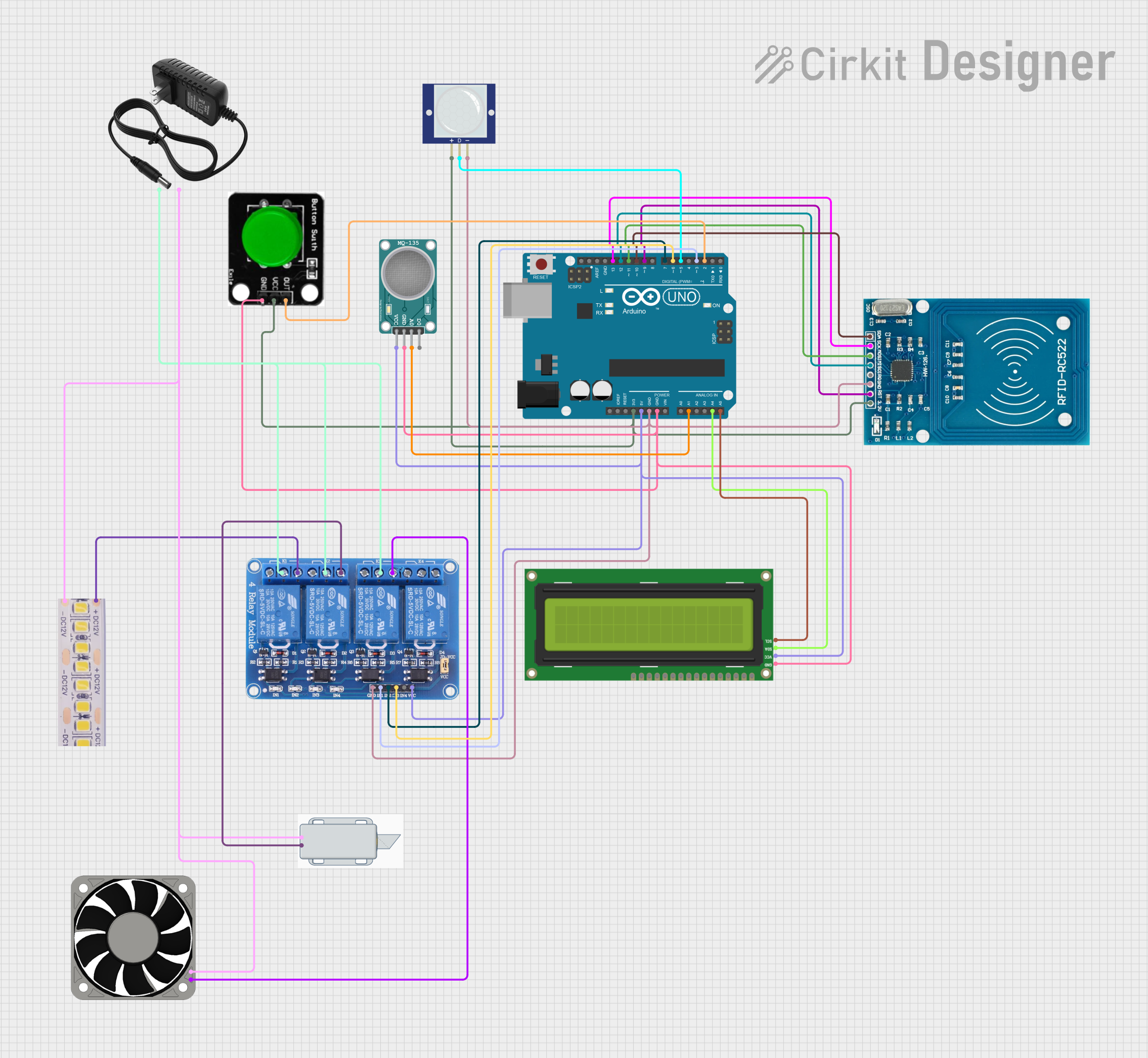
Circuit Documentation
Summary
This circuit is designed to interface an Arduino UNO with various peripherals including an RFID-RC522 module, an I2C LCD 16x2 screen, a 4-channel 5V relay module, a PIR motion sensor, an MQ-135 air quality sensor, a 12V white LED strip, a 12V solenoid lock, a 12V power supply, a 40mm 12V fan, and a green button. The Arduino UNO serves as the central processing unit, controlling the peripherals based on sensor inputs and RFID card detection. The circuit is powered by both the Arduino's onboard voltage regulators and an external 12V power supply.
Component List
- Arduino UNO: A microcontroller board based on the ATmega328P, featuring digital and analog I/O pins.
- RFID-RC522: An RFID reader/writer module for contactless communication using the 13.56MHz frequency.
- I2C LCD 16x2 Screen: A liquid crystal display with 16 columns and 2 rows for text, interfaced via the I2C protocol.
- Relay 4 Channel 5V: A relay module with four channels that can be used to control high power devices.
- PIR Motion Sensor (Wokwi Compatible): A passive infrared sensor that detects motion by measuring changes in the infrared levels emitted by surrounding objects.
- MQ-135 SENSOR AIR QUALITY: A sensor for detecting a wide range of gases, including NH3, NOx, alcohol, benzene, smoke, and CO2.
- 12V White LED strip: A strip of LEDs that operates at 12V, used for illumination.
- 12V Solenoid Lock: An electromagnetic lock that operates at 12V, used for security purposes.
- 12V Power Supply: Provides 12V to power the components that require higher voltage than what the Arduino can supply.
- 40mm Fan 12V: A 40mm fan that operates at 12V, used for cooling or ventilation.
- Green Button: A pushbutton that can be used to trigger events in the circuit.
Wiring Details
Arduino UNO
3.3Vconnected to RFID-RC522 VCC, Green Button VCC, and PIR Motion Sensor VCC.5Vconnected to Relay 4 Channel VCC, I2C LCD Screen VCC, and MQ-135 Sensor VCC.GNDconnected to the ground of all components.A1connected to MQ-135 Sensor A0.A4connected to I2C LCD Screen SDA.A5connected to I2C LCD Screen SCL.D2connected to Green Button OUT.D3connected to Relay 4 Channel IN1.D5connected to PIR Motion Sensor OUT.D6connected to Relay 4 Channel IN3.D7connected to Relay 4 Channel IN2.D9connected to RFID-RC522 RST.D10connected to RFID-RC522 SDA.D11connected to RFID-RC522 MOSI.D12connected to RFID-RC522 MISO.D13connected to RFID-RC522 SCK.
RFID-RC522
VCC (3.3V)connected to Arduino UNO 3.3V.RSTconnected to Arduino UNO D9.GNDconnected to Arduino UNO GND.MISOconnected to Arduino UNO D12.MOSIconnected to Arduino UNO D11.SCKconnected to Arduino UNO D13.SDAconnected to Arduino UNO D10.
I2C LCD 16x2 Screen
SCLconnected to Arduino UNO A5.SDAconnected to Arduino UNO A4.VCC (5V)connected to Arduino UNO 5V.GNDconnected to Arduino UNO GND.
Relay 4 Channel 5V
VCCconnected to Arduino UNO 5V.GNDconnected to Arduino UNO GND.IN1connected to Arduino UNO D3.IN2connected to Arduino UNO D7.IN3connected to Arduino UNO D6.COM1,COM2,COM3connected to 12V power supply +.NO1connected to 12V White LED strip +12V.NO2connected to 12V Solenoid Lock +.NO3connected to 40mm Fan 12V +12V.
PIR Motion Sensor (Wokwi Compatible)
VCCconnected to Arduino UNO 3.3V.OUTconnected to Arduino UNO D5.GNDconnected to Arduino UNO GND.
MQ-135 SENSOR AIR QUALITY
VCCconnected to Arduino UNO 5V.GNDconnected to Arduino UNO GND.A0connected to Arduino UNO A1.
12V White LED strip
+12Vconnected to Relay 4 Channel NO1.GNDconnected to 12V power supply -.
12V Solenoid Lock
+connected to Relay 4 Channel NO2.-connected to 12V power supply -.
12V Power Supply
+connected to Relay 4 Channel COM1, COM2, COM3.-connected to the ground of 12V White LED strip, 12V Solenoid Lock, and 40mm Fan 12V.
40mm Fan 12V
+12Vconnected to Relay 4 Channel NO3.-12Vconnected to 12V power supply -.
Green Button
VCCconnected to Arduino UNO 3.3V.OUTconnected to Arduino UNO D2.GNDconnected to Arduino UNO GND.
Documented Code
#include <SPI.h>
#include <MFRC522.h>
#include <Wire.h>
#include <LiquidCrystal_I2C.h>

// Define pins for RFID
#define SS_PIN 10
#define RST_PIN 9
#define Lock 7
#define Button 2

// Define pins for PIR sensor and LED
#define LED 3
#define PIR 5

// Define pins for air quality sensor and fan
#define airsensor A1
#define FAN 6

// Air quality threshold
const int AIR_QUALITY_THRESHOLD = 100;

// Initialize the LCD with I2C address 0x27, 16 columns, and 2 rows
LiquidCrystal_I2C lcd(0x27, 16, 2);

MFRC522 mfrc522(SS_PIN, RST_PIN);  // Create MFRC522 instance.

void setup() {
  // Setup for RFID
  pinMode(Button, INPUT);
  pinMode(Lock, OUTPUT);
  Serial.begin(9600);    // Initiate serial communication
  SPI.begin();           // Initiate SPI bus
  mfrc522.PCD_Init();    // Initiate MFRC522

  // Setup for PIR sensor and LED
  pinMode(LED, OUTPUT);  // Declare LED as output
  pinMode(PIR, INPUT);   // Declare PIR sensor as input

  // Setup for air quality sensor and fan
  pinMode(airsensor, INPUT);
  pinMode(FAN, OUTPUT);

  // Setup for LCD
  lcd.init();            // Initialize the I2C LCD
  lcd.backlight();       // Turn on the LCD backlight
  lcd.setCursor(0, 0);   // Set the cursor to the first row, first column
  lcd.print("System Ready");  // Display the initial message
  delay(2000);           // Wait 2 seconds to display this message
  lcd.clear();           // Clear the LCD screen

  unsigned long previousMillis = 0;
  const long interval = 500; // interval at which to read sensors
}

void loop() {
  unsigned long currentMillis = millis();
  if (currentMillis - previousMillis >= interval) {
    previousMillis = currentMillis;
    // Call functions to handle RFID, PIR, and Air Quality
    handleRFID();
    handlePIR();
    handleAirQuality();
  }
}

void handleRFID() {
  lcd.setCursor(0, 0);   // Set the cursor to the first row

  // ************ RFID Section ************
  Serial.println("Loop started");

  // Check button state
  int buttonState = digitalRead(Button);
  Serial.print("Button state: ");
  Serial.println(buttonState);

  // Look for new RFID cards
  if (!mfrc522.PICC_IsNewCardPresent()) {
    Serial.println("No new card present");
    updateLCD(0, 0, "No Card Present");
  } else {
    if (!mfrc522.PICC_ReadCardSerial()) {
      Serial.println("Failed to read card serial");
      updateLCD(0, 0, "