
Circuit Documentation
Summary
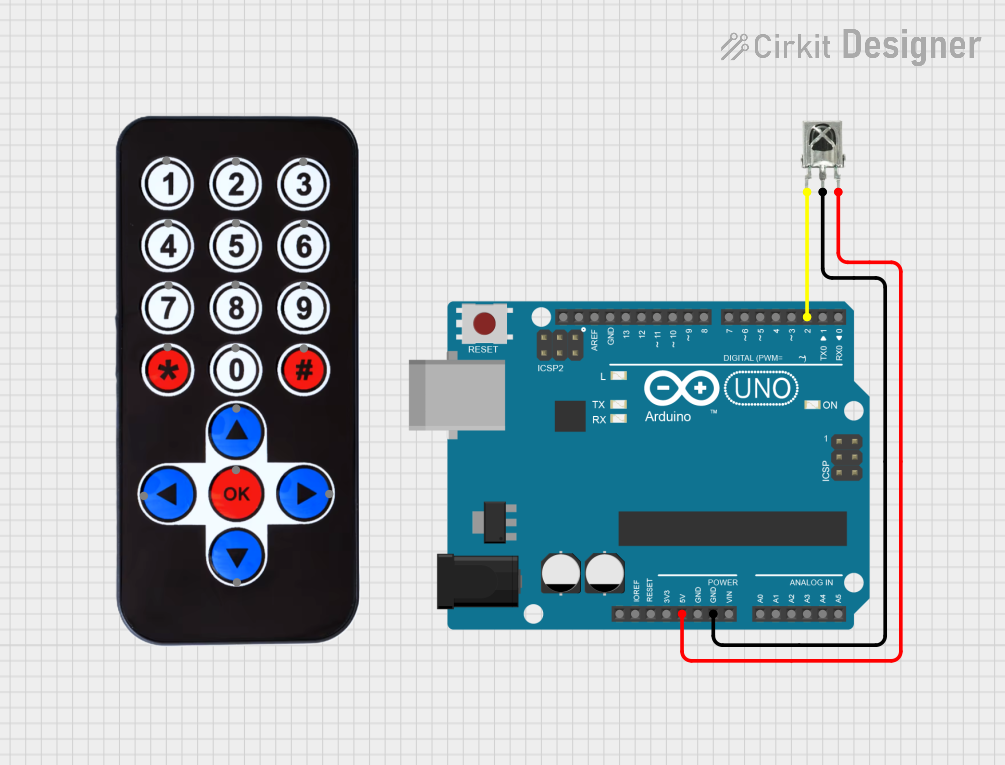
This circuit involves an Arduino UNO microcontroller interfaced with a VS1838B IR Receiver. The Arduino UNO is used to read signals from the IR receiver and print the received IR codes to the serial monitor. The circuit is powered by the 5V supply from the Arduino UNO.
Component List
Arduino UNO
- Description: A microcontroller board based on the ATmega328P.
- Pins: UNUSED, IOREF, Reset, 3.3V, 5V, GND, Vin, A0, A1, A2, A3, A4, A5, SCL, SDA, AREF, D13, D12, D11, D10, D9, D8, D7, D6, D5, D4, D3, D2, D1, D0
- Purpose in Circuit: Acts as the main controller to read IR signals and print them to the serial monitor.
HX1838 Infrared IR Wireless Remote Control
- Description: An infrared remote control used to send IR signals.
- Pins: FFA25D (1), FF629D (2), FFE21D (3), FF22DD (4), FF02FD (5), FFC23D (6), FFE01F (7), FFA857 (8), FF906F (9), FF9867 (0), FFB04F (#), FF6897 (*), FF18E7 (↑), FF5AA5 (→), FF10EF (←), FF4AB5 (↓), FF38C7 (OK)
- Purpose in Circuit: Sends IR signals to be received by the VS1838B IR Receiver.
VS1838B IR Receiver
- Description: An infrared receiver module used to receive IR signals.
- Pins: OUT, GND, VCC
- Purpose in Circuit: Receives IR signals from the HX1838 remote control and sends the data to the Arduino UNO.
Wiring Details
Arduino UNO
- 5V: Connected to VCC of the VS1838B IR Receiver.
- GND: Connected to GND of the VS1838B IR Receiver.
- D2: Connected to OUT of the VS1838B IR Receiver.
HX1838 Infrared IR Wireless Remote Control
- No direct connections in this circuit. The remote control sends IR signals wirelessly to the VS1838B IR Receiver.
VS1838B IR Receiver
- VCC: Connected to 5V of the Arduino UNO.
- GND: Connected to GND of the Arduino UNO.
- OUT: Connected to D2 of the Arduino UNO.
Code Documentation
#include <IRremote.h>

const int RECV_PIN = 2; // Pin connected to the IR receiver OUT pin (D2)
IRrecv irrecv(RECV_PIN);
decode_results results;

void setup() {
  Serial.begin(9600); // Initialize serial communication
  irrecv.enableIRIn(); // Start the IR receiver
}

void loop() {
  if (irrecv.decode()) {
    Serial.print("IR Code: ");
    Serial.println(irrecv.decodedIRData.decodedRawData, HEX); // Print the received IR code in HEX
    irrecv.resume(); // Receive the next value
  }
}
Code Explanation
- Libraries: The
IRremotelibrary is included to handle IR signal decoding. - Pin Definition:
RECV_PINis defined as pin 2, which is connected to the OUT pin of the VS1838B IR Receiver. - IRrecv Object: An
IRrecvobject namedirrecvis created to handle IR signal reception. - Setup Function:
- Initializes serial communication at 9600 baud rate.
- Enables the IR receiver.
- Loop Function:
- Checks if an IR signal has been received.
- Prints the received IR code in hexadecimal format to the serial monitor.
- Resumes the IR receiver to receive the next signal.
This documentation provides a comprehensive overview of the circuit, including the components used, their wiring, and the code running on the Arduino UNO.