
NodeMCU ESP8266 Based Ultrasonic Water Level Indicator with Wi-Fi Connectivity
View and Edit Project In Cirkit Designer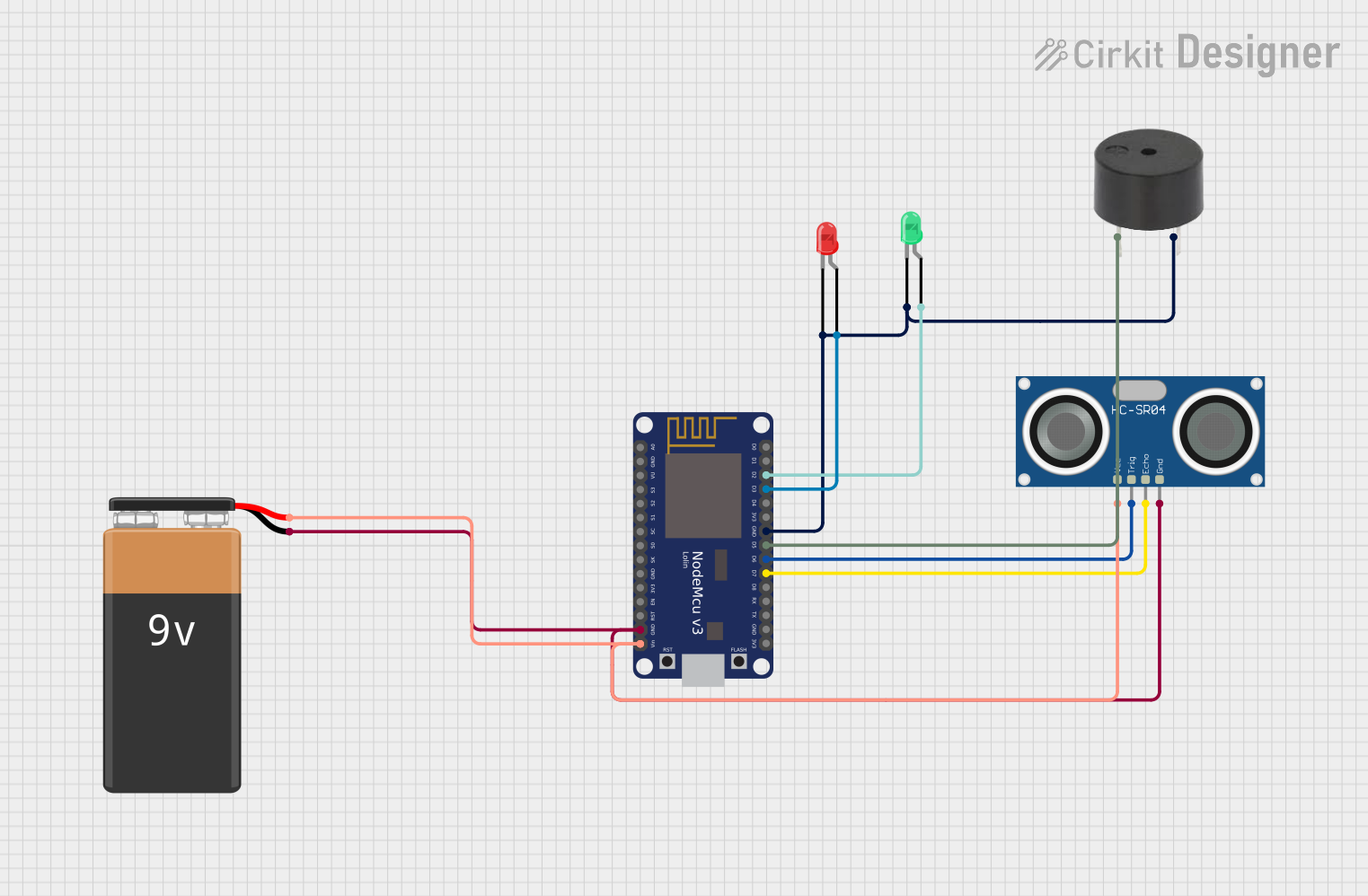
Circuit Documentation
Summary
This circuit is designed to measure water levels using an HC-SR04 Ultrasonic Sensor and display the status through LEDs and a buzzer. The NodeMCU V3 ESP8266 microcontroller is used to process the sensor data, control the LEDs and buzzer, and send the water level data to a ThingSpeak channel over WiFi. A 9V battery powers the circuit.
Component List
NodeMCU V3 ESP8266
- Microcontroller with WiFi capability.
- Pins: A0, GND, VU, S3, S2, S1, SC, S0, SK, 3V3, EN, RST, Vin, D0, D1, D2, D3, D4, D5, D6, D7, D8, RX, TX.
LED: Two Pin (Green)
- A green LED indicator.
- Pins: cathode, anode.
LED: Two Pin (Red)
- A red LED indicator.
- Pins: cathode, anode.
HC-SR04 Ultrasonic Sensor
- A sensor for measuring distance via ultrasonic waves.
- Pins: VCC, TRIG, ECHO, GND.
Buzzer
- An audible alert device.
- Pins: PIN, GND.
9V Battery
- Power source for the circuit.
- Pins: -, +.
Wiring Details
NodeMCU V3 ESP8266
- GND connected to the GND of the HC-SR04, buzzer, and 9V battery (-).
- Vin connected to the + of the 9V battery.
- D2 connected to the anode of the green LED.
- D3 connected to the anode of the red LED.
- D5 connected to the PIN of the buzzer.
- D6 connected to the TRIG pin of the HC-SR04.
- D7 connected to the ECHO pin of the HC-SR04.
LED: Two Pin (Green)
- Anode connected to D2 of the NodeMCU V3 ESP8266.
- Cathode connected to GND.
LED: Two Pin (Red)
- Anode connected to D3 of the NodeMCU V3 ESP8266.
- Cathode connected to GND.
HC-SR04 Ultrasonic Sensor
- VCC connected to Vin of the NodeMCU V3 ESP8266.
- TRIG connected to D6 of the NodeMCU V3 ESP8266.
- ECHO connected to D7 of the NodeMCU V3 ESP8266.
- GND connected to GND of the NodeMCU V3 ESP8266.
Buzzer
- PIN connected to D5 of the NodeMCU V3 ESP8266.
- GND connected to GND.
9V Battery
-
- connected to Vin of the NodeMCU V3 ESP8266.
-
- connected to GND.
Documented Code
#include <ESP8266WiFi.h>
String apiKey = "70O35NQFSPR4YI1S"; // write your "Write API key"
const char* ssid = "OnePlus Nord CE3 5G"; // write your "wifi name"
const char* password = "1223334444"; // write your "wifi password"
unsigned long channel = 2649966; // write your "wifi password"
const char* server = "api.thingspeak.com";

WiFiClient client;

const int trigPin = D6;
const int echoPin = D7;
long duration;
int waterlevel;

void setup() {
  pinMode(D2,OUTPUT);
  pinMode(D3,OUTPUT);
  pinMode(D4,OUTPUT);
  pinMode(D5,OUTPUT);
  Serial.begin(9600);
  Serial.println("Serial Begin");
  pinMode(trigPin, OUTPUT); // Sets the trigPin as an Output
  pinMode(echoPin, INPUT);
  WiFi.begin(ssid, password);
  Serial.println();
  Serial.print("Connecting to ");
  Serial.println(ssid);

  while (WiFi.status() != WL_CONNECTED) {
    delay(500);
    Serial.print(".");
  }

  Serial.println("");
  Serial.println("WiFi connected");
}

void loop() {
  ultra();
  delay(1000);

  // we have made changes in program to decrease the latency.
  // but it will take minimum 15 second to post data on Thingspeak channel.

  if (client.connect(server,80)) {
    fwd_to_Thingspeak();
  }

  client.stop();
  Serial.println("Waiting");
  delay(1000);
}

void ultra() {
  // Clears the trigPin
  digitalWrite(trigPin, LOW);
  delayMicroseconds(2);

  // Sets the trigPin on HIGH state for 10 micro seconds
  digitalWrite(trigPin, HIGH);
  delayMicroseconds(10);
  digitalWrite(trigPin, LOW);

  duration = pulseIn(echoPin, HIGH);
  waterlevel= duration*0.034/2;
  Serial.println("waterlevel=" + String(waterlevel) + " cm");

  if(waterlevel<=10) {
    digitalWrite(D3,HIGH);
    digitalWrite(D5,LOW);
    digitalWrite(D2,LOW);
  } else if(waterlevel>=10) {
    digitalWrite(D2,HIGH);
    digitalWrite(D5,HIGH);
    digitalWrite(D3,LOW);
  }
}

void fwd_to_Thingspeak() {
  String postStr = apiKey;
  postStr +="&field1=";
  postStr += String(waterlevel);  // ultrasonic data
  postStr += "\r\n\r\n";

  client.print("POST /update HTTP/1.1\n");
  client.print("Host: api.thingspeak.com\n");
  client.print("Connection: close\n");
  client.print("X-THINGSPEAKAPIKEY: "+apiKey+"\n");
  client.print("Content-Type: application/x-www-form-urlencoded\n");
  client.print("Content-Length: ");
  client.print(postStr.length());
  client.print("\n\n");
  client.print(postStr);

  Serial.println("Send data to thingspeak: ");
  Serial.print("Content-Length: ");
  Serial.print(postStr.length());
  Serial.print(" Field-1: ");
  Serial.print(waterlevel);  // ultrasonic data
  Serial.println(" data send");
}
This code is designed to be uploaded to the NodeMCU V3 ESP8266 microcontroller. It initializes the WiFi connection, reads the water level from the HC-SR04 Ultrasonic Sensor, and sends the data to a ThingSpeak channel. It also controls the green and red LEDs and the buzzer based on the water level.