
Arduino Nano-Based Heart Rate and SpO2 Monitor with MAX30102 Sensor
View and Edit Project In Cirkit Designer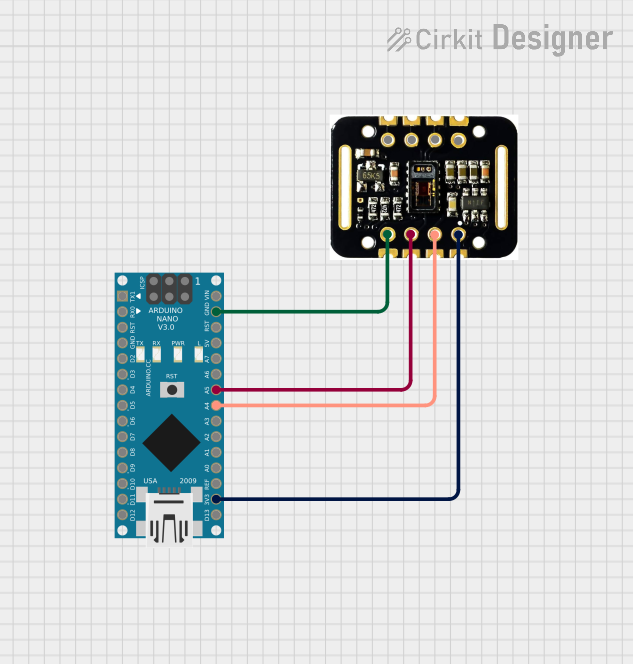
Circuit Documentation
Summary
This circuit consists of an Arduino Nano microcontroller connected to a MAX30102 Heart Rate and SpO2 sensor. The Arduino Nano reads data from the sensor and processes it to determine heart rate and SpO2 levels, which are then output via the serial monitor.
Component List
Arduino Nano
- Description: A small, complete, and breadboard-friendly board based on the ATmega328P.
- Pins: D1/TX, D0/RX, RESET, GND, D2, D3, D4, D5, D6, D7, D8, D9, D10, D11/MOSI, D12/MISO, VIN, 5V, A7, A6, A5, A4, A3, A2, A1, A0, AREF, 3V3, D13/SCK
MAX30102 HR + SpO2 Sensor
- Description: A sensor module for measuring heart rate and SpO2 levels.
- Pins: INT, IRD, RD, GND, SCL, SDA, VIN
Wiring Details
Arduino Nano
- GND: Connected to GND of MAX30102 HR + SpO2 sensor
- A5: Connected to SCL of MAX30102 HR + SpO2 sensor
- A4: Connected to SDA of MAX30102 HR + SpO2 sensor
- 3V3: Connected to VIN of MAX30102 HR + SpO2 sensor
MAX30102 HR + SpO2 Sensor
- GND: Connected to GND of Arduino Nano
- SCL: Connected to A5 of Arduino Nano
- SDA: Connected to A4 of Arduino Nano
- VIN: Connected to 3V3 of Arduino Nano
Code Documentation
Arduino Nano Code
#include <Wire.h>
#include "MAX30105.h"
#include "spo2_algorithm.h"

MAX30105 particleSensor;

void setup() {
  Serial.begin(115200);
  Wire.begin();

  if (!particleSensor.begin(Wire, I2C_SPEED_FAST)) {
    Serial.println("MAX30102 was not found. Please check wiring/power.");
    while (1);
  }

  particleSensor.setup();
  particleSensor.setPulseAmplitudeRed(0x0A); // Turn Red LED to low to indicate sensor is running
  particleSensor.setPulseAmplitudeGreen(0); // Turn off Green LED
}

void loop() {
  long irValue = particleSensor.getIR();

  if (checkForBeat(irValue) == true) {
    float beatsPerMinute = 60 / getTimeBetweenBeats();
    Serial.print("BPM: ");
    Serial.print(beatsPerMinute);
    Serial.print(", SpO2: ");
    Serial.println(computeSpO2());
  }

  delay(1000);
}

float computeSpO2() {
  // Placeholder function for SpO2 computation
  // Implement SpO2 algorithm here
  return 98.0; // Dummy value for SpO2
}
This code initializes the MAX30102 sensor and sets up the Arduino Nano to read data from the sensor. The setup function configures the sensor and the loop function continuously reads the IR value from the sensor. If a heartbeat is detected, it calculates the beats per minute (BPM) and a placeholder SpO2 value, which are then printed to the serial monitor.