
Circuit Documentation
Summary
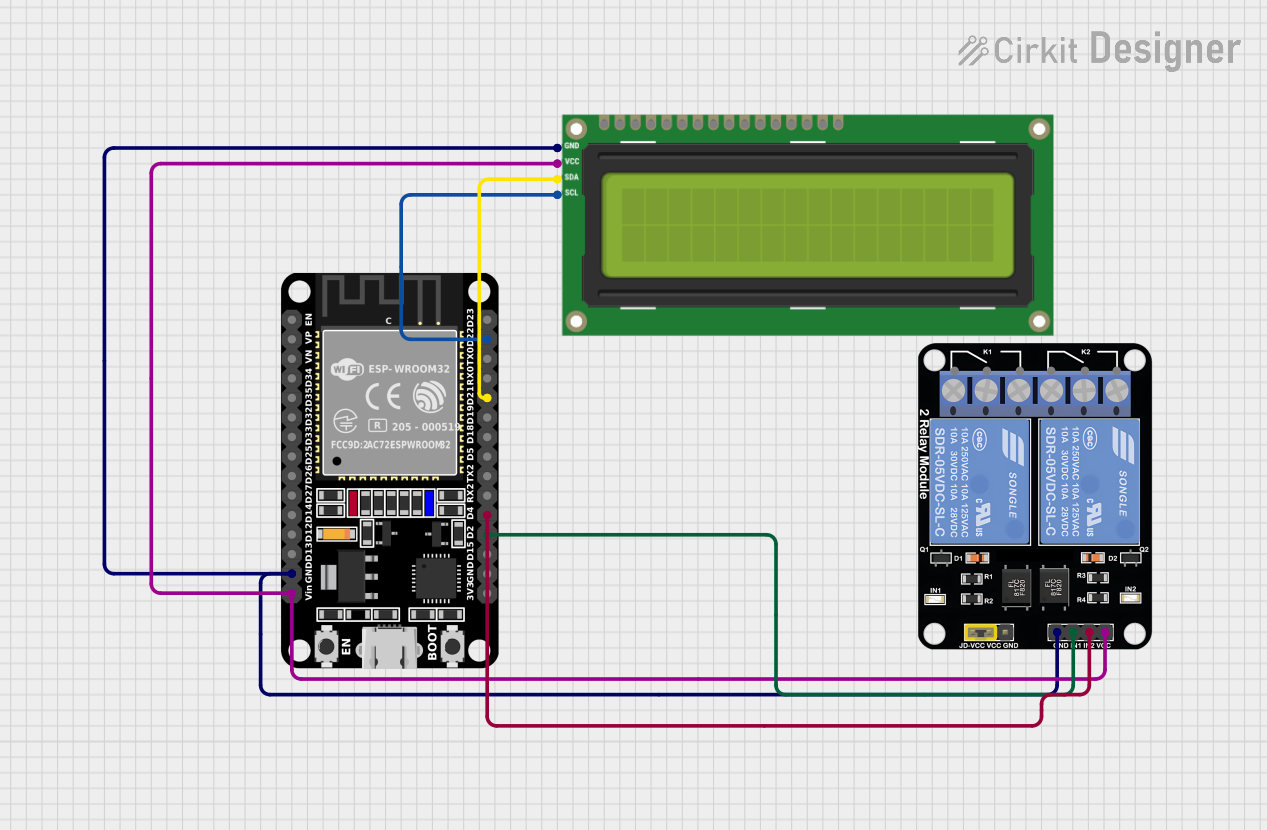
This circuit integrates an ESP32 microcontroller with an I2C LCD 16x2 screen and a 2-channel relay module. The ESP32 is programmed to display messages on the LCD screen and potentially control the relay module, although the specific control logic for the relays is not included in the provided code. The circuit is designed to operate with a common ground and a shared power supply voltage for both the LCD and the relay module, which is provided by the ESP32's Vin pin.
Component List
ESP32 (30 pin)
- Description: A 30-pin microcontroller with Wi-Fi and Bluetooth capabilities.
- Purpose: Acts as the central processing unit of the circuit, interfacing with the LCD screen and controlling the relay module.
I2C LCD 16x2 Screen
- Description: A 16-character by 2-line liquid crystal display with an I2C interface.
- Purpose: Displays messages sent from the ESP32.
Relay Module 2 Channel
- Description: A module with two independent relay channels.
- Purpose: Allows the ESP32 to control higher power devices or circuits.
Wiring Details
ESP32 (30 pin)
- GND: Connected to the common ground of the circuit.
- Vin: Supplies power to the LCD screen and the relay module.
- D22 (SCL): Serial Clock Line for I2C communication with the LCD screen.
- D21 (SDA): Serial Data Line for I2C communication with the LCD screen.
- D4: Connected to the IN2 pin of the relay module (control signal for the second relay channel).
- D2: Connected to the IN1 pin of the relay module (control signal for the first relay channel).
I2C LCD 16x2 Screen
- GND: Connected to the common ground of the circuit.
- VCC (5V): Powered by the ESP32's Vin pin.
- SCL: Connected to the ESP32's D22 pin for I2C communication.
- SDA: Connected to the ESP32's D21 pin for I2C communication.
Relay Module 2 Channel
- GND: Connected to the common ground of the circuit.
- VCC: Powered by the ESP32's Vin pin.
- IN1: Controlled by the ESP32's D2 pin.
- IN2: Controlled by the ESP32's D4 pin.
Documented Code
/*
 * This Arduino Sketch interfaces an ESP32 with an I2C LCD 16x2 screen.
 * The ESP32 displays two messages on the LCD screen in a loop with delays.
 * Connections:
 * - ESP32 GND to LCD GND
 * - ESP32 Vin to LCD VCC (5V)
 * - ESP32 D22 to LCD SCL
 * - ESP32 D21 to LCD SDA
 */

#include <Wire.h>
#include <LiquidCrystal_I2C.h>

LiquidCrystal_I2C lcd(0x27, 16, 2);

void setup() {
  Serial.begin(115200);
  lcd.init();
  lcd.backlight();
  lcd.print("UNDERWATER LEAK");
  delay(2000);
  lcd.init();
  lcd.backlight();
  lcd.print("");
  delay(2000);
}

void loop() {
  delay(1000);
  lcd.clear();
  lcd.setCursor(0, 0);
  lcd.print("CHHECK SENSORS");
  delay(2000);
}
Filename: sketch.ino
Description: The code initializes the I2C LCD screen and prints the messages "UNDERWATER LEAK" and "CHHECK SENSORS" in an alternating fashion with delays between each message. The code contains a typo in the message "CHHECK SENSORS" which should likely be corrected to "CHECK SENSORS".