
ESP32-Based Water Quality Monitoring System with Wi-Fi Connectivity
View and Edit Project In Cirkit Designer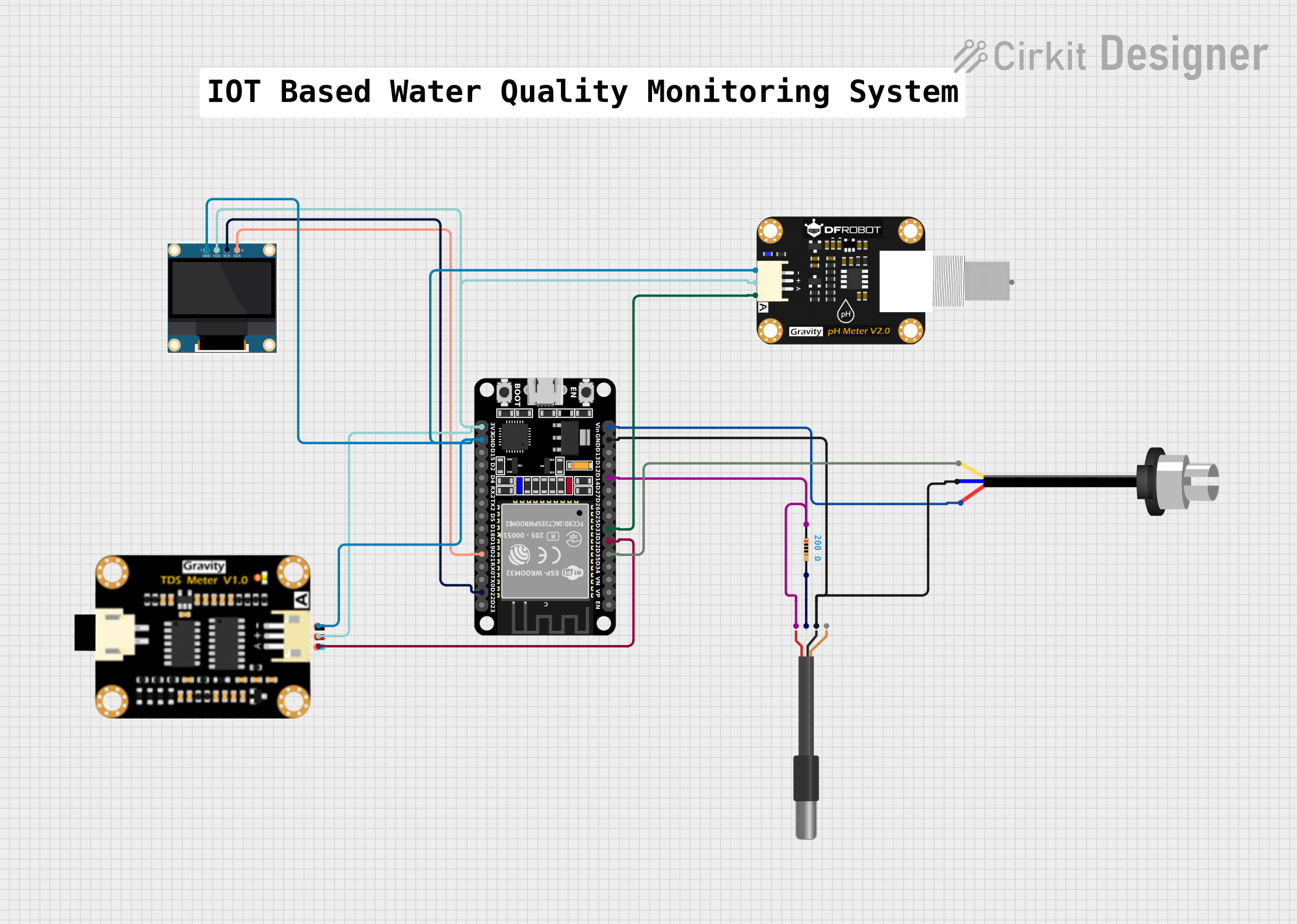
Circuit Documentation
Summary
The circuit in question is designed to monitor various environmental parameters such as temperature, turbidity, total dissolved solids (TDS), and pH levels. It utilizes an ESP32 microcontroller as the central processing unit, which is responsible for reading sensor data, displaying it on an OLED screen, and transmitting it to a remote server via Wi-Fi. The sensors used in this circuit include a DS18B20 temperature sensor, a turbidity sensor, a TDS sensor module, and a pH sensor module. The data from these sensors is displayed on a 0.96" OLED screen and is also sent to a ThingSpeak server for remote monitoring.
Component List
DS18B20 1-Wire Temperature Sensor Probe Cable
- A digital temperature sensor that communicates over a 1-Wire bus.
Sonda Sensor Turbidez / Turbidity Sensor
- Measures the turbidity of a liquid, indicating how clear the liquid is.
Resistor (200 Ohms)
- A passive two-terminal electrical component that implements electrical resistance as a circuit element.
ESP32 (30 pin)
- A microcontroller with Wi-Fi capabilities, used as the main processing unit for the circuit.
TDS Sensor Module
- Measures the total dissolved solids in water, indicating the concentration of dissolved substances.
Modulo Sensor PH
- Measures the pH level of a solution, indicating its acidity or alkalinity.
0.96" OLED
- A small display used for showing sensor readings and other information.
Comment
- A placeholder for additional notes or comments, not an actual physical component.
Wiring Details
DS18B20 1-Wire Temperature Sensor Probe Cable
VDDconnected to a 200 Ohm resistor and then to theD14pin on the ESP32.GNDconnected to the common ground.DQconnected to the other end of the 200 Ohm resistor.
Sonda Sensor Turbidez / Turbidity Sensor
Sconnected to theD35pin on the ESP32.-connected to the common ground.+connected to theVinpin on the ESP32.
TDS Sensor Module
TDS Aconnected to theD32pin on the ESP32.TDS Negativeconnected to the common ground.TDS Positiveconnected to the3V3pin on the ESP32.
Modulo Sensor PH
Aconnected to theD33pin on the ESP32.-connected to the common ground.+connected to the3V3pin on the ESP32.
0.96" OLED
SCKconnected to theD22pin on the ESP32.SDAconnected to theD21pin on the ESP32.GNDconnected to the common ground.VDDconnected to the3V3pin on the ESP32.
Documented Code
The code provided is for the ESP32 microcontroller and is written in C++ for the Arduino platform. It includes libraries for Wi-Fi communication, HTTP requests, OneWire communication, DallasTemperature for the DS18B20 sensor, and Adafruit libraries for the OLED display.
Key Features of the Code:
- Connects to a Wi-Fi network.
- Reads sensor data from the turbidity, pH, TDS, and temperature sensors.
- Displays sensor data on the OLED screen.
- Sends sensor data to a ThingSpeak server for remote monitoring.
Code Structure:
- Includes and constants definition.
- Network credentials and ThingSpeak settings.
- Pin definitions for sensor and display connections.
- Initialization of sensors and display.
- The
setup()function establishes Wi-Fi connection, initializes sensors, and sets up the OLED display. - The
loop()function reads sensor data, updates the OLED display, and sends data to ThingSpeak.
Code File:
- Filename:
sketch.ino
#include <WiFi.h>
#include <HTTPClient.h>
#include <OneWire.h>
#include <DallasTemperature.h>
#include <Adafruit_GFX.h>
#include <Adafruit_SSD1306.h>

// Replace with your network credentials
const char* ssid = "your_SSID";
const char* password = "your_PASSWORD";

// ThingSpeak settings
const char* server = "api.thingspeak.com";
String apiKey = "your_API_KEY";

// Pin definitions
const int turbidityPin = 35; // S pin of turbidity sensor
const int phPin = 33;        // A pin of pH sensor
const int tdsPin = 32;       // TDS A pin of TDS sensor
const int oneWireBus = 14;   // DQ pin of DS18B20 temperature sensor
const int oledSda = 21;      // SDA pin of OLED display
const int oledScl = 22;      // SCK pin of OLED display

// Setup a oneWire instance to communicate with any OneWire devices
OneWire oneWire(oneWireBus);

// Pass our oneWire reference to Dallas Temperature sensor
DallasTemperature sensors(&oneWire);

// OLED display settings
#define SCREEN_WIDTH 128
#define SCREEN_HEIGHT 64
#define OLED_RESET    -1
Adafruit_SSD1306 display(SCREEN_WIDTH, SCREEN_HEIGHT, &Wire, OLED_RESET);

void setup() {
  Serial.begin(115200);
  WiFi.begin(ssid, password);

  while (WiFi.status() != WL_CONNECTED) {
    delay(1000);
    Serial.println("Connecting to WiFi...");
  }
  Serial.println("Connected to WiFi");

  // Start the DS18B20 sensor
  sensors.begin();

  // Initialize OLED display
  if(!display.begin(SSD1306_I2C_ADDRESS, oledSda, oledScl)) {
    Serial.println(F("SSD1306 allocation failed"));
    for(;;);
  }
  display.display();
  delay(2000); // Pause for 2 seconds
  display.clearDisplay();
}

void loop() {
  if (WiFi.status() == WL_CONNECTED) {
    HTTPClient http;

    // Read sensor data
    int turbidityValue = analogRead(turbidityPin);
    int phValue = analogRead(phPin);
    int tdsValue = analogRead(tdsPin);

    // Request temperature from DS18B20
    sensors.requestTemperatures();
    float temperatureC = sensors.getTempCByIndex(0);

    // Display sensor data on OLED
    display.clearDisplay();
    display.setTextSize(1);
    display.setTextColor(SSD1306_WHITE);
    display.setCursor(0, 0);
    display.print("Turbidity: ");
    display.println(turbidityValue);
    display.print("pH: ");
    display.println(phValue);
    display.print("TDS: ");
    display.println(tdsValue);
    display.print("Temp: ");
    display.print(temperatureC);
    display.println(" C");
    display.display();

    // Prepare data to send
    String url = String("http://") + server + "/update?api_key=" + apiKey +
                 "&field1=" + String(turbidityValue) +
                 "&field2=" + String(phValue) +
                 "&field3=" + String(tdsValue) +
                 "&field4=" + String(temperatureC);

    http.begin(url);
    int httpCode = http.GET();

    if (httpCode > 0) {
      String payload = http.getString();
      Serial.println(payload);
    } else {
      Serial.println("Error in HTTP request");
    }

    http.end();
  } else {
    Serial.println("WiFi not connected");
  }

  delay(20000); // ThingSpeak allows updates every 15 seconds
}
Note: The actual Wi-Fi credentials and ThingSpeak API key must be replaced with real values for the code to function properly.