
Arduino UNO-Based Smart Weather Station with LCD Display and Relay Control
View and Edit Project In Cirkit Designer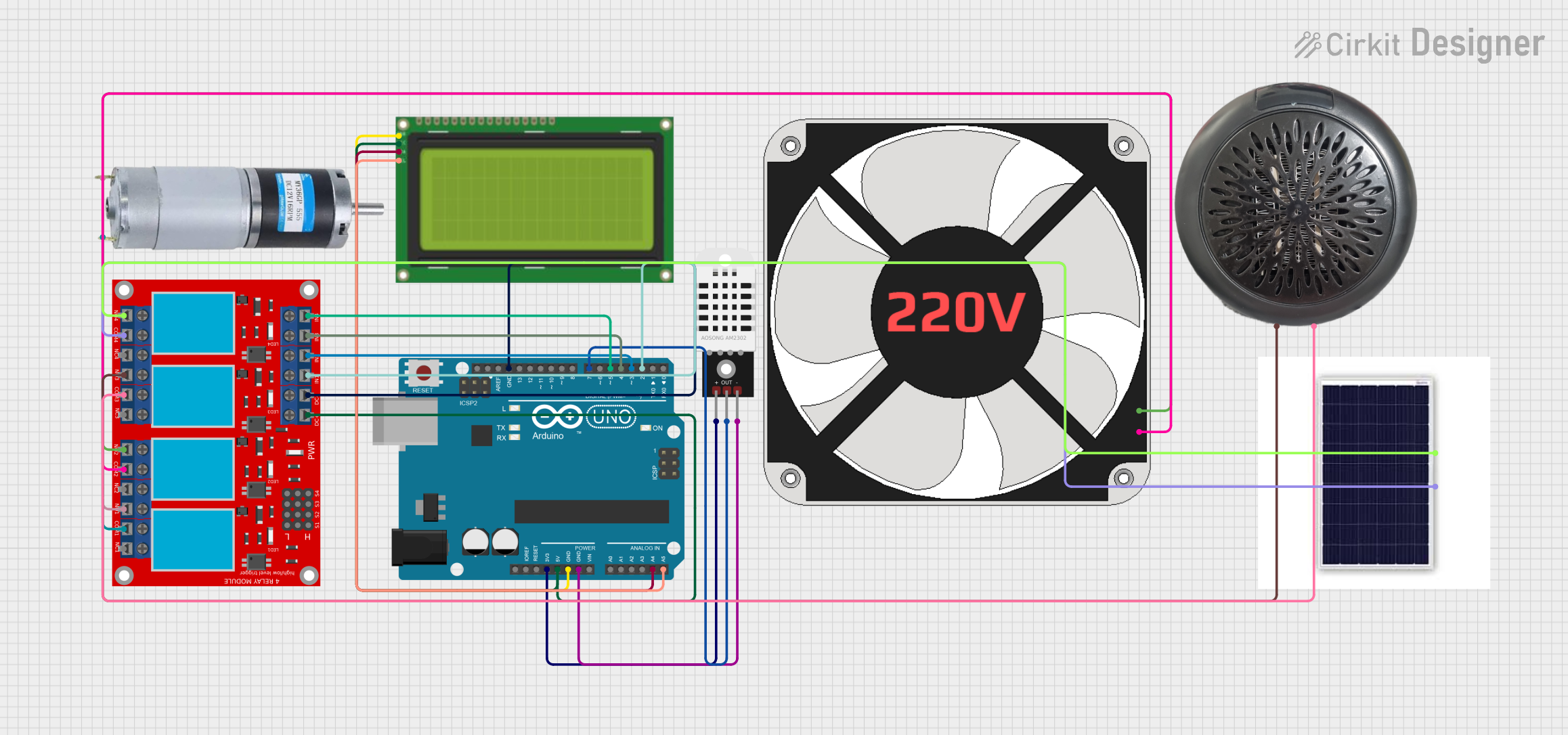
Circuit Documentation
Summary
This circuit is designed to monitor temperature and humidity using a DHT22 sensor and display the readings on a 20x4 I2C LCD. Additionally, it controls a 4-channel relay module to manage various devices such as a solar panel, warm air blower, 220V fan, and a DC motor. The entire system is controlled by an Arduino UNO.
Component List
Arduino UNO
- Description: Microcontroller board based on the ATmega328P.
- Pins: UNUSED, IOREF, Reset, 3.3V, 5V, GND, Vin, A0, A1, A2, A3, A4, A5, SCL, SDA, AREF, D13, D12, D11, D10, D9, D8, D7, D6, D5, D4, D3, D2, D1, D0
Lcd 20x4 i2c
- Description: 20x4 character LCD display with I2C interface.
- Pins: GND, 5V, SCA, SCL
DHT22
- Description: Digital temperature and humidity sensor.
- Pins: +, Out, -
4 channel relay module
- Description: Relay module with 4 channels for controlling high voltage devices.
- Pins: N.O. 4, COM 4, N.C. 4, N.O. 3, COM 3, N.C. 3, N.O. 2, COM 2, N.C. 2, N.O. 1, COM 1, N.C. 1, Pin 13, Pin 14, Pin 15, Pin 16, Pin 17, Pin 18, Pin 19, Pin 20, Pin 21, Pin 22, Pin 23, Pin 24, VCC+, VCC- (GND), IN 1, IN 2, IN 3, IN 4
DC Motor
- Description: Direct current motor.
- Pins: positive, negative
220V Fan
- Description: Fan operating at 220V.
- Pins: N, L
Warm Air Blower
- Description: Device for blowing warm air.
- Pins: V+, V-
Solar Panel
- Description: Solar panel for generating electricity.
- Pins: Vcc, Gnd
Wiring Details
Arduino UNO
- 3.3V to DHT22 (+)
- 5V to 4 channel relay module (VCC+) and Lcd 20x4 i2c (5V)
- GND to Lcd 20x4 i2c (GND), DHT22 (-), and 4 channel relay module (VCC- (GND))
- A4 to Lcd 20x4 i2c (SCA)
- A5 to Lcd 20x4 i2c (SCL)
- D7 to DHT22 (Out)
- D5 to 4 channel relay module (IN 4)
- D4 to 4 channel relay module (IN 3)
- D3 to 4 channel relay module (IN 2)
- D2 to 4 channel relay module (IN 1)
Lcd 20x4 i2c
- GND to Arduino UNO (GND)
- 5V to Arduino UNO (5V)
- SCA to Arduino UNO (A4)
- SCL to Arduino UNO (A5)
DHT22
- + to Arduino UNO (3.3V)
- Out to Arduino UNO (D7)
- - to Arduino UNO (GND)
4 channel relay module
- VCC+ to Arduino UNO (5V)
- VCC- (GND) to Arduino UNO (GND)
- IN 4 to Arduino UNO (D5)
- IN 3 to Arduino UNO (D4)
- IN 2 to Arduino UNO (D3)
- IN 1 to Arduino UNO (D2)
- N.O. 4 to Solar Panel (Vcc)
- COM 4 to Solar Panel (Gnd)
- N.O. 3 to Warm Air Blower (V+)
- COM 3 to Warm Air Blower (V-)
- N.O. 2 to 220V Fan (L)
- COM 2 to 220V Fan (N)
- N.O. 1 to DC Motor (positive)
- COM 1 to DC Motor (negative)
DC Motor
- positive to 4 channel relay module (N.O. 1)
- negative to 4 channel relay module (COM 1)
220V Fan
- L to 4 channel relay module (N.O. 2)
- N to 4 channel relay module (COM 2)
Warm Air Blower
- V+ to 4 channel relay module (N.O. 3)
- V- to 4 channel relay module (COM 3)
Solar Panel
- Vcc to 4 channel relay module (N.O. 4)
- Gnd to 4 channel relay module (COM 4)
Code Documentation
// Libraries
#include <DHT.h>
#include <LiquidCrystal_I2C.h>
#include <Wire.h>

// Constants
#define DHTPIN 7         // Pin connected to the DHT22 sensor
#define DHTTYPE DHT22    // Define sensor type (DHT22)

// Initialize DHT sensor and LCD
DHT dht(DHTPIN, DHTTYPE);
LiquidCrystal_I2C lcd(0x27, 20, 4);    // Set the LCD address to 0x27 for a 20x4 display

// Variables
float humidity;      // Stores humidity value
float temperature;   // Stores temperature value

void setup() {
    Serial.begin(9600);                      // Start serial communication
    Serial.println("Temperature and Humidity Sensor Test");

    dht.begin();                             // Initialize the DHT sensor
    lcd.init();                              // Initialize the LCD
    lcd.backlight();                         // Turn on the LCD backlight

    // Display a startup message
    lcd.setCursor(0, 0);
    lcd.print("DHT22 Sensor Ready");
    lcd.setCursor(0, 1);
    lcd.print("Initializing...");
    delay(2000);                             // Display startup message for 2 seconds
    lcd.clear();
}

void loop() {
    // Read humidity and temperature
    humidity = dht.readHumidity();
    temperature = dht.readTemperature();

    // Check if the readings are valid
    if (isnan(humidity) || isnan(temperature)) {
        Serial.println("Failed to read from DHT sensor!");

        // Display error message on LCD
        lcd.setCursor(0, 0);
        lcd.print("  Sensor Error!   ");
        lcd.setCursor(0, 1);
        lcd.print(" Check Wiring...  ");
    } else {
        // Print values to Serial Monitor
        Serial.print("Humidity: ");
        Serial.print(humidity);
        Serial.print(" %, Temp: ");
        Serial.print(temperature);
        Serial.println(" °C");

        // Clear lines before displaying new data
        lcd.setCursor(0, 0);
        lcd.print("                "); // Clear the line by printing spaces
        lcd.setCursor(0, 1);
        lcd.print("                "); // Clear the line by printing spaces
        lcd.setCursor(0, 2);
        lcd.print("                "); // Clear the line by printing spaces
        lcd.setCursor(0, 3);
        lcd.print("                "); // Clear the line by printing spaces

        // Display temperature
        lcd.setCursor(0, 0);
        lcd.print("Temperature:     ");
        lcd.setCursor(0, 1);
        lcd.print("T: ");
        lcd.print(temperature, 1); // Print temperature with one decimal
        lcd.print((char)223);      // Degree symbol
        lcd.print("C");

        // Display humidity
        lcd.setCursor(0, 2);
        lcd.print("Humidity:        ");
        lcd.setCursor(0, 3);
        lcd.print("H: ");
        lcd.print(humidity, 1);    // Print humidity with one decimal
        lcd.print("%");
    }

    delay(2000); // Wait 2 seconds before the next reading
}