
Arduino UNO Controlled Servo with Ultrasonic and Thermal Scanning
View and Edit Project In Cirkit Designer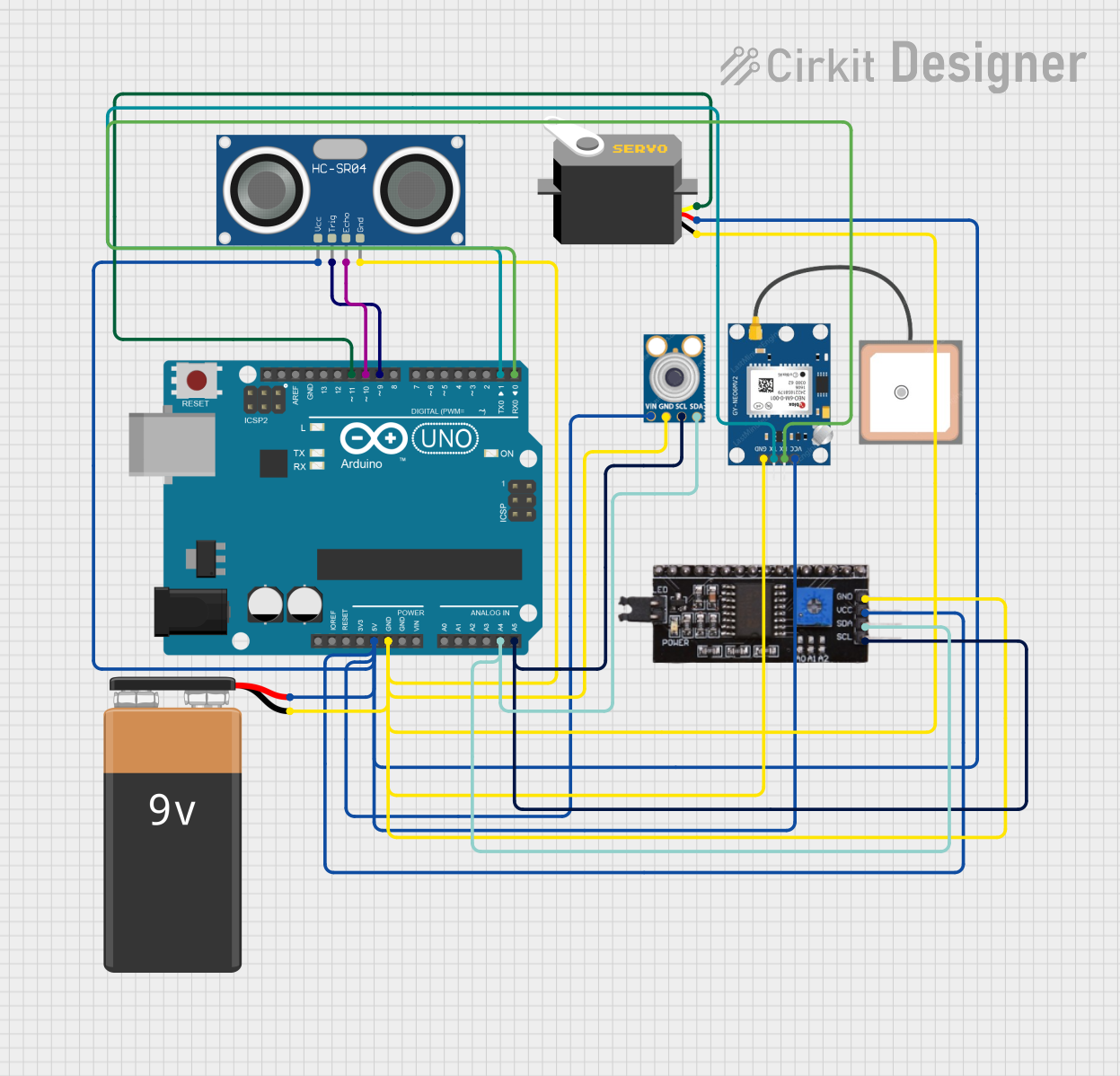
Circuit Documentation
Summary
This circuit is designed to control a servo motor that rotates an ultrasonic sensor (HC-SR04) and a thermal sensor (MLX90614) to scan the environment. The ultrasonic sensor is used to measure distances, while the thermal sensor measures temperatures. The data collected from these sensors can be used to identify a person in a critical situation. The Arduino UNO serves as the central processing unit, controlling the servo and reading data from the sensors. The circuit is powered by a 9V battery, and communication with the thermal sensor is facilitated through an I2C module.
Component List
Arduino UNO
- Microcontroller board based on the ATmega328P
- Used as the main controller for the circuit
Servo
- A motor capable of precise control of angular position
- Used to rotate the ultrasonic sensor
HC-SR04 Ultrasonic Sensor
- A sensor that measures distance using ultrasonic waves
- Used to detect objects and measure their distance from the sensor
mlx90614
- An infrared thermometer for non-contact temperature measurements
- Used to measure the temperature of objects
I2C module
- A communication module that allows I2C communication
- Used to facilitate communication between the Arduino and mlx90614 sensor
9V Battery
- A power source for the circuit
- Provides the necessary voltage to power the Arduino and other components
GPS NEO 6M
- A GPS module for location tracking
- Used to provide geographical location data
Wiring Details
Arduino UNO
5Vconnected to the positive terminal of the 9V Battery and VCC pins of Servo, GPS NEO 6M, I2C module, HC-SR04 Ultrasonic Sensor, and mlx90614GNDconnected to the negative terminal of the 9V Battery and GND pins of Servo, GPS NEO 6M, I2C module, HC-SR04 Ultrasonic Sensor, and mlx90614A4 (SDA)connected to SDA pins of I2C module and mlx90614A5 (SCL)connected to SCL pins of I2C module and mlx90614D11connected to the pulse pin of the ServoD10connected to the ECHO pin of the HC-SR04 Ultrasonic SensorD9connected to the TRIG pin of the HC-SR04 Ultrasonic SensorD1 (TX)connected to the RX pin of the GPS NEO 6MD0 (RX)connected to the TX pin of the GPS NEO 6M
Servo
vccconnected to the positive terminal of the 9V Batterygndconnected to the negative terminal of the 9V Batterypulseconnected toD11on the Arduino UNO
HC-SR04 Ultrasonic Sensor
VCCconnected to the positive terminal of the 9V BatteryGNDconnected to the negative terminal of the 9V BatteryECHOconnected toD10on the Arduino UNOTRIGconnected toD9on the Arduino UNO
mlx90614
VINconnected to the positive terminal of the 9V BatteryGNDconnected to the negative terminal of the 9V BatterySDAconnected toA4 (SDA)on the Arduino UNOSCLconnected toA5 (SCL)on the Arduino UNO
I2C module
VCCconnected to the positive terminal of the 9V BatteryGNDconnected to the negative terminal of the 9V BatterySDAconnected toA4 (SDA)on the Arduino UNOSCLconnected toA5 (SCL)on the Arduino UNO
9V Battery
+connected to5Von the Arduino UNO and VCC pins of other components-connected toGNDon the Arduino UNO and GND pins of other components
GPS NEO 6M
VCCconnected to the positive terminal of the 9V BatteryGNDconnected to the negative terminal of the 9V BatteryTXconnected toD0 (RX)on the Arduino UNORXconnected toD1 (TX)on the Arduino UNO
Documented Code
// This Arduino sketch controls a servo motor to rotate an ultrasonic sensor
// and a thermal sensor (MLX90614) to scan the environment. The ultrasonic
// sensor measures distances, and the thermal sensor measures temperatures.
// The data is used to identify a person in a critical situation.

#include <Servo.h>
#include <Wire.h>
#include <Adafruit_MLX90614.h>

// Defines pins for the Ultrasonic Sensor
const int trigPin = 9;
const int echoPin = 10;

// Variables for the duration and the distance
long duration;
int distance;

Servo myServo; // Creates a servo object for controlling the servo motor
Adafruit_MLX90614 mlx = Adafruit_MLX90614(); // Creates an object for the MLX90614

void setup() {
  pinMode(trigPin, OUTPUT); // Sets the trigPin as an Output
  pinMode(echoPin, INPUT); // Sets the echoPin as an Input
  Serial.begin(9600);
  myServo.attach(11); // Defines on which pin is the servo motor attached
  mlx.begin(); // Initializes the MLX90614 sensor
}

void loop() {
  // Rotates the servo motor from 15 to 165 degrees
  for(int i = 15; i <= 165; i++) {
    myServo.write(i);
    delay(30);
    distance = calculateDistance(); // Calculates distance
    float temp = mlx.readObjectTempC(); // Reads temperature
    Serial.print(i); // Sends the current degree to the Serial Port
    Serial.print(",");
    Serial.print(distance); // Sends the distance value to the Serial Port
    Serial.print(",");
    Serial.print(temp); // Sends the temperature value to the Serial Port
    Serial.print(".");
  }
  // Repeats the previous lines from 165 to 15 degrees
  for(int i = 165; i > 15; i--) {
    myServo.write(i);
    delay(30);
    distance = calculateDistance();
    float temp = mlx.readObjectTempC();
    Serial.print(i);
    Serial.print(",");
    Serial.print(distance);
    Serial.print(",");
    Serial.print(temp);
    Serial.print(".");
  }
}

// Function for calculating the distance measured by the Ultrasonic sensor
int calculateDistance() {
  digitalWrite(trigPin, LOW);
  delayMicroseconds(2);
  digitalWrite(trigPin, HIGH); // Sets the trigPin on HIGH state for 10 micro seconds
  delayMicroseconds(10);
  digitalWrite(trigPin, LOW);
  duration = pulseIn(echoPin, HIGH); // Reads the echoPin
  distance = duration * 0.034 / 2; // Calculating the distance
  return distance;
}
This code is designed to be uploaded to the Arduino UNO microcontroller. It initializes the servo and sensors in the setup() function and then enters a loop where it rotates the servo, reads the distance from the ultrasonic sensor, and the temperature from the MLX90614 sensor. The data is then printed to the serial port for monitoring. The calculateDistance() function is used to trigger the ultrasonic sensor and calculate the distance based on the time it takes for the echo to return.