
Arduino UNO and DHT22 Temperature and Humidity Sensor with Serial Monitoring
View and Edit Project In Cirkit Designer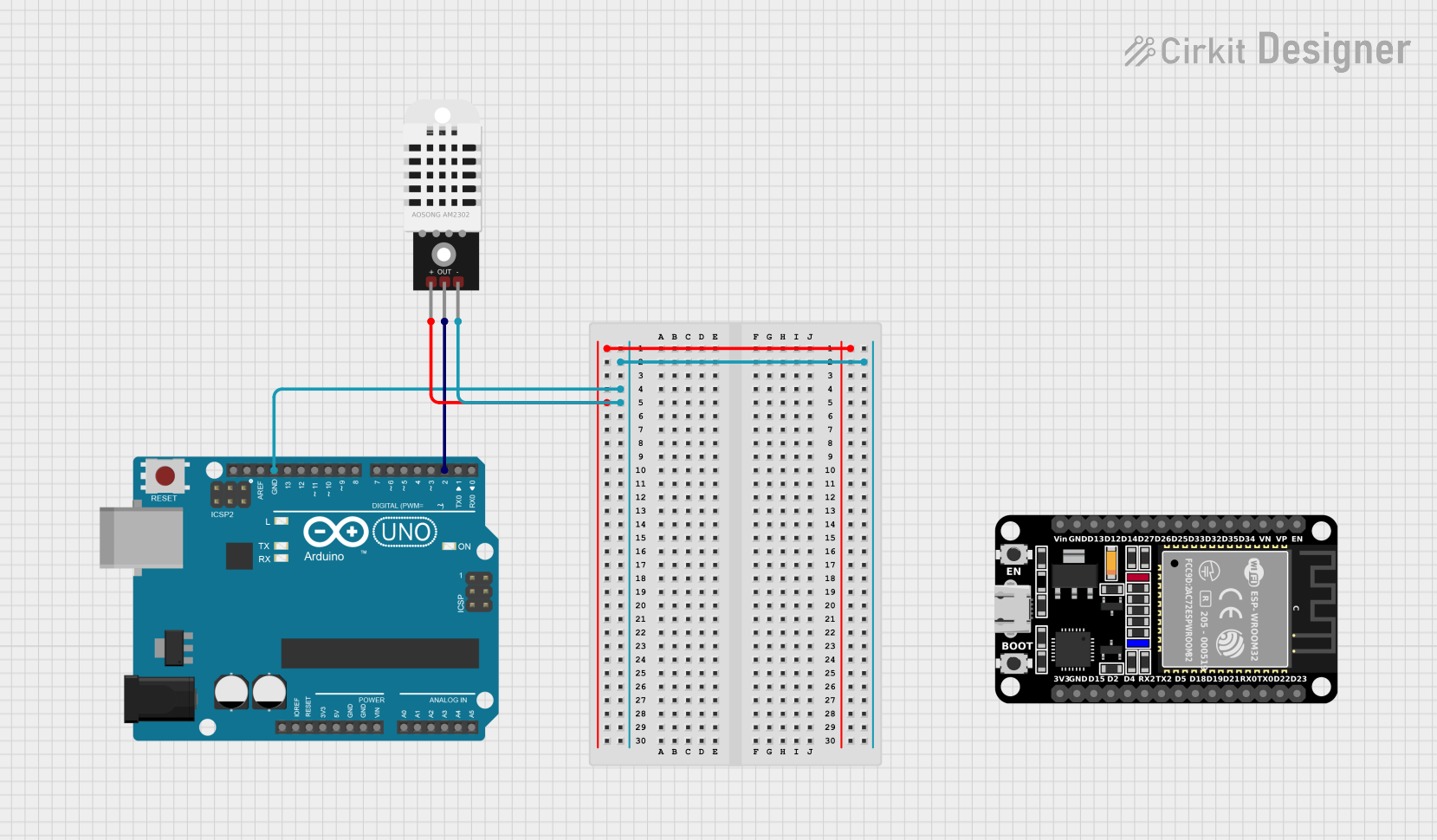
Circuit Documentation
Summary
This circuit involves an Arduino UNO microcontroller interfaced with a DHT22 temperature and humidity sensor. The Arduino UNO reads data from the DHT22 sensor and outputs the temperature and humidity readings to the Serial Monitor.
Component List
DHT22
- Description: Temperature and Humidity Sensor
- Pins:
+: Power supply (3.3V or 5V)Out: Data output-: Ground
Arduino UNO
- Description: Microcontroller Board
- Pins:
UNUSEDIOREFReset3.3V5VGNDVinA0toA5SCLSDAAREFD13toD0
ESP32 (30 pin)
- Description: Microcontroller Board (Not used in this circuit)
- Pins:
ENVPVND34toD0GNDVin3V3
Wiring Details
DHT22
+pin connected to a power supply (3.3V or 5V)Outpin connected toD2pin of the Arduino UNO-pin connected toGNDpin of the Arduino UNO
Arduino UNO
GNDpin connected to-pin of the DHT22D2pin connected toOutpin of the DHT22
Documented Code
#include "DHT.h"  // Include the DHT library

#define DHTPIN 2      // GPIO pin connected to the DHT22 data pin
#define DHTTYPE DHT22 // Specify the sensor type (DHT11, DHT22, etc.)

DHT dht(DHTPIN, DHTTYPE);

void setup() {
  Serial.begin(115200); // Initialize serial communication
  dht.begin();          // Initialize the DHT sensor
  Serial.println("DHT22 Sensor Test");
}

void loop() {
  // Read temperature as Celsius
  float temperature = dht.readTemperature();
  // Read humidity
  float humidity = dht.readHumidity();

  // Check if any reading failed
  if (isnan(temperature) || isnan(humidity)) {
    Serial.println("Failed to read from DHT sensor!");
    return;
  }

  // Print the results to the Serial Monitor
  Serial.print("Temperature: ");
  Serial.print(temperature);
  Serial.println(" °C");

  Serial.print("Humidity: ");
  Serial.print(humidity);
  Serial.println(" %");

  delay(50000); // Wait for 2 seconds before reading again
}
This code initializes the DHT22 sensor and reads temperature and humidity data from it. The readings are then printed to the Serial Monitor. If the sensor fails to provide readings, an error message is displayed.