
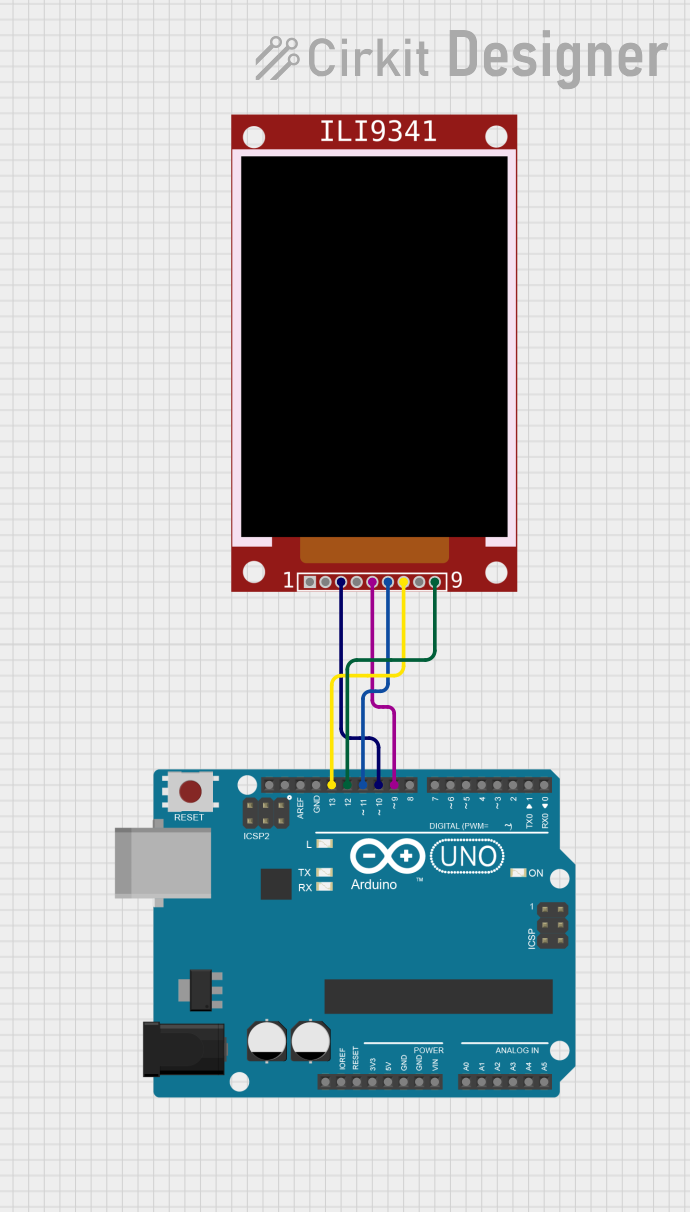
Circuit Documentation
Summary
This circuit involves an Arduino UNO microcontroller interfacing with an ILI9341 TFT display. The Arduino UNO is used to control the display, sending commands and data to render graphics. The connections between the Arduino and the display are made through specific digital pins, and the code uploaded to the Arduino handles the initialization and drawing operations on the display.
Component List
ILI9341
- Description: TFT LCD display module
- Pins: VCC, GND, CS, RST, D/C, MOSI, SCK, LED, MISO
- Purpose: To display graphics and text as controlled by the Arduino UNO.
Arduino UNO
- Description: Microcontroller board based on the ATmega328P
- Pins: UNUSED, IOREF, Reset, 3.3V, 5V, GND, Vin, A0, A1, A2, A3, A4, A5, SCL, SDA, AREF, D13, D12, D11, D10, D9, D8, D7, D6, D5, D4, D3, D2, D1, D0
- Purpose: To control the ILI9341 display and execute the embedded code for rendering graphics.
Wiring Details
ILI9341
- CS: Connected to Arduino UNO pin D10
- D/C: Connected to Arduino UNO pin D9
- MOSI: Connected to Arduino UNO pin D11
- SCK: Connected to Arduino UNO pin D13
- MISO: Connected to Arduino UNO pin D12
Arduino UNO
- D10: Connected to ILI9341 pin CS
- D9: Connected to ILI9341 pin D/C
- D11: Connected to ILI9341 pin MOSI
- D13: Connected to ILI9341 pin SCK
- D12: Connected to ILI9341 pin MISO
Code Documentation
Code for Arduino UNO
/*
  Fingerprint - generating a complex graphics pattern with little code.

  Try changing line 27 and experimenting with the patterns, e.g.:
  tft.drawPixel(x, y, (x + y) * sin(x * y));

  https://wokwi.com/arduino/projects/307567963154678338
*/

#include <Adafruit_ILI9341.h>

#define TFT_CS   10
#define TFT_DC   9
Adafruit_ILI9341 tft = Adafruit_ILI9341(TFT_CS, TFT_DC);

#define WIDTH 320
#define HEIGHT 240

void setup(void) {
  tft.begin();
//   tft.setRotation(0);

  uint8_t command = 0x48;
  tft.sendCommand(0x36, &command, 1);

  uint16_t redColor = color565(255, 0, 0); // Convert RGB(255, 0, 0) to RGB565

  tft.drawPixel(0, 0, redColor);
}

void loop() {
//   for (int y = 0; y < HEIGHT; y++) {
//     for (int x = 0; x < WIDTH; x++) {
//       tft.drawPixel(x, y, x * y);
//     }
//   }
}

uint16_t color565(uint8_t r, uint8_t g, uint8_t b) {
  return ((r & 0xF8) << 8) | ((g & 0xFC) << 3) | (b >> 3);
}
This code initializes the ILI9341 display and draws a single red pixel at the top-left corner of the screen. The color565 function is used to convert RGB values to the RGB565 format required by the display. The setup function handles the initialization and the drawing of the pixel, while the loop function is currently commented out but can be used to draw more complex patterns.