
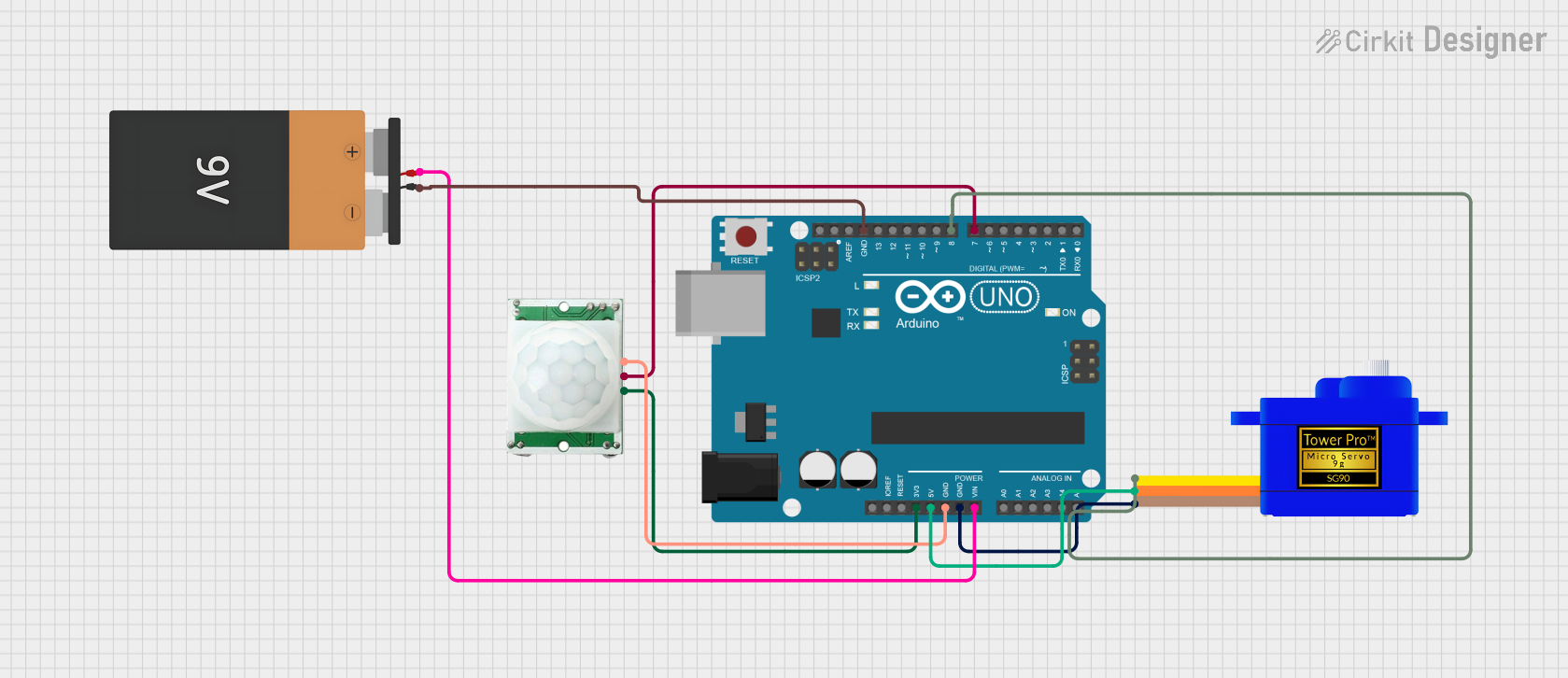
Circuit Documentation
Summary
This circuit is designed to interface an Arduino UNO with a Servomotor SG90 and a PIR (Passive Infrared) Motion Sensor. The Arduino UNO is powered by a 9V battery and controls the servomotor based on the input from the PIR sensor. When motion is detected by the PIR sensor, the Arduino UNO commands the servomotor to rotate to a specified angle. The circuit is intended for applications where motion detection is required to trigger a mechanical response, such as in automated doors, alarms, or interactive installations.
Component List
Arduino UNO
- Microcontroller board based on the ATmega328P
- It has 14 digital input/output pins, 6 analog inputs, a 16 MHz quartz crystal, a USB connection, a power jack, an ICSP header, and a reset button.
Servomotor SG90
- A small and lightweight servo motor capable of precise control
- It operates on 5V and can be easily interfaced with the Arduino.
PIR/Motion Sensor
- A sensor that detects motion through changes in infrared levels emitted by objects in its field of view.
- It operates on 3.3V and provides a digital output signal indicating motion detection.
Battery 9V
- A standard 9V battery used to power the Arduino UNO and, indirectly, the other components in the circuit.
Wiring Details
Arduino UNO
- 3.3V connected to PIR/Motion Sensor VCC
- 5V connected to Servomotor SG90 VCC
- GND connected to:
- PIR/Motion Sensor GND
- Servomotor SG90 GND
- Battery 9V GND
- Vin connected to Battery 9V VCC
- D8 connected to Servomotor SG90 SIG
- D7 connected to PIR/Motion Sensor OUTPUT
Servomotor SG90
- VCC connected to Arduino UNO 5V
- GND connected to Arduino UNO GND
- SIG connected to Arduino UNO D8
PIR/Motion Sensor
- VCC connected to Arduino UNO 3.3V
- GND connected to Arduino UNO GND
- OUTPUT connected to Arduino UNO D7
Battery 9V
- VCC connected to Arduino UNO Vin
- GND connected to Arduino UNO GND
Documented Code
#include <Servo.h>
Servo myservo;

int pir = 7;  // digital pin for PIR motion sensor

void setup()
{
  pinMode(pir, INPUT);
  myservo.attach(8);  // digital pin for servo motor
  Serial.begin(9600);
}

void loop()
{
  int x = digitalRead(pir);
  Serial.println(x);

  if(x == HIGH)
  {
    myservo.write(180);  // move servo to 180 degrees
    delay(3000);         // wait for 3 seconds
  }
  else
  {
    myservo.write(0);    // move servo back to 0 degrees
  }
}
Code Explanation
- The
Servolibrary is included to control the servomotor. - The
pirvariable is assigned to digital pin 7, which is connected to the PIR sensor's output. - In the
setup()function, the PIR sensor pin is set as an input, the servomotor is attached to digital pin 8, and the serial communication is started at 9600 bps for debugging purposes. - The
loop()function continuously reads the PIR sensor's output. If motion is detected (output is HIGH), the servomotor is commanded to rotate to 180 degrees and hold for 3 seconds. If no motion is detected, the servomotor returns to 0 degrees.