
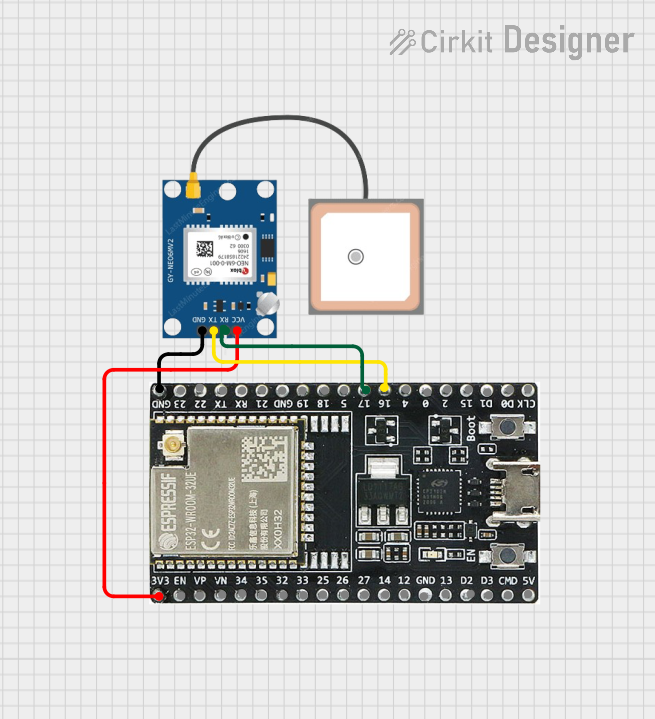
Circuit Documentation
Summary of the Circuit
This circuit integrates a GPS NEO 6M module with an ESP32-WROOM-32UE microcontroller. The GPS module provides location data, which is communicated to the ESP32 microcontroller for processing. The ESP32 is responsible for handling the GPS data and potentially interfacing with other systems or sensors. The power supply for the GPS module is drawn from the ESP32's 3.3V output, and the communication between the GPS module and the ESP32 is established via serial communication (UART).
Component List
GPS NEO 6M
- Description: A GPS module capable of providing geolocation data.
- Pins:
- VCC: Power supply input.
- RX: Serial data receive pin.
- TX: Serial data transmit pin.
- GND: Ground connection.
ESP32-WROOM-32UE
- Description: A powerful microcontroller with Wi-Fi and Bluetooth capabilities.
- Pins:
- 3v3: 3.3V power output.
- EN: Chip enable.
- VP, VN: Sensor voltage pins.
- 34, 35, 32, 33, 25, 26, 27, 14, 12, 13, D2, D3, 23, 22, 21, 19, 18, 5, 17, 16, 4, 0, 2, 15, D1, D0, CKL: General purpose I/O pins.
- GND: Ground connection.
- 5V: 5V power input.
- TX, RX: Serial communication pins.
Wiring Details
GPS NEO 6M
- VCC connected to ESP32-WROOM-32UE 3v3.
- RX connected to ESP32-WROOM-32UE pin 17.
- TX connected to ESP32-WROOM-32UE pin 16.
- GND connected to ESP32-WROOM-32UE GND.
ESP32-WROOM-32UE
- 3v3 providing power to GPS NEO 6M VCC.
- EN, VP, VN, 34, 35, 32, 33, 25, 26, 27, 14, 12, 13, D2, D3, 23, 22, 21, 19, 18, 5, 4, 0, 2, 15, D1, D0, CKL are not connected in this circuit.
- Pin 17 connected to GPS NEO 6M RX.
- Pin 16 connected to GPS NEO 6M TX.
- GND connected to GPS NEO 6M GND.
- 5V, TX, RX are not connected in this circuit.
Documented Code
Microcontroller Code (ESP32-WROOM-32UE)
File: sketch.ino
void setup() {
  // put your setup code here, to run once:

}

void loop() {
  // put your main code here, to run repeatedly:

}
Note: The provided code is a template and does not include specific functionality. It is expected that the user will add code to initialize the serial communication with the GPS module and handle the received data within the setup() and loop() functions, respectively.