
Arduino UNO-Based Weather Station with LCD Display and Motor Control
View and Edit Project In Cirkit Designer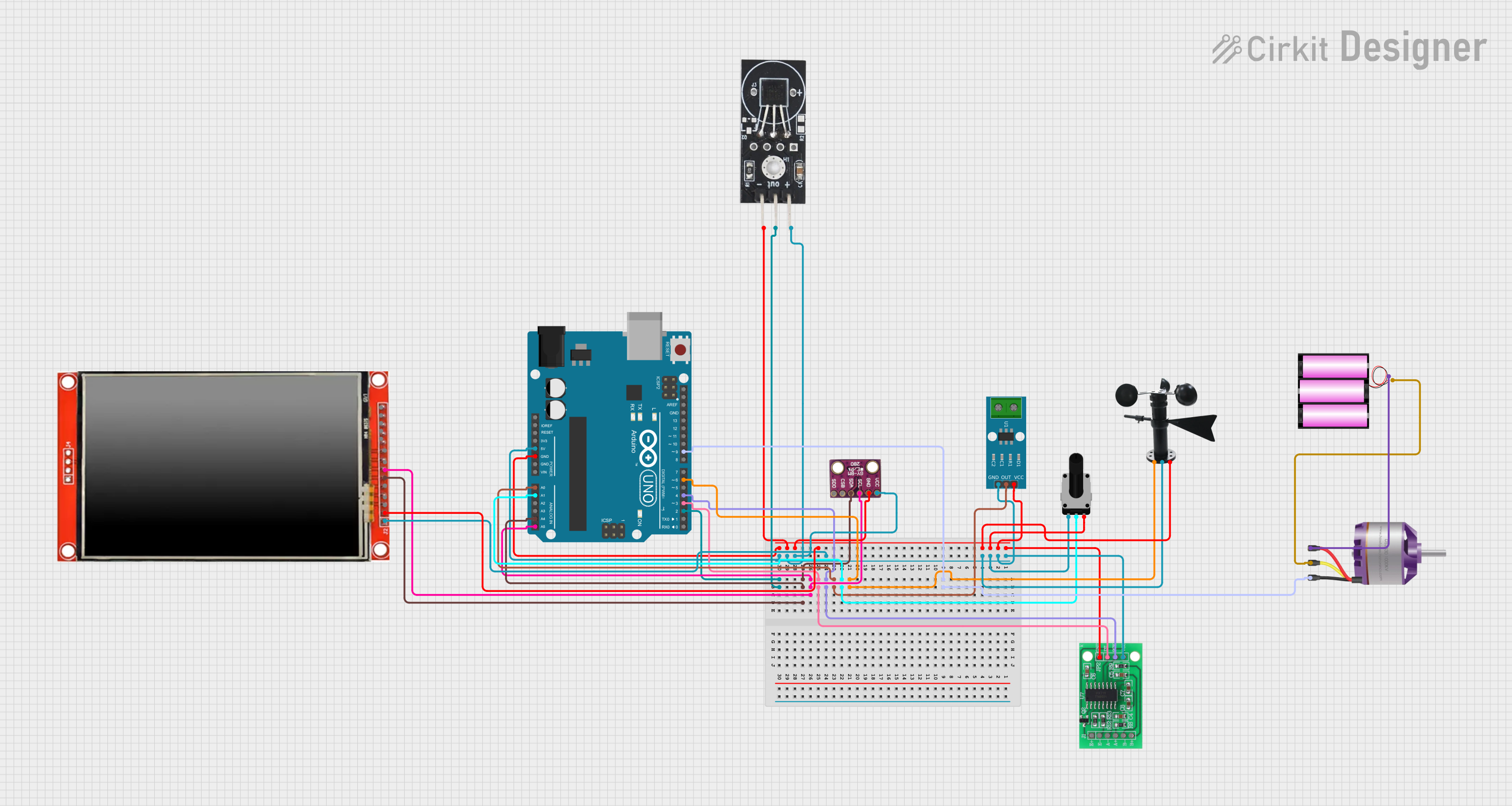
Circuit Documentation
Summary
This circuit is designed to interface various sensors and a motor with an Arduino UNO microcontroller. The sensors include a DS18B20 temperature sensor, an ACS712 current sensor, a BMP280 pressure sensor, a rotary potentiometer, a wind vane, and an HX711 load cell interface. Additionally, an LCD TFT screen is used for display purposes. The circuit also includes a brushless motor controlled by the Arduino. The Arduino reads data from the sensors, processes it, and displays the information on the LCD screen while controlling the motor speed based on the potentiometer input.
Component List
Arduino UNO
- Description: Microcontroller board based on the ATmega328P.
- Pins: UNUSED, IOREF, Reset, 3.3V, 5V, GND, Vin, A0, A1, A2, A3, A4, A5, SCL, SDA, AREF, D13, D12, D11, D10, D9, D8, D7, D6, D5, D4, D3, D2, D1, D0
DS18B20 Temperature Sensor
- Description: Digital temperature sensor.
- Pins: GND, VCC, OUT
ACS712 Current Sensor 5A 20A 30A
- Description: Current sensor module.
- Pins: 1, 2, GND, OUT, VCC
Rotary Potentiometer
- Description: Variable resistor used to control motor speed.
- Pins: leg1, wiper, leg2
- Properties: Resistance: 10000 Ohms
Wind Vane
- Description: Sensor to measure wind direction.
- Pins: A0, VCC, GND
LCD TFT screen ILI9488 HD
- Description: Display module.
- Pins: PEN, TDO, TDI, VCC (3.3~5V), GND, CS, RST, D/C, SDI(MOSI), SCK, BL, SDO(MISO), TCS, TCK
Battery 12V
- Description: Power source.
- Pins: +, -
BMP280
- Description: Pressure sensor.
- Pins: SDO, CSB, SDA, SCL, GND, VCC
HX711 - Bridge Sensor Interface
- Description: Load cell amplifier.
- Pins: E+, E-, A-, A+, B-, B+, GND - GROUND, DATA (OUT), SCK - CLOCK (IN), 3.3/3.5V Supply
Brushless Motor
- Description: Motor controlled by the Arduino.
- Pins: L1, L2, L3
Wiring Details
Arduino UNO
- D9 connected to Brushless Motor L3
- D6 connected to Wind Vane A0
- A1 connected to Rotary Potentiometer wiper
- A0 connected to ACS712 Current Sensor OUT
- D4 connected to HX711 - Bridge Sensor Interface SCK - CLOCK (IN)
- D3 connected to HX711 - Bridge Sensor Interface DATA (OUT)
- A5 connected to LCD TFT screen ILI9488 HD SCK and BMP280 SCL
- A4 connected to LCD TFT screen ILI9488 HD SDI(MOSI) and BMP280 SDA
- D2 connected to DS18B20 Temperature Sensor OUT
- GND connected to HX711 - Bridge Sensor Interface GND - GROUND, ACS712 Current Sensor VCC, Rotary Potentiometer leg2, Wind Vane GND, LCD TFT screen ILI9488 HD GND, BMP280 GND, DS18B20 Temperature Sensor GND
- 5V connected to HX711 - Bridge Sensor Interface 3.3/3.5V Supply, ACS712 Current Sensor GND, Rotary Potentiometer leg1, Wind Vane VCC, LCD TFT screen ILI9488 HD VCC (3.3~5V), BMP280 VCC, DS18B20 Temperature Sensor VCC
DS18B20 Temperature Sensor
- GND connected to Arduino UNO GND
- VCC connected to Arduino UNO 5V
- OUT connected to Arduino UNO D2
ACS712 Current Sensor 5A 20A 30A
- GND connected to Arduino UNO 5V
- OUT connected to Arduino UNO A0
- VCC connected to Arduino UNO GND
Rotary Potentiometer
- leg1 connected to Arduino UNO 5V
- wiper connected to Arduino UNO A1
- leg2 connected to Arduino UNO GND
Wind Vane
- A0 connected to Arduino UNO D6
- VCC connected to Arduino UNO 5V
- GND connected to Arduino UNO GND
LCD TFT screen ILI9488 HD
- SCK connected to Arduino UNO A5
- SDI(MOSI) connected to Arduino UNO A4
- GND connected to Arduino UNO GND
- VCC (3.3~5V) connected to Arduino UNO 5V
Battery 12V
- + connected to Brushless Motor L1
- - connected to Brushless Motor L2
BMP280
- SCL connected to Arduino UNO A5
- SDA connected to Arduino UNO A4
- GND connected to Arduino UNO GND
- VCC connected to Arduino UNO 5V
HX711 - Bridge Sensor Interface
- SCK - CLOCK (IN) connected to Arduino UNO D4
- DATA (OUT) connected to Arduino UNO D3
- GND - GROUND connected to Arduino UNO GND
- 3.3/3.5V Supply connected to Arduino UNO 5V
Brushless Motor
- L1 connected to Battery 12V +
- L2 connected to Battery 12V -
- L3 connected to Arduino UNO D9
Documented Code
#include <DHT.h>
#include <Wire.h>
#include <Adafruit_Sensor.h>
#include <Adafruit_BMP280.h>
#include <LiquidCrystal_I2C.h>

// DHT22 setup
#define DHTPIN 2
#define DHTTYPE DHT22
DHT dht(DHTPIN, DHTTYPE);

// BMP280 setup
Adafruit_BMP280 bmp;

// Load cell HX711 setup
#include "HX711.h"
#define LOADCELL_DT 3
#define LOADCELL_SCK 4
HX711 loadCell;

// Motor control setup
#define POT_PIN A1
#define ESC_PIN 9

// Current sensor
#define CURRENT_PIN A0

// LCD setup
LiquidCrystal_I2C lcd(0x27, 16, 2);

void setup() {
  // Serial setup
  Serial.begin(9600);

  // DHT22 setup
  dht.begin();

  // BMP280 setup
  if (!bmp.begin(0x76)) {
    Serial.println("BMP280 not detected!");
    while (1);
  }

  // HX711 setup
  loadCell.begin(LOADCELL_DT, LOADCELL_SCK);
  loadCell.set_scale();
  loadCell.tare();

  // Motor setup
  pinMode(ESC_PIN, OUTPUT);

  // LCD setup
  lcd.init();
  lcd.backlight();

  // Current sensor setup
  pinMode(CURRENT_PIN, INPUT);
}

void loop() {
  // DHT22 readings
  float temperature = dht.readTemperature();
  float humidity = dht.readHumidity();

  // BMP280 readings
  float pressure = bmp.readPressure();

  // Load cell readings
  float force = loadCell.get_units();

  // Current sensor readings
  float current = analogRead(CURRENT_PIN) * (5.0 / 1023.0) * 100;

  // Motor speed control
  int potValue = analogRead(POT_PIN);
  int escSignal = map(potValue, 0, 1023, 1000, 2000);
  analogWrite(ESC_PIN, escSignal);

  // Display data
  lcd.setCursor(0, 0);
  lcd.print("Temp: ");
  lcd.print(temperature);
  lcd.print("C");

  lcd.setCursor(0, 1);
  lcd.print("Press: ");
  lcd.print(pressure / 100);
  lcd.print("hPa");

  // Print to serial
  Serial.print("Temp: "); Serial.print(temperature);
  Serial.print(" Humidity: "); Serial.print(humidity);
  Serial.print(" Pressure: "); Serial.print(pressure / 100