
Arduino Nano-Based Temperature and Humidity Monitor with OLED Display and Automatic Fan Control
View and Edit Project In Cirkit Designer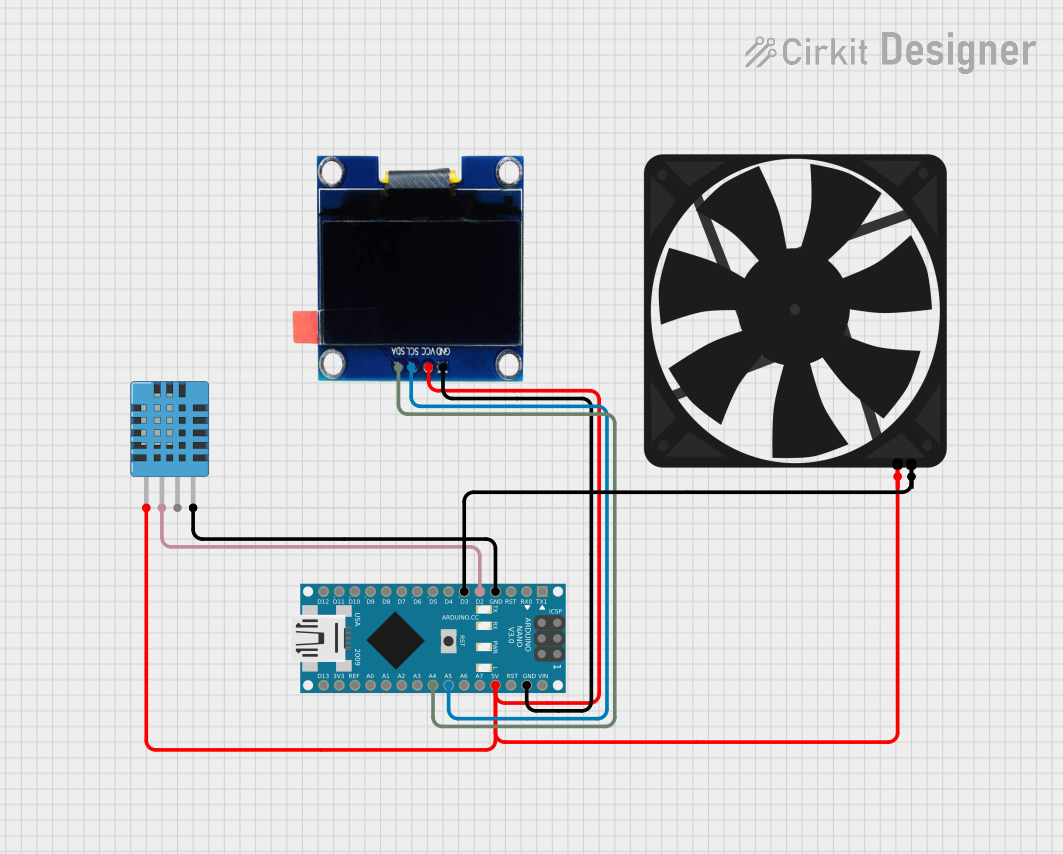
Circuit Documentation
Summary
This circuit is designed to monitor temperature and humidity using a DHT11 sensor and display the readings on a 1.3" OLED display. Additionally, a fan is controlled based on the temperature readings. The entire system is managed by an Arduino Nano microcontroller.
Component List
OLED 1.3" Display
- Description: A small OLED display used to show temperature and fan status.
- Pins: GND, VCC, SCL, SDA
DHT11 Humidity and Temperature Sensor
- Description: A sensor used to measure temperature and humidity.
- Pins: VDD, DATA, NULL, GND
Fan
- Description: A fan that is turned on or off based on the temperature readings.
- Pins: GND, 5V
Arduino Nano
- Description: A microcontroller used to read sensor data, control the fan, and update the OLED display.
- Pins: D1/TX, D0/RX, RESET, GND, D2, D3, D4, D5, D6, D7, D8, D9, D10, D11/MOSI, D12/MISO, VIN, 5V, A7, A6, A5, A4, A3, A2, A1, A0, AREF, 3V3, D13/SCK
Wiring Details
OLED 1.3" Display
- GND connected to Arduino Nano GND
- VCC connected to Arduino Nano 5V
- SCL connected to Arduino Nano A5
- SDA connected to Arduino Nano A4
DHT11 Humidity and Temperature Sensor
- VDD connected to Arduino Nano 5V
- DATA connected to Arduino Nano D2
- GND connected to Arduino Nano GND
Fan
- 5V connected to Arduino Nano 5V
- GND connected to Arduino Nano D3
Code Documentation
#include <Adafruit_GFX.h>
#include <Adafruit_SSD1306.h>
#include <DHT.h>

// OLED display width and height
#define SCREEN_WIDTH 128
#define SCREEN_HEIGHT 64

// Initialize OLED display (I2C address 0x3C)
Adafruit_SSD1306 display(SCREEN_WIDTH, SCREEN_HEIGHT, &Wire, -1);

// DHT Sensor setup
#define DHTPIN 2
#define DHTTYPE DHT11 // Change to DHT22 if using a DHT22 sensor
DHT dht(DHTPIN, DHTTYPE);

// Fan pin
#define FAN_PIN 3

// Temperature threshold
#define TEMP_THRESHOLD 20

void setup() {
  // Initialize serial communication
  Serial.begin(9600);

  // Initialize OLED display
  if (!display.begin(0x3C)) {
    Serial.println("SSD1306 allocation failed");
    for (;;);
  }
  display.display();
  delay(2000);
  display.clearDisplay();

  // Initialize DHT sensor
  dht.begin();

  // Initialize fan pin
  pinMode(FAN_PIN, OUTPUT);
  digitalWrite(FAN_PIN, LOW); // Ensure fan is OFF at start
}

void loop() {
  // Read temperature
  float temp = dht.readTemperature();

  // Check if reading is valid
  if (isnan(temp)) {
    Serial.println("Failed to read from DHT sensor!");
    return;
  }

  // Determine fan status
  bool fanOn = temp > TEMP_THRESHOLD;

  // Control fan
  digitalWrite(FAN_PIN, fanOn ? HIGH : LOW);

  // Display temperature and fan status on OLED
  display.clearDisplay();
  display.setTextSize(2);
  display.setTextColor(SSD1306_WHITE);
  display.setCursor(0, 0);
  display.print("Temp: ");
  display.print(temp, 1); // Display temperature with 1 decimal
  display.print(" C");

  display.setTextSize(2);
  display.setCursor(0, 30);
  if (fanOn) {
    display.print("FAN: ON");
  } else {
    display.print("FAN: OFF");
  }

  display.display();
  delay(1000); // Update every 1 second
}
This code initializes the OLED display and DHT11 sensor, reads the temperature, and controls the fan based on the temperature threshold. The temperature and fan status are displayed on the OLED screen.