
Circuit Documentation
Summary
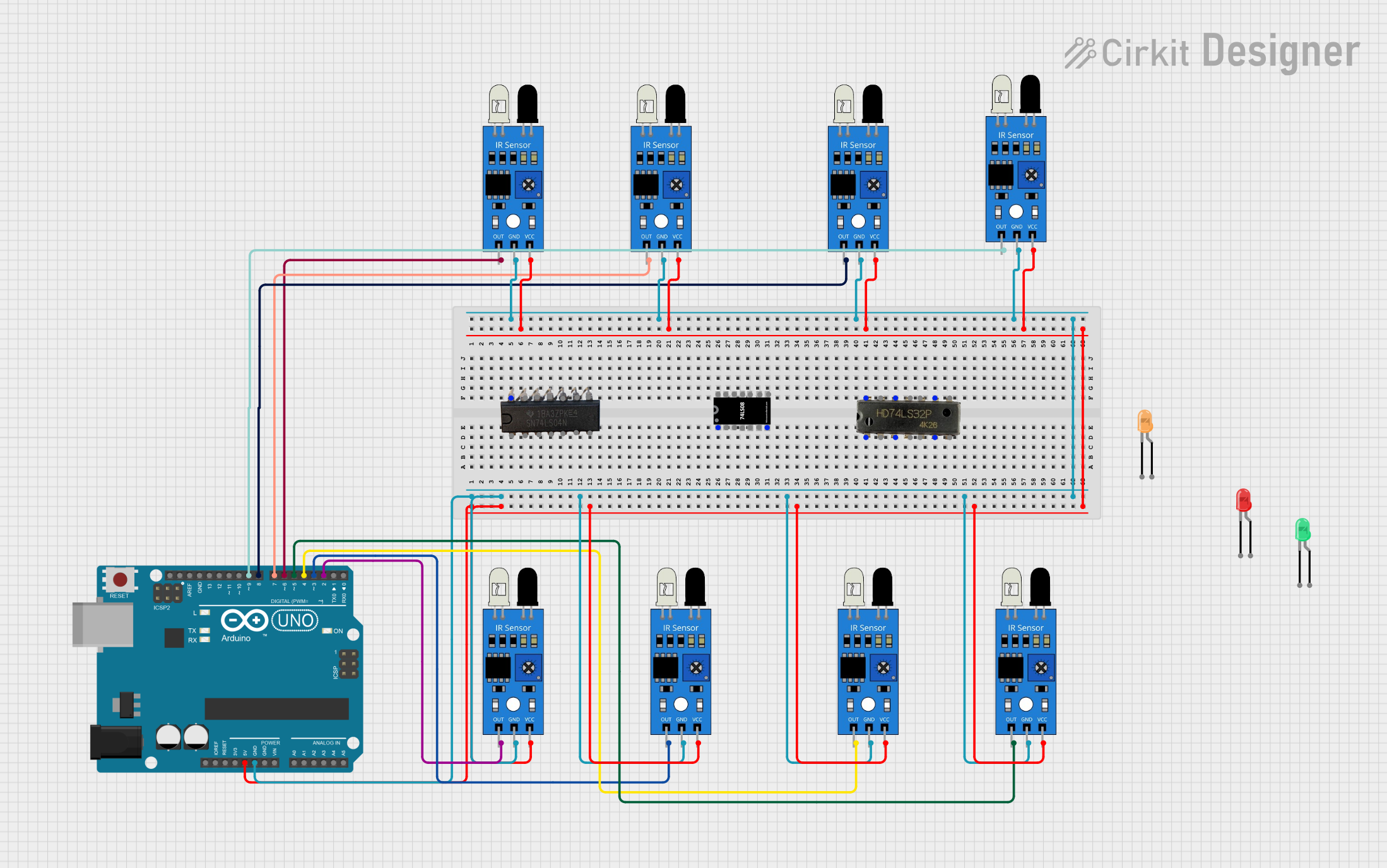
This circuit involves an Arduino UNO microcontroller interfacing with multiple IR sensors and LEDs. The IR sensors are used to detect objects, and the Arduino processes these signals to control the LEDs. The circuit is designed to demonstrate basic sensor interfacing and control using an Arduino.
Component List
IR Sensor
- Description: Infrared sensor used for object detection.
- Pins: out, gnd, vcc
7432 OR Gate IC
- Description: Quad 2-input OR gate.
- Pins: A1, B1, Y1, A2, B2, Y2, GND, VCC, B4, A4, Y4, B3, A3, Y3
Arduino UNO
- Description: Microcontroller board based on the ATmega328P.
- Pins: UNUSED, IOREF, Reset, 3.3V, 5V, GND, Vin, A0, A1, A2, A3, A4, A5, SCL, SDA, AREF, D13, D12, D11, D10, D9, D8, D7, D6, D5, D4, D3, D2, D1, D0
LED: Two Pin (red)
- Description: Red LED.
- Pins: cathode, anode
LED: Two Pin (green)
- Description: Green LED.
- Pins: cathode, anode
LED: Two Pin (orange)
- Description: Orange LED.
- Pins: cathode, anode
IC 7408
- Description: Quad 2-input AND gate.
- Pins: A1, B1, Y1, A2, B2, Y2, GND, Vcc, B4, A4, Y4, A3, B3, Y3
7404 NOT Gate
- Description: Hex inverter.
- Pins: VCC, 6A, 6Y, 5A, 5Y, 4A, 4Y, 1A, 1Y, 2A, 2Y, 3A, 3Y, GND
Wiring Details
IR Sensor
- vcc connected to 5V of Arduino UNO
- gnd connected to GND of Arduino UNO
- out connected to:
- D2 of Arduino UNO
- D9 of Arduino UNO
- D8 of Arduino UNO
- D7 of Arduino UNO
- D6 of Arduino UNO
- D5 of Arduino UNO
- D4 of Arduino UNO
- D3 of Arduino UNO
7432 OR Gate IC
- No specific connections provided in the net list.
Arduino UNO
- 5V connected to vcc of all IR sensors
- GND connected to gnd of all IR sensors
- D2 connected to out of one IR sensor
- D9 connected to out of one IR sensor
- D8 connected to out of one IR sensor
- D7 connected to out of one IR sensor
- D6 connected to out of one IR sensor
- D5 connected to out of one IR sensor
- D4 connected to out of one IR sensor
- D3 connected to out of one IR sensor
LED: Two Pin (red)
- No specific connections provided in the net list.
LED: Two Pin (green)
- No specific connections provided in the net list.
LED: Two Pin (orange)
- No specific connections provided in the net list.
IC 7408
- No specific connections provided in the net list.
7404 NOT Gate
- No specific connections provided in the net list.
Documented Code
Arduino UNO Code (sketch.ino)
void setup() {
  // put your setup code here, to run once:

}

void loop() {
  // put your main code here, to run repeatedly:

}
Documentation (documentation.txt)
This documentation provides a comprehensive overview of the circuit, including a summary, detailed component list, wiring details, and the code used in the Arduino UNO.