
Arduino UNO Capacitive Proximity Sensor Object Detection System
View and Edit Project In Cirkit Designer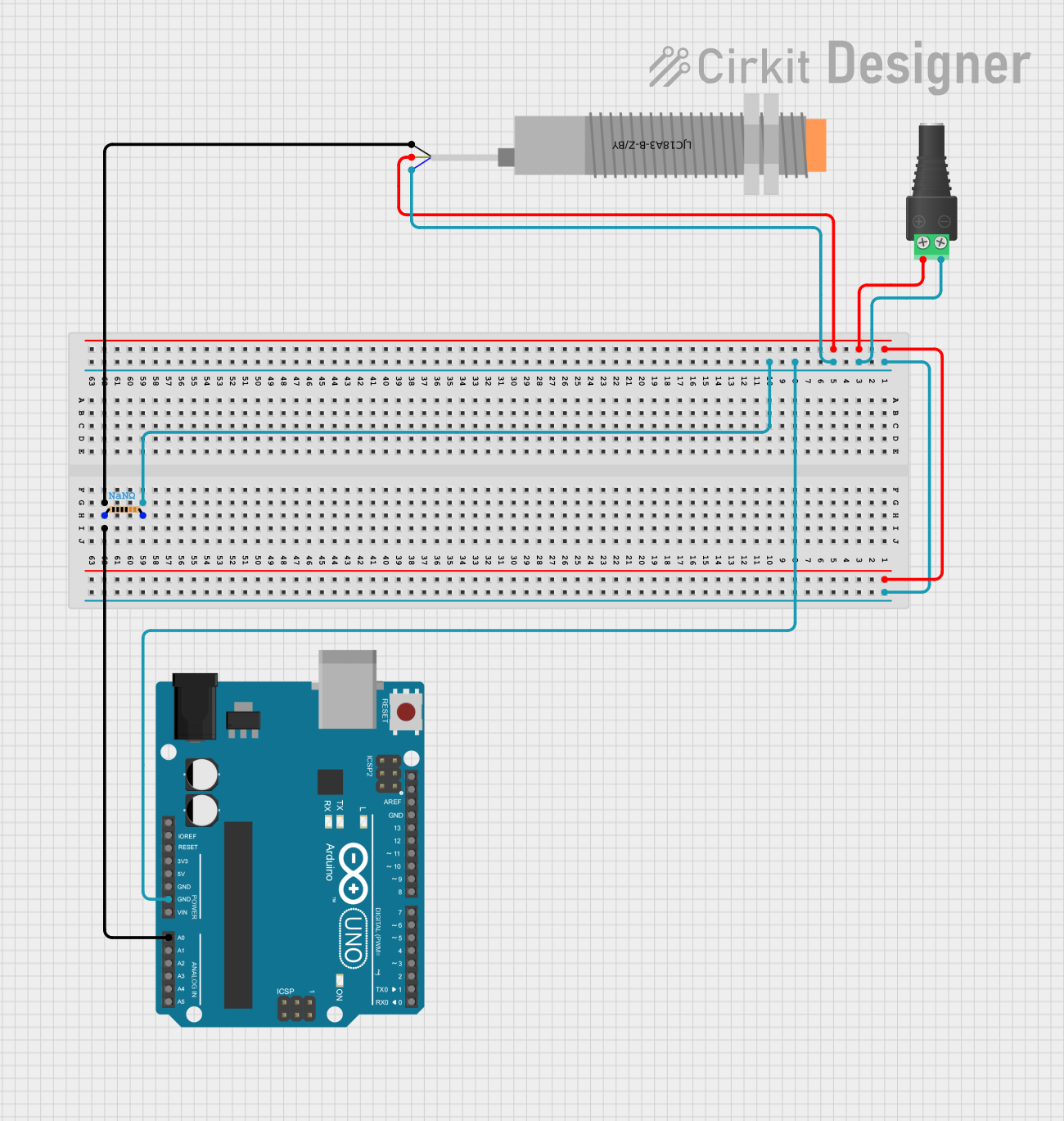
Circuit Documentation
Summary
This circuit is designed to detect the presence of an object using a capacitive proximity sensor and an Arduino UNO. The sensor's signal is read by the Arduino, which then determines if an object is detected based on a predefined threshold. The result is printed to the Serial Monitor.
Component List
2.1mm Barrel Jack with Terminal Block
- Pins: POS, NEG
- Description: Power input connector for the circuit.
- Purpose: Provides power to the circuit components.
LJC18A3-B-Z/BY Capacitive Proximity Sensor
- Pins: VO (BLU), VI (BRN), SIG (BLK)
- Description: Sensor to detect the presence of an object.
- Purpose: Detects objects and sends a signal to the Arduino.
Arduino UNO
- Pins: UNUSED, IOREF, Reset, 3.3V, 5V, GND, Vin, A0, A1, A2, A3, A4, A5, SCL, SDA, AREF, D13, D12, D11, D10, D9, D8, D7, D6, D5, D4, D3, D2, D1, D0
- Description: Microcontroller board.
- Purpose: Reads the sensor signal and determines if an object is detected.
Resistor
- Pins: pin1, pin2
- Description: Resistor component.
- Purpose: Used to limit current in the circuit.
- Properties:
- Resistance: NaN Ohms
Wiring Details
2.1mm Barrel Jack with Terminal Block
- POS is connected to VI (BRN) of the LJC18A3-B-Z/BY Capacitive Proximity Sensor.
- NEG is connected to:
- pin2 of the Resistor
- VO (BLU) of the LJC18A3-B-Z/BY Capacitive Proximity Sensor
- GND of the Arduino UNO
LJC18A3-B-Z/BY Capacitive Proximity Sensor
- VI (BRN) is connected to POS of the 2.1mm Barrel Jack with Terminal Block.
- VO (BLU) is connected to:
- NEG of the 2.1mm Barrel Jack with Terminal Block
- pin2 of the Resistor
- GND of the Arduino UNO
- SIG (BLK) is connected to:
- pin1 of the Resistor
- A0 of the Arduino UNO
Arduino UNO
- GND is connected to:
- NEG of the 2.1mm Barrel Jack with Terminal Block
- VO (BLU) of the LJC18A3-B-Z/BY Capacitive Proximity Sensor
- pin2 of the Resistor
- A0 is connected to:
- SIG (BLK) of the LJC18A3-B-Z/BY Capacitive Proximity Sensor
- pin1 of the Resistor
Resistor
- pin1 is connected to:
- SIG (BLK) of the LJC18A3-B-Z/BY Capacitive Proximity Sensor
- A0 of the Arduino UNO
- pin2 is connected to:
- NEG of the 2.1mm Barrel Jack with Terminal Block
- VO (BLU) of the LJC18A3-B-Z/BY Capacitive Proximity Sensor
- GND of the Arduino UNO
Code Documentation
/*
 * This Arduino sketch reads the signal from a capacitive proximity sensor
 * connected to pin A0 and determines if an object is detected. The result
 * is printed to the Serial Monitor.
 */

const int sensorPin = A0; // Pin connected to the sensor signal
const int threshold = 500; // Threshold value for object detection

void setup() {
  Serial.begin(9600); // Initialize serial communication
  pinMode(sensorPin, INPUT); // Set sensor pin as input
}

void loop() {
  int sensorValue = analogRead(sensorPin); // Read the sensor value
  if (sensorValue > threshold) {
    Serial.println("Object detected");
  } else {
    Serial.println("No object detected");
  }
  delay(500); // Wait for 500 milliseconds
}
This code initializes the Arduino to read the signal from the capacitive proximity sensor connected to pin A0. It then continuously reads the sensor value and prints "Object detected" if the value exceeds the threshold, otherwise it prints "No object detected". The loop runs every 500 milliseconds.