
ESP32 Wi-Fi Controlled Video Player with TFT Display and SD Card
View and Edit Project In Cirkit Designer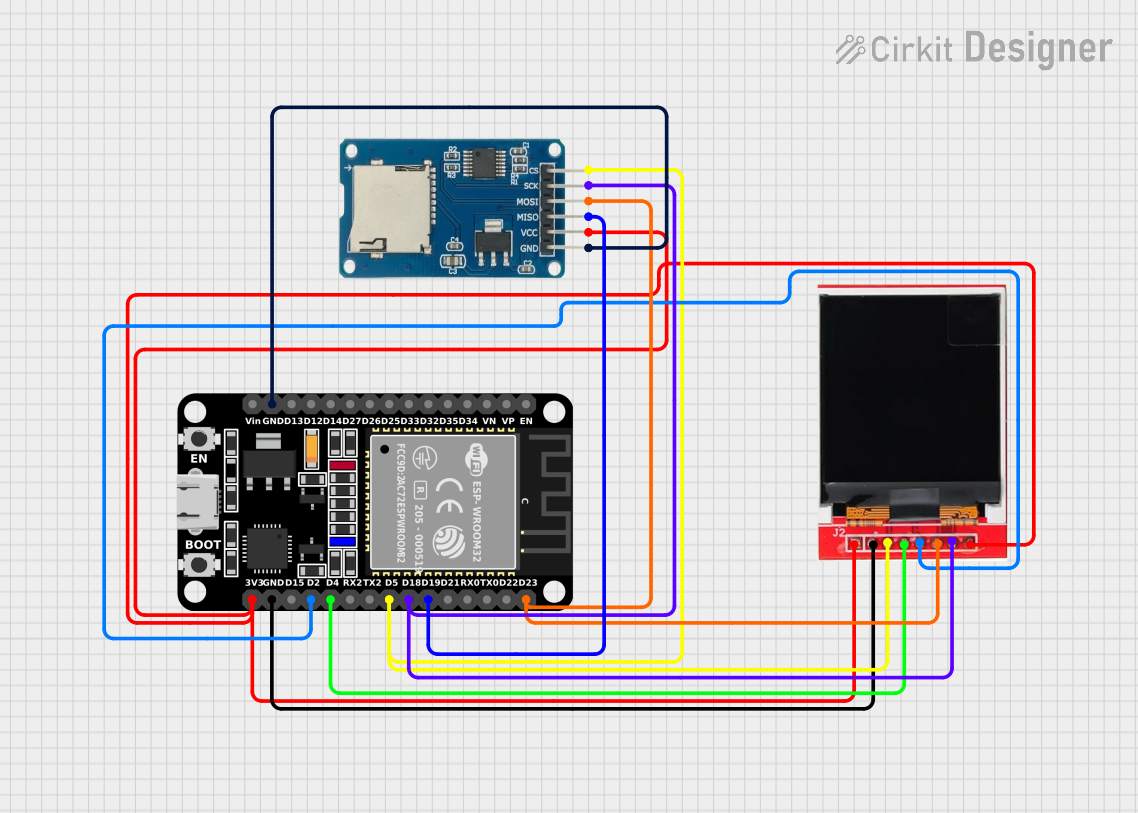
Circuit Documentation
Summary
This circuit is designed to play video files from an SD card using an ESP32 microcontroller and display the video on a TFT LCD display. The ESP32 connects to a WiFi network, initializes the TFT display, and reads video files from the SD card. The main components in this circuit are the ESP32 microcontroller, a TFT LCD display (ST7735S), and a Micro SD Card Module.
Component List
ESP32 (30 pin)
- Description: A powerful microcontroller with built-in WiFi and Bluetooth capabilities.
- Pins: EN, VP, VN, D34, D35, D32, D33, D25, D26, D27, D14, D12, D13, GND, Vin, D23, D22, TX0, RX0, D21, D19, D18, D5, TX2, RX2, D4, D2, D15, 3V3
TFT LCD Display ST7735S
- Description: A 1.8-inch TFT LCD display module with a resolution of 128x160 pixels.
- Pins: Vcc, GND, CS, RESET, A0, SDA, SCK, LED
Micro SD Card Module
- Description: A module for reading and writing to micro SD cards.
- Pins: cs, sck, mosi, miso, vcc, gnd
Wiring Details
ESP32 (30 pin)
GND is connected to:
- GND of the Micro SD Card Module
- GND of the TFT LCD Display ST7735S
D23 is connected to:
- SDA of the TFT LCD Display ST7735S
- mosi of the Micro SD Card Module
D19 is connected to:
- miso of the Micro SD Card Module
D18 is connected to:
- SCK of the TFT LCD Display ST7735S
- sck of the Micro SD Card Module
D5 is connected to:
- CS of the TFT LCD Display ST7735S
- cs of the Micro SD Card Module
D4 is connected to:
- RESET of the TFT LCD Display ST7735S
D2 is connected to:
- A0 of the TFT LCD Display ST7735S
3V3 is connected to:
- Vcc of the TFT LCD Display ST7735S
- LED of the TFT LCD Display ST7735S
- vcc of the Micro SD Card Module
TFT LCD Display ST7735S
Vcc is connected to:
- 3V3 of the ESP32
GND is connected to:
- GND of the ESP32
CS is connected to:
- D5 of the ESP32
RESET is connected to:
- D4 of the ESP32
A0 is connected to:
- D2 of the ESP32
SDA is connected to:
- D23 of the ESP32
SCK is connected to:
- D18 of the ESP32
LED is connected to:
- 3V3 of the ESP32
Micro SD Card Module
cs is connected to:
- D5 of the ESP32
sck is connected to:
- D18 of the ESP32
mosi is connected to:
- D23 of the ESP32
miso is connected to:
- D19 of the ESP32
vcc is connected to:
- 3V3 of the ESP32
gnd is connected to:
- GND of the ESP32
Code Documentation
/*
 * ESP32 SD Card Video Player
 * This code initializes the ESP32, sets up the TFT display,
 * connects to a WiFi network, and plays video files from an SD card.
 */

#include <TFT_eSPI.h> // Include the TFT library
#include <WiFi.h> // Include the WiFi library
#include <SD.h> // Include the SD card library
#include <SPI.h> // Include the SPI library

const char* ssid = "your_SSID"; // Replace with your SSID
const char* password = "your_PASSWORD"; // Replace with your password

TFT_eSPI tft = TFT_eSPI(); // Create TFT object

void setup() {
  // Initialize serial communication
  Serial.begin(115200);
  // Initialize the TFT display
  tft.init();
  tft.setRotation(1); // Set display orientation
  tft.fillScreen(TFT_BLACK); // Clear the screen
  tft.setTextColor(TFT_WHITE); // Set text color
  tft.setTextSize(2); // Set text size
  tft.setCursor(0, 0); // Set cursor position
  tft.println("Initializing..."); // Display message
  // Connect to WiFi
  WiFi.begin(ssid, password);
  while (WiFi.status() != WL_CONNECTED) {
    delay(1000);
    Serial.println("Connecting to WiFi...");
  }
  Serial.println("Connected to WiFi");
  // Initialize SD card
  if (!SD.begin()) {
    Serial.println("Card Mount Failed");
    return;
  }
  uint8_t cardType = SD.cardType();
  if (cardType == CARD_NONE) {
    Serial.println("No SD card attached");
    return;
  }
  Serial.println("SD card initialized");
}

void loop() {
  // Main loop code
  // Add your video playback logic here
  // Example: Displaying a simple message
  tft.fillScreen(TFT_BLACK); // Clear the screen
  tft.setCursor(0, 0); // Reset cursor position
  tft.println("Playing video..."); // Display message
  delay(5000); // Wait for 5 seconds before refreshing
}
This code initializes the ESP32, sets up the TFT display, connects to a WiFi network, and initializes the SD card. The main loop is currently set to display a simple message, but you can add your video playback logic in the loop.