
Arduino Leonardo Controlled I2C LCD Display for Text Scrolling
View and Edit Project In Cirkit Designer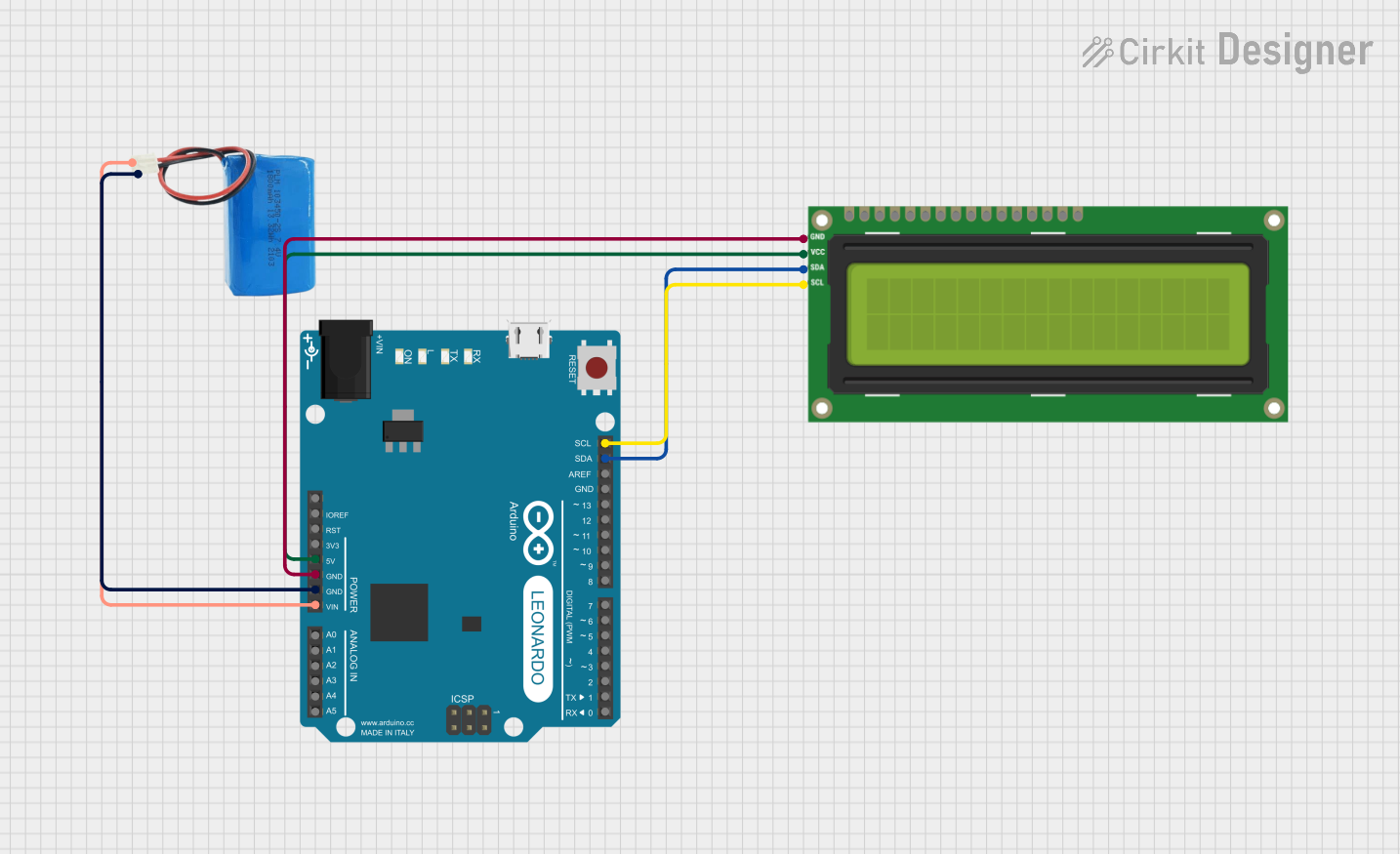
Circuit Documentation
Summary of the Circuit
This circuit consists of an Arduino Leonardo (Rev3b) microcontroller, an I2C LCD 16x2 Screen, and a 5V battery. The Arduino Leonardo is responsible for controlling the LCD screen to display scrolling text. The LCD screen is connected to the Arduino via the I2C communication protocol, using the SDA and SCL lines. The 5V battery provides power to the Arduino, which in turn powers the LCD screen. The ground connections are shared between the Arduino, the LCD screen, and the battery to complete the circuit.
Component List
Arduino Leonardo (Rev3b)
- Description: A microcontroller board based on the ATmega32u4.
- Pins: D0/RX, D1/TX, D2/SDA, D3 PWM/SCL, D4/A6, D5 PWM, D6 PWM/A7, D7, n.c., IOREF, RESET, 3V3, 5V, GND, VIN, A0, A1, A2, A3, A4, A5, D8/A8, D9 PWM/A9, D10 PWM/A10, D11 PWM, D12/A11, D13 PWM, AREF, SDA, SCL.
I2C LCD 16x2 Screen
- Description: A 16x2 character LCD display with an I2C interface.
- Pins: SCL, SDA, VCC (5V), GND, VDD, VO, RS, RW, E, D0, D1, D2, D3, D4, D5, D6, D7, BLA, BLK.
5V Battery
- Description: A power source providing a 5V output.
- Pins: Positive, Negative.
Wiring Details
Arduino Leonardo (Rev3b)
- 5V connected to I2C LCD 16x2 Screen VCC (5V).
- GND connected to I2C LCD 16x2 Screen GND and 5V Battery Negative.
- VIN connected to 5V Battery Positive.
- SDA connected to I2C LCD 16x2 Screen SDA.
- SCL connected to I2C LCD 16x2 Screen SCL.
I2C LCD 16x2 Screen
- VCC (5V) connected to Arduino Leonardo 5V.
- GND connected to Arduino Leonardo GND.
- SDA connected to Arduino Leonardo SDA.
- SCL connected to Arduino Leonardo SCL.
5V Battery
- Positive connected to Arduino Leonardo VIN.
- Negative connected to Arduino Leonardo GND.
Documented Code
/*
 * This Arduino sketch interfaces with a 16x2 I2C LCD screen to display
 * running text. The text will scroll from right to left continuously.
 */

#include <Wire.h>
#include <LiquidCrystal_I2C.h>

// Set the LCD address to 0x27 for a 16 chars and 2 line display
LiquidCrystal_I2C lcd(0x27, 16, 2);

void setup() {
  // Initialize the LCD
  lcd.begin();
  // Turn on the backlight
  lcd.backlight();
  // Print initial message
  lcd.print("IOT BASED URBAN WATER DISTRUBUTION SYSTEM");
}

void loop() {
  // Scroll the text to the left
  lcd.scrollDisplayLeft();
  // Wait for 300 milliseconds
  delay(300);
}
Filename: sketch.ino
Description: The code initializes a 16x2 I2C LCD screen with the address 0x27. In the setup() function, the LCD is initialized, the backlight is turned on, and an initial message is displayed. The loop() function continuously scrolls the text to the left with a delay of 300 milliseconds between each scroll.