
Arduino UNO-Based Wireless Stepper Motor Controller with LED Indicator
View and Edit Project In Cirkit Designer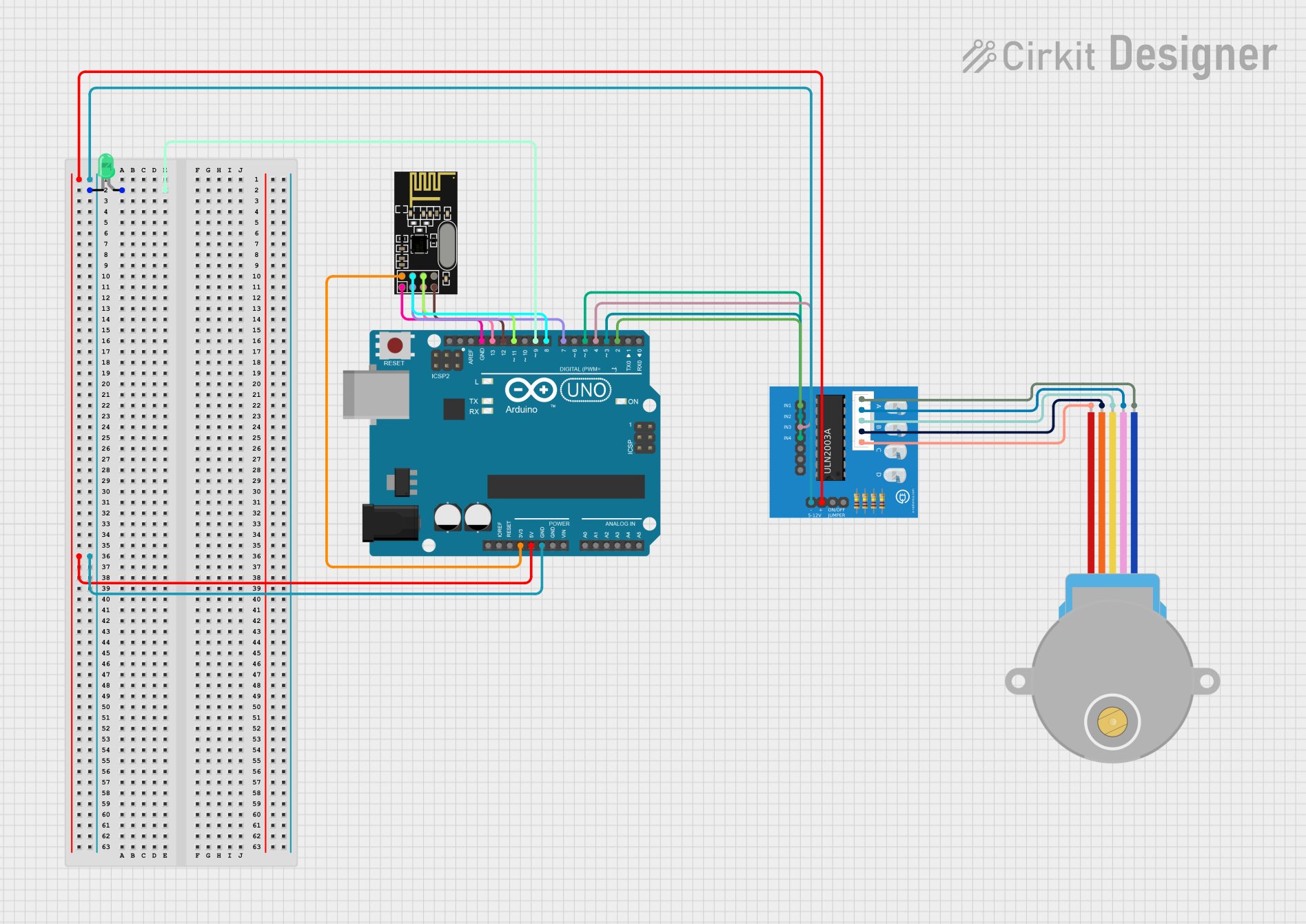
Circuit Documentation
Summary
This circuit involves an Arduino UNO microcontroller, an NRF24L01 wireless module, a green LED, a ULN2003A breakout board, and a 28BYJ-48 stepper motor. The Arduino UNO serves as the central controller, interfacing with the NRF24L01 for wireless communication, controlling the LED, and driving the stepper motor through the ULN2003A breakout board.
Component List
Arduino UNO
- Description: A microcontroller board based on the ATmega328P.
- Pins: UNUSED, IOREF, Reset, 3.3V, 5V, GND, Vin, A0, A1, A2, A3, A4, A5, SCL, SDA, AREF, D13, D12, D11, D10, D9, D8, D7, D6, D5, D4, D3, D2, D1, D0
NRF24L01
- Description: A wireless transceiver module for communication.
- Pins: IRQ (not used), MOSI, CSN, VCC (3V), GND, CE, SCK, MISO
LED: Two Pin (green)
- Description: A green LED with two pins.
- Pins: cathode, anode
ULN2003A Breakout Board
- Description: A driver board for controlling stepper motors.
- Pins: In 1, In 2, In 3, In 4, In 5, In 6, In 7, 0V, +5V, ON/OFF jumper switch, BLUE wire, PINK wire, YELLOW wire, ORANGE wire, RED wire
28BYJ-48 Stepper Motor
- Description: A 5V stepper motor.
- Pins: BLUE, PINK, YELLOW, ORANGE, RED
Wiring Details
Arduino UNO
- D9: Connected to the anode of the green LED.
- 5V: Connected to the +5V pin of the ULN2003A breakout board.
- GND: Connected to the 0V pin of the ULN2003A breakout board, the cathode of the green LED, and the GND pin of the NRF24L01.
- D2: Connected to the In 1 pin of the ULN2003A breakout board.
- D3: Connected to the In 2 pin of the ULN2003A breakout board.
- D4: Connected to the In 3 pin of the ULN2003A breakout board.
- D5: Connected to the In 4 pin of the ULN2003A breakout board.
- 3.3V: Connected to the VCC (3V) pin of the NRF24L01.
- D13: Connected to the SCK pin of the NRF24L01.
- D12: Connected to the MISO pin of the NRF24L01.
- D11: Connected to the MOSI pin of the NRF24L01.
- D8: Connected to the CSN pin of the NRF24L01.
- D7: Connected to the CE pin of the NRF24L01.
NRF24L01
- VCC (3V): Connected to the 3.3V pin of the Arduino UNO.
- GND: Connected to the GND pin of the Arduino UNO.
- SCK: Connected to the D13 pin of the Arduino UNO.
- MISO: Connected to the D12 pin of the Arduino UNO.
- MOSI: Connected to the D11 pin of the Arduino UNO.
- CSN: Connected to the D8 pin of the Arduino UNO.
- CE: Connected to the D7 pin of the Arduino UNO.
LED: Two Pin (green)
- anode: Connected to the D9 pin of the Arduino UNO.
- cathode: Connected to the 0V pin of the ULN2003A breakout board and the GND pin of the Arduino UNO.
ULN2003A Breakout Board
- +5V: Connected to the 5V pin of the Arduino UNO.
- 0V: Connected to the GND pin of the Arduino UNO and the cathode of the green LED.
- In 1: Connected to the D2 pin of the Arduino UNO.
- In 2: Connected to the D3 pin of the Arduino UNO.
- In 3: Connected to the D4 pin of the Arduino UNO.
- In 4: Connected to the D5 pin of the Arduino UNO.
- BLUE wire: Connected to the BLUE pin of the 28BYJ-48 stepper motor.
- PINK wire: Connected to the PINK pin of the 28BYJ-48 stepper motor.
- YELLOW wire: Connected to the YELLOW pin of the 28BYJ-48 stepper motor.
- ORANGE wire: Connected to the ORANGE pin of the 28BYJ-48 stepper motor.
- RED wire: Connected to the RED pin of the 28BYJ-48 stepper motor.
28BYJ-48 Stepper Motor
- BLUE: Connected to the BLUE wire pin of the ULN2003A breakout board.
- PINK: Connected to the PINK wire pin of the ULN2003A breakout board.
- YELLOW: Connected to the YELLOW wire pin of the ULN2003A breakout board.
- ORANGE: Connected to the ORANGE wire pin of the ULN2003A breakout board.
- RED: Connected to the RED wire pin of the ULN2003A breakout board.
Documented Code
Arduino UNO Code
void setup() {
  // put your setup code here, to run once:

}

void loop() {
  // put your main code here, to run repeatedly:

}
This code is a basic template for the Arduino UNO. The setup() function is where you initialize your components and the loop() function is where you place the main logic that runs repeatedly.