
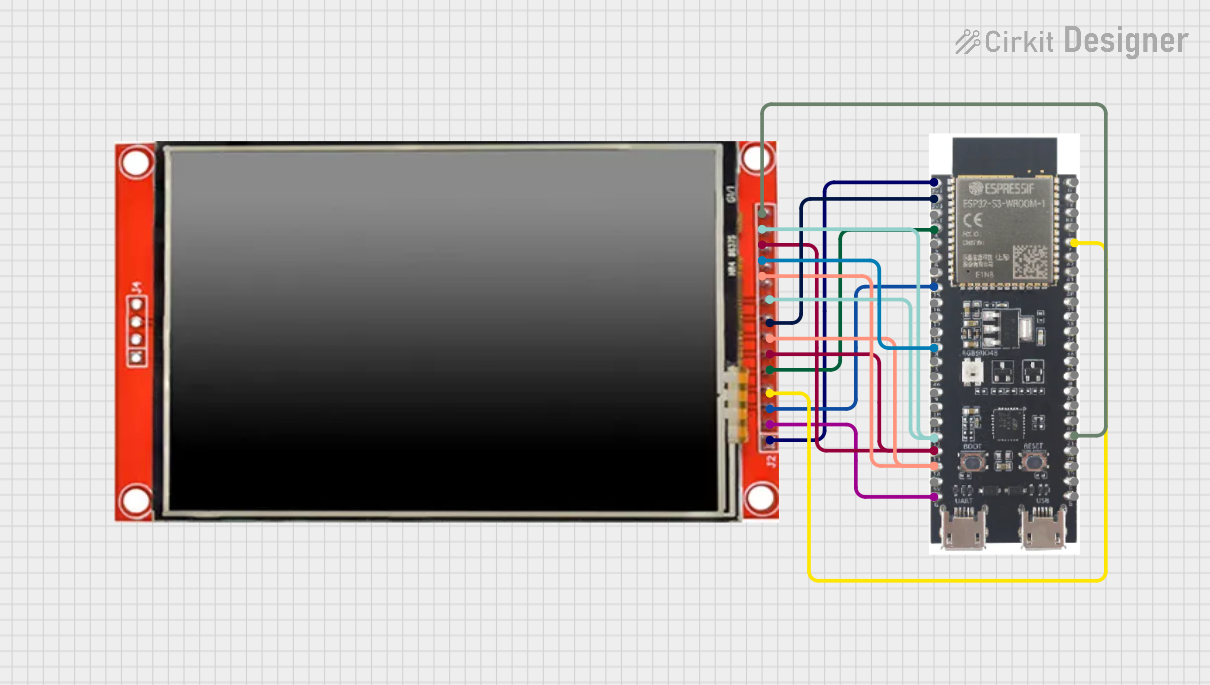
Circuit Documentation
Summary
This document describes a circuit that connects an ESP32-S3 microcontroller to an ILI9488 TFT LCD display. The purpose of the circuit is to demonstrate basic drawing functions on the LCD using the ESP32-S3. The ESP32-S3 is programmed to initialize the display, set its orientation, and draw various graphics including text, lines, rectangles, and circles.
Component List
LCD TFT Screen ILI9488 HD
- Description: A high-definition TFT LCD screen that uses the ILI9488 driver.
- Pins: PEN, TDO, TDI, VCC (3.3~5V), GND, CS, RST, D/C, SDI(MOSI), SCK, BL, SDO(MISO), TCS, TCK
ESP32-S3
- Description: A microcontroller with Wi-Fi and Bluetooth capabilities, suitable for a wide range of applications.
- Pins: 3v3, EN, GPIO4, GPIO5, GPIO6, GPIO7, GPIO15, GPIO16, GPIO17, GPIO18, GPIO8, GPIO46, GPIO9, GPIO10, GPIO11, GPIO12, GPIO13, GPIO14, 5V, GND, GPIO43, GPIO44, GPIO1, GPIO2, GPIO42, GPIO41, GPIO40, GPIO39, GPIO38, GPIO37, GPIO36, GPIO35, GPIO0, GPIO45, GPIO48, GPIO47, GPIO21, GPIO20, GPIO19
Wiring Details
LCD TFT Screen ILI9488 HD
- PEN: Connected to GPIO21 on ESP32-S3
- TDO/SDO(MISO): Connected to GPIO12 on ESP32-S3
- SDI(MOSI)/TDI: Connected to GPIO13 on ESP32-S3
- VCC (3.3~5V): Connected to 3v3 on ESP32-S3
- GND: Connected to GND on ESP32-S3
- CS: Connected to GPIO15 on ESP32-S3
- RST: Connected to GPIO2 on ESP32-S3
- D/C: Connected to GPIO4 on ESP32-S3
- SCK/TCK: Connected to GPIO14 on ESP32-S3
- BL: Connected to 3v3 on ESP32-S3 (for backlight)
- TCS: Connected to GPIO18 on ESP32-S3
ESP32-S3
- GPIO21: Connected to PEN on ILI9488 TFT LCD
- GPIO12: Connected to TDO/SDO(MISO) on ILI9488 TFT LCD
- GPIO13: Connected to SDI(MOSI)/TDI on ILI9488 TFT LCD
- 3v3: Connected to VCC (3.3~5V) and BL on ILI9488 TFT LCD
- GND: Connected to GND on ILI9488 TFT LCD
- GPIO15: Connected to CS on ILI9488 TFT LCD
- GPIO2: Connected to RST on ILI9488 TFT LCD
- GPIO4: Connected to D/C on ILI9488 TFT LCD
- GPIO14: Connected to SCK/TCK on ILI9488 TFT LCD
- GPIO18: Connected to TCS on ILI9488 TFT LCD
Documented Code
The following code is written for the ESP32-S3 microcontroller to interface with the ILI9488 TFT LCD display. The code is written in Arduino C/C++ and is intended to be compiled and uploaded to the ESP32-S3 using the Arduino IDE.
/*
 * This Arduino Sketch is for an ESP32-S3 microcontroller connected to an ILI9488
 * TFT LCD display. The code initializes the display and demonstrates basic
 * drawing functions using the TFT_eSPI library.
 */

#include <TFT_eSPI.h> // Include the graphics library

TFT_eSPI tft = TFT_eSPI(); // Create an instance of the display

void setup() {
  tft.init(); // Initialize the display
  tft.setRotation(1); // Set the display orientation
  tft.fillScreen(TFT_BLACK); // Clear the screen with black color

  // Draw some example graphics
  tft.setTextColor(TFT_WHITE, TFT_BLACK); // Set text color to white on black
  tft.drawString("Hello, World!", 10, 10, 4); // Draw text at position (10, 10)
  tft.drawLine(0, 0, tft.width(), tft.height(), TFT_RED); // Draw a red line
  tft.drawRect(10, 30, 100, 50, TFT_GREEN); // Draw a green rectangle
  tft.fillCircle(60, 100, 30, TFT_BLUE); // Draw a filled blue circle
}

void loop() {
  // Add code here to update the display in the loop if needed
}
The code initializes the TFT display and sets up the screen orientation. It then proceeds to fill the screen with a black background and draw a series of graphics including text, a line, a rectangle, and a circle in different colors. The loop() function is left empty, as the display does not require constant updates for this static demonstration.