
Circuit Documentation
Summary
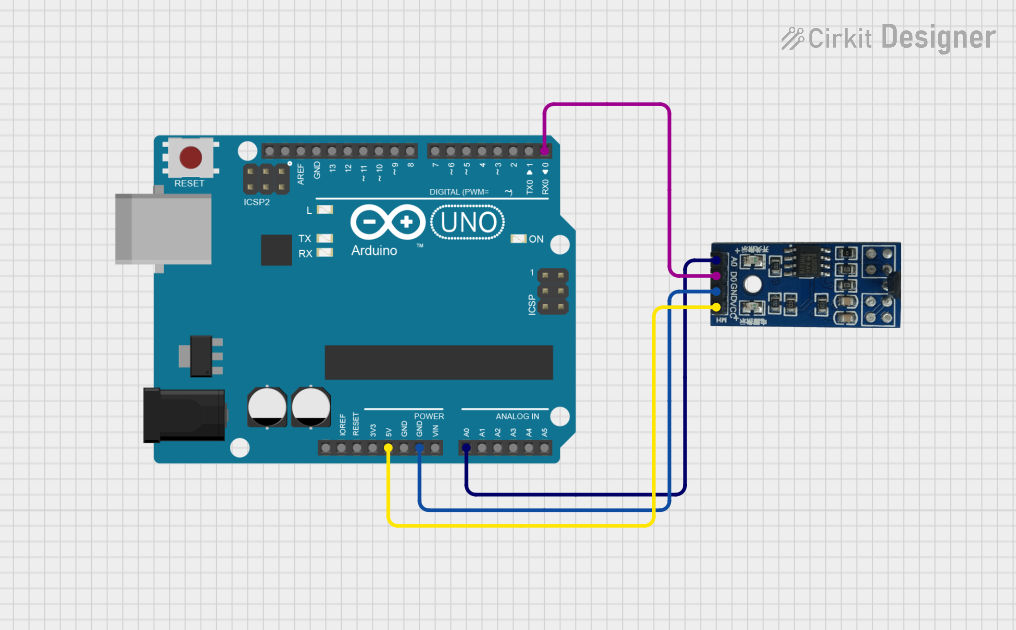
This circuit involves an Arduino UNO microcontroller and a Hall magnetic sensor. The Hall sensor is used to detect magnetic fields and outputs both analog and digital signals. The Arduino UNO reads these signals and outputs the data via serial communication.
Component List
Arduino UNO
- Description: A microcontroller board based on the ATmega328P.
- Pins: UNUSED, IOREF, Reset, 3.3V, 5V, GND, Vin, A0, A1, A2, A3, A4, A5, SCL, SDA, AREF, D13, D12, D11, D10, D9, D8, D7, D6, D5, D4, D3, D2, D1, D0
Hall sensor (magnetic)
- Description: A sensor that detects magnetic fields and outputs both analog and digital signals.
- Pins: VCC (5V), GND, D0 (Digital), A0 (Analog)
Wiring Details
Arduino UNO
- 5V: Connected to Hall sensor VCC (5V)
- GND: Connected to Hall sensor GND
- A0: Connected to Hall sensor A0 (Analog)
- D0: Connected to Hall sensor D0 (Digital)
Hall sensor (magnetic)
- VCC (5V): Connected to Arduino 5V
- GND: Connected to Arduino GND
- A0 (Analog): Connected to Arduino A0
- D0 (Digital): Connected to Arduino D0
Code Documentation
/*
 * Arduino Sketch to read data from a Hall magnetic sensor
 * Components:
 * - Arduino UNO
 * - Hall sensor (magnetic)
 * Connections:
 * - Hall sensor VCC (5V) to Arduino 5V
 * - Hall sensor GND to Arduino GND
 * - Hall sensor A0 (Analog) to Arduino A0
 * - Hall sensor D0 (Digital) to Arduino D0
 */

int analogPin = A0; // Analog pin connected to Hall sensor A0
int digitalPin = 0; // Digital pin connected to Hall sensor D0

void setup() {
  Serial.begin(9600); // Initialize serial communication at 9600 bps
  pinMode(digitalPin, INPUT); // Set digital pin as input
}

void loop() {
  int analogValue = analogRead(analogPin); // Read analog value
  int digitalValue = digitalRead(digitalPin); // Read digital value
  Serial.print("Analog Value: ");
  Serial.print(analogValue);
  Serial.print("\tDigital Value: ");
  Serial.println(digitalValue);
  delay(500); // Wait for 500 milliseconds
}
This code initializes the Arduino UNO to read both analog and digital signals from the Hall sensor. The analog value is read from pin A0, and the digital value is read from pin D0. The values are then printed to the serial monitor every 500 milliseconds.