
ESP32-Based Smart Weighing Scale with HX711 and I2C LCD Display
View and Edit Project In Cirkit Designer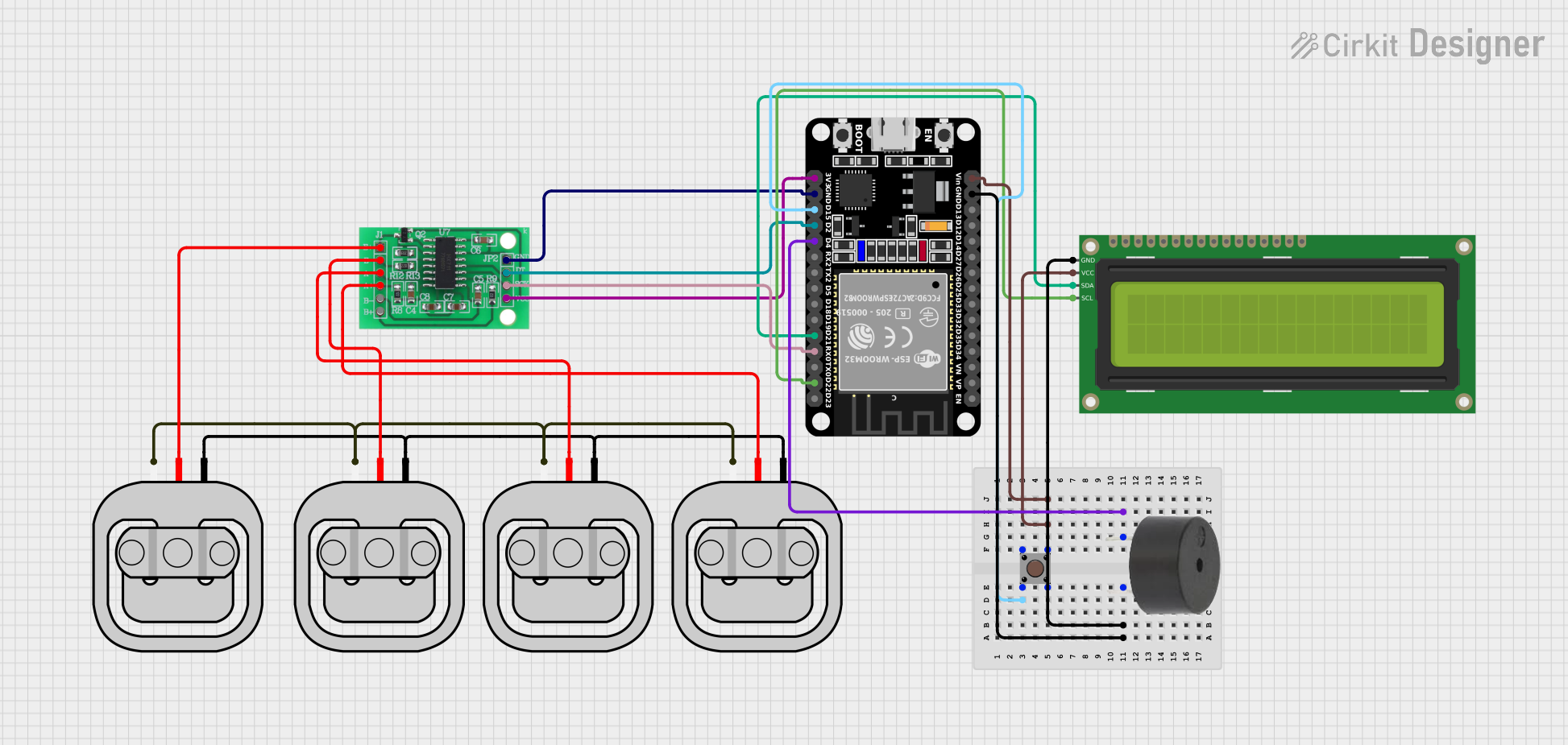
Circuit Documentation
Summary
This circuit is designed to measure weight using load sensors and display the measured weight on a 16x2 I2C LCD. The circuit also includes a pushbutton to tare (zero) the scale and a buzzer that activates when the weight exceeds a certain limit. The ESP32 microcontroller is used to interface with the load sensors, LCD, pushbutton, and buzzer.
Component List
HX711 - Bridge Sensor Interface
- Description: Interface for load sensors to measure weight.
- Pins: E+, E-, A-, A+, B-, B+, GND - GROUND, DATA (OUT), SCK - CLOCK (IN), 3.3/3.5V Supply
Load Sensor - 50kg
- Description: Sensor to measure weight.
- Pins: W, R, B
16x2 I2C LCD
- Description: LCD display to show weight measurements.
- Pins: GND, VCC, SDA, SCL
ESP32 (30 pin)
- Description: Microcontroller to interface with sensors and display.
- Pins: EN, VP, VN, D34, D35, D32, D33, D25, D26, D27, D14, D12, D13, GND, Vin, D23, D22, TX0, RX0, D21, D19, D18, D5, TX2, RX2, D4, D2, D15, 3V3
Pushbutton
- Description: Button to tare (zero) the scale.
- Pins: Pin 3 (out), Pin 4 (out), Pin 1 (in), Pin 2 (in)
Buzzer
- Description: Buzzer to alert when weight exceeds a limit.
- Pins: PIN, GND
Wiring Details
HX711 - Bridge Sensor Interface
- SCK - CLOCK (IN): Connected to ESP32 pin RX0
- DATA (OUT): Connected to ESP32 pin D2
- GND - GROUND: Connected to ESP32 pin GND
- 3.3/3.5V Supply: Connected to ESP32 pin 3V3
- E+: Connected to Load Sensor pin R
- E-: Connected to Load Sensor pin R
- A-: Connected to Load Sensor pin R
- A+: Connected to Load Sensor pin R
Load Sensor - 50kg
- W: Connected to other Load Sensor pins W
- R: Connected to HX711 pins E+, E-, A-, A+
- B: Connected to other Load Sensor pins B
16x2 I2C LCD
- GND: Connected to ESP32 pin GND
- VCC: Connected to ESP32 pin Vin
- SDA: Connected to ESP32 pin D21
- SCL: Connected to ESP32 pin D22
ESP32 (30 pin)
- D15: Connected to Pushbutton pin 2 (in)
- Vin: Connected to Pushbutton pin 3 (out)
- GND: Connected to HX711 pin GND - GROUND, 16x2 I2C LCD pin GND, and Buzzer pin GND
- D4: Connected to Buzzer pin PIN
- D2: Connected to HX711 pin DATA (OUT)
- RX0: Connected to HX711 pin SCK - CLOCK (IN)
- D21: Connected to 16x2 I2C LCD pin SDA
- D22: Connected to 16x2 I2C LCD pin SCL
- 3V3: Connected to HX711 pin 3.3/3.5V Supply
Pushbutton
- Pin 2 (in): Connected to ESP32 pin D15
- Pin 3 (out): Connected to ESP32 pin Vin
Buzzer
- PIN: Connected to ESP32 pin D4
- GND: Connected to ESP32 pin GND
Documented Code
#include <Wire.h>
#include <LiquidCrystal_I2C.h>
#include "HX711.h"

// Definições de pinos
#define LOADCELL_DOUT_PIN 2
#define LOADCELL_SCK_PIN 16
#define BUTTON_PIN 15
#define BUZZER_PIN 4

// Inicialização do display LCD I2C
LiquidCrystal_I2C lcd(0x27, 16, 2);

// Inicialização do HX711
HX711 scale;

void setup() {
  // Inicialização do display LCD
  lcd.begin();
  lcd.backlight();
  lcd.setCursor(0, 0);
  lcd.print("Inicializando...");

  // Inicialização do HX711
  scale.begin(LOADCELL_DOUT_PIN, LOADCELL_SCK_PIN);
  scale.set_scale(); // Ajuste a escala conforme necessário
  scale.tare(); // Zera a balança

  // Configuração do pino do botão
  pinMode(BUTTON_PIN, INPUT_PULLUP);

  // Configuração do pino do buzzer
  pinMode(BUZZER_PIN, OUTPUT);
  digitalWrite(BUZZER_PIN, LOW);

  lcd.clear();
  lcd.setCursor(0, 0);
  lcd.print("Pronto");
  delay(2000);
  lcd.clear();
}

void loop() {
  // Leitura do peso
  float weight = scale.get_units(10);

  // Exibição do peso no display LCD
  lcd.setCursor(0, 0);
  lcd.print("Peso: ");
  lcd.print(weight, 2);
  lcd.print(" kg");

  // Verificação do botão
  if (digitalRead(BUTTON_PIN) == LOW) {
    scale.tare(); // Zera a balança
    lcd.clear();
    lcd.setCursor(0, 0);
    lcd.print("Zerado");
    delay(1000);
    lcd.clear();
  }

  // Acionamento do buzzer se o peso for maior que um valor limite
  if (weight > 10.0) { // Ajuste o valor limite conforme necessário
    digitalWrite(BUZZER_PIN, HIGH);
  } else {
    digitalWrite(BUZZER_PIN, LOW);
  }

  delay(500);
}
This code initializes the LCD, HX711, pushbutton, and buzzer. It reads the weight from the load sensors, displays it on the LCD, and activates the buzzer if the weight exceeds a specified limit. The pushbutton is used to tare (zero) the scale.