
Arduino UNO Motion Detection System with IR Sensor, LCD Display, and Servo Control
View and Edit Project In Cirkit Designer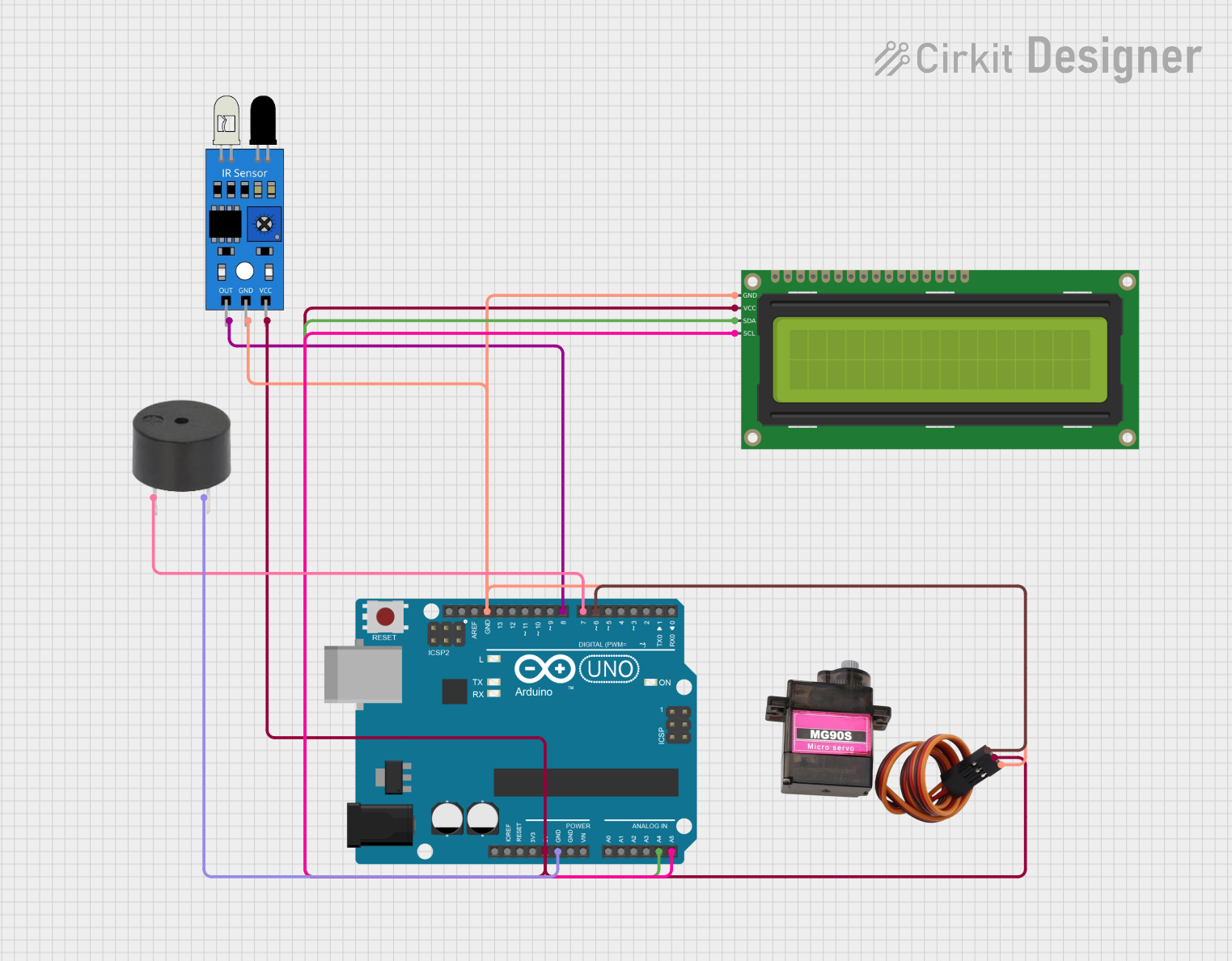
Circuit Documentation
Summary
This circuit is designed to interface with an IR sensor, a buzzer, a 16x2 I2C LCD, and a servo motor using an Arduino UNO. The IR sensor detects motion, and if motion is detected, the buzzer is deactivated. The LCD displays the status of the system, and the servo motor can be controlled based on additional logic. The Arduino UNO serves as the central microcontroller, coordinating the actions of all connected components.
Component List
IR Sensor
- Description: Detects infrared light, typically used for motion detection.
- Pins: out, gnd, vcc
Arduino UNO
- Description: A microcontroller board based on the ATmega328P.
- Pins: UNUSED, IOREF, Reset, 3.3V, 5V, GND, Vin, A0, A1, A2, A3, A4, A5, SCL, SDA, AREF, D13, D12, D11, D10, D9, D8, D7, D6, D5, D4, D3, D2, D1, D0
16x2 I2C LCD
- Description: A 16x2 character LCD display with I2C interface.
- Pins: GND, VCC, SDA, SCL
MG90S Servo Motor
- Description: A small servo motor used for precise control of angular position.
- Pins: SIG, VCC, GND
Buzzer
- Description: An audio signaling device.
- Pins: PIN, GND
Wiring Details
IR Sensor
- out connected to D8 on Arduino UNO
- gnd connected to GND on Arduino UNO
- vcc connected to 5V on Arduino UNO
Arduino UNO
- D8 connected to out on IR Sensor
- GND connected to GND on 16x2 I2C LCD, MG90S Servo Motor, IR Sensor, and Buzzer
- 5V connected to VCC on 16x2 I2C LCD, MG90S Servo Motor, and IR Sensor
- A4 connected to SDA on 16x2 I2C LCD
- A5 connected to SCL on 16x2 I2C LCD
- D7 connected to PIN on Buzzer
- D6 connected to SIG on MG90S Servo Motor
16x2 I2C LCD
- GND connected to GND on Arduino UNO
- VCC connected to 5V on Arduino UNO
- SDA connected to A4 on Arduino UNO
- SCL connected to A5 on Arduino UNO
MG90S Servo Motor
- SIG connected to D6 on Arduino UNO
- VCC connected to 5V on Arduino UNO
- GND connected to GND on Arduino UNO
Buzzer
- PIN connected to D7 on Arduino UNO
- GND connected to GND on Arduino UNO
Code Documentation
/*
 * This Arduino Sketch is designed to interface with an IR sensor, a buzzer,
 * a 16x2 I2C LCD, and a servo motor. The IR sensor detects motion, and if
 * motion is detected, the buzzer is deactivated. The LCD displays the status
 * of the system, and the servo motor can be controlled based on additional
 * logic (e.g., RFID card detection).
 */

#include <Wire.h>
#include <LiquidCrystal_I2C.h>
#include <Servo.h>

// I2C LCD setup
LiquidCrystal_I2C lcd(0x27, 16, 2);

// Servo setup
Servo myServo;

void setup() {
  // Initialize serial communication
  Serial.begin(9600);

  // Initialize LCD
  lcd.init();
  lcd.backlight();
  lcd.setCursor(0, 0);
  lcd.print("System Ready");

  // Initialize Servo
  myServo.attach(6);
  myServo.write(0); // Set to default position

  // Setup pins
  pinMode(8, INPUT);  // IR Sensor
  pinMode(7, OUTPUT); // Buzzer
}

void loop() {
  // IR Sensor
  if (digitalRead(8) == HIGH) {
    digitalWrite(7, HIGH); // Buzzer OFF
    lcd.setCursor(0, 1);
    lcd.print("Motion Detected");
  } else {
    digitalWrite(7, LOW);  // Buzzer ON
    lcd.setCursor(0, 1);
    lcd.print("No Motion     ");
  }
  delay(100);
}
This code initializes the LCD, servo motor, and sets up the pins for the IR sensor and buzzer. In the main loop, it reads the state of the IR sensor and updates the buzzer and LCD display accordingly.