
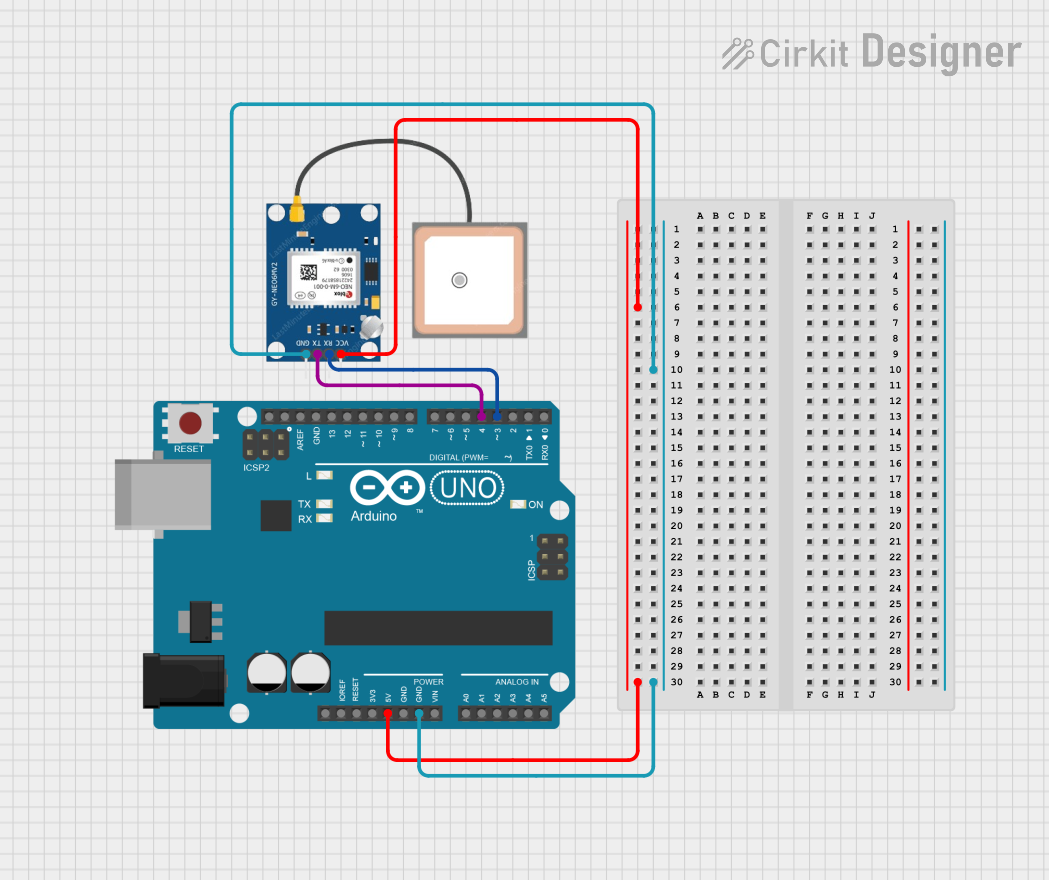
Circuit Documentation
Summary
This document describes a simple GPS interfacing circuit using an Arduino UNO and a GPS NEO 6M module. The Arduino UNO microcontroller board is used to communicate with the GPS module and relay the GPS data to a connected computer via serial communication. The GPS module receives power from the Arduino and communicates with it using serial data lines.
Component List
Arduino UNO
- Description: A microcontroller board based on the ATmega328P.
- Pins: UNUSED, IOREF, Reset, 3.3V, 5V, GND, Vin, A0-A5, SCL, SDA, AREF, D0-D13.
- Purpose: Acts as the main controller and interface for the GPS module.
GPS NEO 6M
- Description: A GPS module capable of providing geolocation data.
- Pins: VCC, RX, TX, GND.
- Purpose: Provides geolocation data to the Arduino UNO.
Wiring Details
Arduino UNO
- 5V connected to GPS NEO 6M VCC.
- GND connected to GPS NEO 6M GND.
- D4 connected to GPS NEO 6M TX.
- D3 connected to GPS NEO 6M RX.
GPS NEO 6M
- VCC connected to Arduino UNO 5V.
- GND connected to Arduino UNO GND.
- TX connected to Arduino UNO D4.
- RX connected to Arduino UNO D3.
Documented Code
Arduino Sketch for GPS NEO 6M Interface
/*
 * Arduino Sketch to interface with GPS NEO 6M module
 * and retrieve location data.
 *
 * Connections:
 * Arduino UNO (5V) -> GPS NEO 6M (VCC)
 * Arduino UNO (GND) -> GPS NEO 6M (GND)
 * Arduino UNO (D4) -> GPS NEO 6M (TX)
 * Arduino UNO (D3) -> GPS NEO 6M (RX)
 */

#include <SoftwareSerial.h>

SoftwareSerial gpsSerial(3, 4); // RX, TX

void setup() {
  Serial.begin(9600); // Initialize serial communication with PC
  gpsSerial.begin(9600); // Initialize serial communication with GPS module
  Serial.println("GPS Module Initialized");
}

void loop() {
  while (gpsSerial.available()) {
    char c = gpsSerial.read();
    Serial.write(c); // Forward GPS data to Serial Monitor
  }
}
File Name: sketch.ino
This code sets up a software serial connection on pins D3 and D4 of the Arduino UNO to communicate with the GPS NEO 6M module. It initializes the serial communication at a baud rate of 9600 bps. The loop() function continuously checks for data from the GPS module and forwards it to the Serial Monitor when available.