
Arduino UNO-Based Water Quality Monitoring System with Wi-Fi Connectivity
View and Edit Project In Cirkit Designer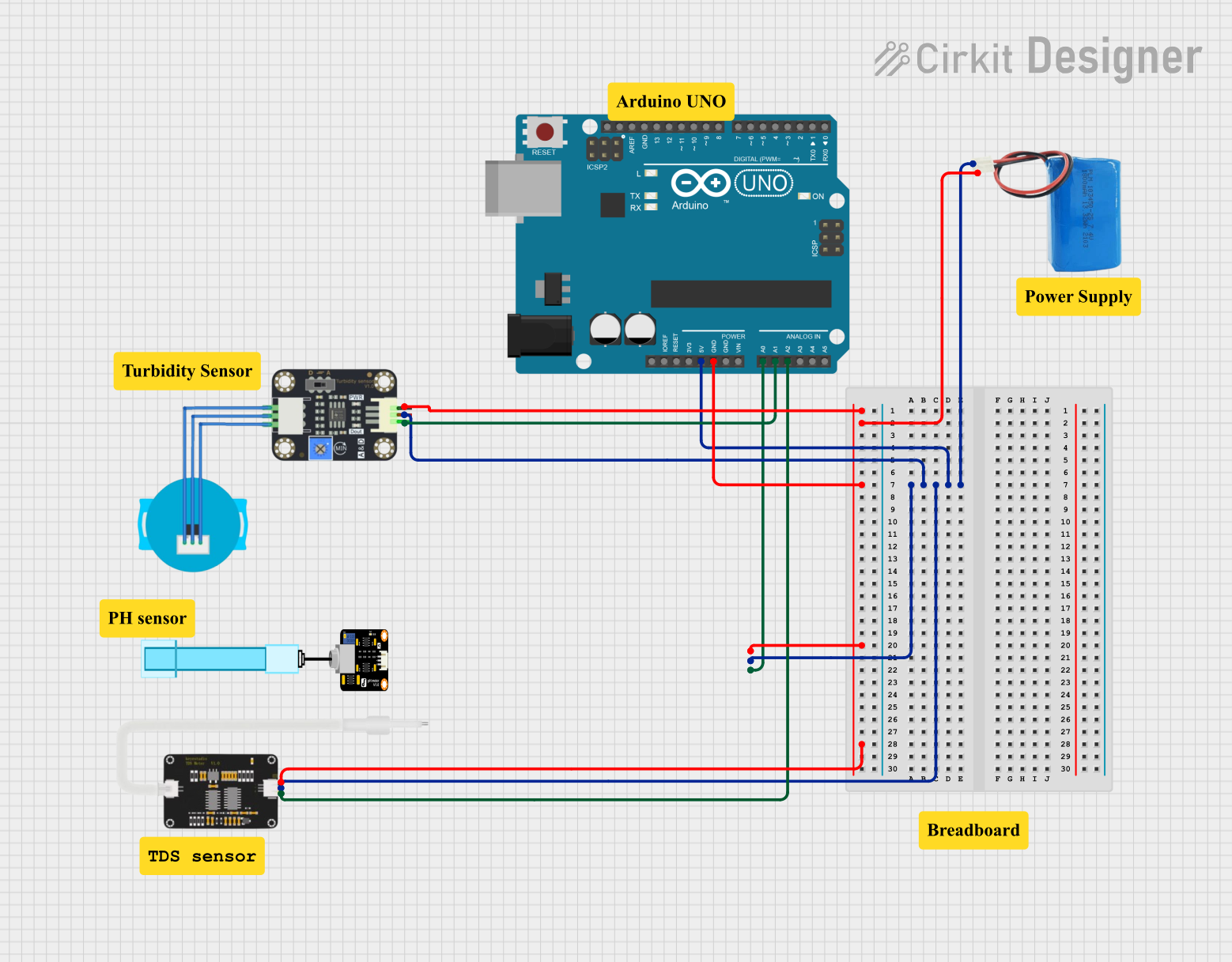
Circuit Documentation
Summary
This circuit is designed to measure water quality parameters including pH, turbidity, and Total Dissolved Solids (TDS). The measurements are taken using respective sensors and the data is processed by an Arduino UNO microcontroller. The processed data is then sent to a cloud server for monitoring and analysis.
Component List
Turbidity Sensor
- Description: Measures the turbidity (cloudiness) of water.
- Pins: OUT, VCC, GND
5V Battery
- Description: Provides power to the circuit.
- Pins: positive, negative
Arduino UNO
- Description: Microcontroller used to process sensor data and send it to the cloud.
- Pins: UNUSED, IOREF, Reset, 3.3V, 5V, GND, Vin, A0, A1, A2, A3, A4, A5, SCL, SDA, AREF, D13, D12, D11, D10, D9, D8, D7, D6, D5, D4, D3, D2, D1, D0
PH Meter
- Description: Measures the pH level of water.
- Pins: Signal, VCC, GND
TDS Sensor
- Description: Measures the Total Dissolved Solids in water.
- Pins: AI, GND, 5V
Wiring Details
Turbidity Sensor
- VCC connected to 5V on Arduino UNO and positive on 5V Battery
- GND connected to GND on Arduino UNO and negative on 5V Battery
- OUT connected to A1 on Arduino UNO
5V Battery
- positive connected to 5V on Arduino UNO, VCC on Turbidity Sensor, VCC on PH Meter, and 5V on TDS Sensor
- negative connected to GND on Arduino UNO, GND on Turbidity Sensor, GND on PH Meter, and GND on TDS Sensor
Arduino UNO
- 5V connected to VCC on Turbidity Sensor, VCC on PH Meter, 5V on TDS Sensor, and positive on 5V Battery
- GND connected to GND on Turbidity Sensor, GND on PH Meter, GND on TDS Sensor, and negative on 5V Battery
- A0 connected to Signal on PH Meter
- A1 connected to OUT on Turbidity Sensor
- A2 connected to AI on TDS Sensor
PH Meter
- VCC connected to 5V on Arduino UNO and positive on 5V Battery
- GND connected to GND on Arduino UNO and negative on 5V Battery
- Signal connected to A0 on Arduino UNO
TDS Sensor
- 5V connected to 5V on Arduino UNO and positive on 5V Battery
- GND connected to GND on Arduino UNO and negative on 5V Battery
- AI connected to A2 on Arduino UNO
Documented Code
Arduino UNO Code
// Include necessary libraries
#include <ESP8266WiFi.h>

// WiFi credentials
const char* ssid = "Your_WiFi_SSID";
const char* password = "Your_WiFi_Password";

// Server or cloud API endpoint
const char* server = "api.thingspeak.com"; // Example: ThingSpeak API
const char* apiKey = "Your_API_Key"; // Replace with your actual API key

// Pin definitions
const int pH_PIN = A0;        // pH sensor connected to A0
const int TURBIDITY_PIN = A1; // Turbidity sensor connected to A1
const int TDS_PIN = A2;       // TDS sensor connected to A2

// WiFi client
WiFiClient client;

void setup() {
  Serial.begin(115200);

  // Initialize WiFi
  Serial.println("Connecting to WiFi...");
  WiFi.begin(ssid, password);

  while (WiFi.status() != WL_CONNECTED) {
    delay(1000);
    Serial.print(".");
  }
  Serial.println("\nWiFi connected");
}

void loop() {
  // Read sensor values
  int phValue = analogRead(pH_PIN); // Raw pH sensor value
  int turbidityValue = analogRead(TURBIDITY_PIN); // Raw turbidity value
  int tdsValue = analogRead(TDS_PIN); // Raw TDS sensor value

  // Convert raw values to meaningful data (example calibration)
  float pH = (phValue / 1023.0) * 14.0; // Example pH conversion
  float turbidity = (turbidityValue / 1023.0) * 100.0; // Example turbidity in NTU
  float tds = (tdsValue / 1023.0) * 500.0; // Example TDS in ppm

  // Print values to Serial Monitor
  Serial.print("pH: ");
  Serial.print(pH);
  Serial.print(" | Turbidity: ");
  Serial.print(turbidity);
  Serial.print(" NTU | TDS: ");
  Serial.print(tds);
  Serial.println(" ppm");

  // Send data to the server
  if (client.connect(server, 80)) {
    String data = "field1=" + String(pH) + "&field2=" + String(turbidity) + "&field3=" + String(tds);
    client.println("POST /update HTTP/1.1");
    client.println("Host: api.thingspeak.com");
    client.println("Connection: close");
    client.println("Content-Type: application/x-www-form-urlencoded");
    client.print("Content-Length: ");
    client.println(data.length());
    client.println();
    client.print(data);
    client.stop();

    Serial.println("Data sent to server.");
  } else {
    Serial.println("Connection to server failed.");
  }

  delay(20000); // Send data every 20 seconds
}
PH Meter Code
void setup() {
  // put your setup code here, to run once:

}

void loop() {
  // put your main code here, to run repeatedly:

}