
ESP32-Based Fingerprint Sensor and SD Card Module for Secure Data Storage
View and Edit Project In Cirkit Designer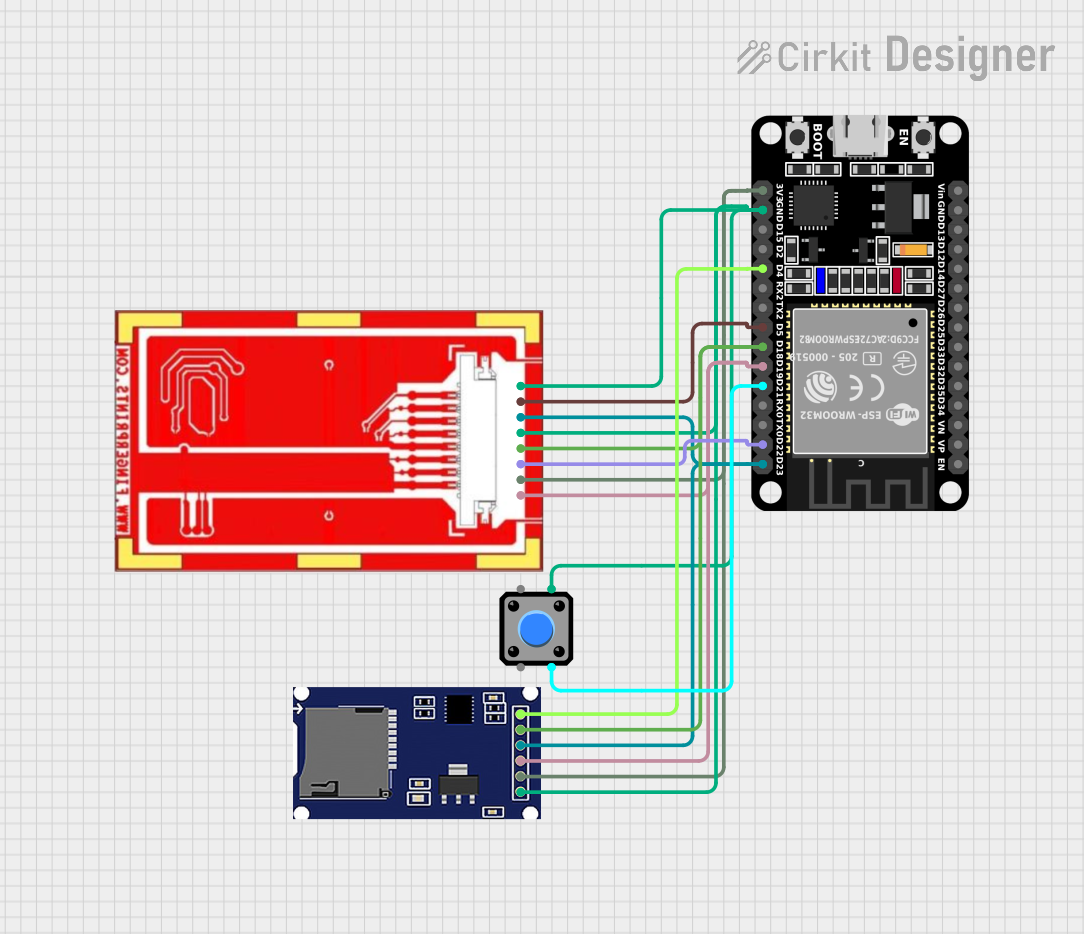
Circuit Documentation
Summary
This circuit integrates an ESP32 microcontroller with a fingerprint sensor, an SD card module, and a pushbutton. The ESP32 handles the communication with the fingerprint sensor and the SD card module via SPI, and it also reads input from the pushbutton to trigger fingerprint capture and storage.
Component List
ESP32 (30 pin)
- Description: A powerful microcontroller with built-in Wi-Fi and Bluetooth capabilities.
- Pins: EN, VP, VN, D34, D35, D32, D33, D25, D26, D27, D14, D12, D13, GND, Vin, D23, D22, TX0, RX0, D21, D19, D18, D5, TX2, RX2, D4, D2, D15, 3V3
Fingerprint Sensor
- Description: A sensor used to capture fingerprint images.
- Pins: SPI_DO, VDD, RST_N, SPI_CK, GND, SPI_DI, SPI_CS_N, ESD drain
SD Module
- Description: A module for interfacing with an SD card for data storage.
- Pins: GND, VCC (5V), MISO (D12), MOSI (D11), SCK (D13), CS (D10)
Pushbutton
- Description: A simple pushbutton used to trigger actions in the circuit.
- Pins: Pin 2, Pin 1, Pin 3, Pin 4
Wiring Details
ESP32 (30 pin)
- D23: Connected to MOSI (D11) of SD Module and SPI_DI of Fingerprint Sensor
- D22: Connected to RST_N of Fingerprint Sensor
- D21: Connected to Pin 3 of Pushbutton
- D19: Connected to MISO (D12) of SD Module and SPI_DO of Fingerprint Sensor
- D18: Connected to SCK (D13) of SD Module and SPI_CK of Fingerprint Sensor
- D5: Connected to SPI_CS_N of Fingerprint Sensor
- D4: Connected to CS (D10) of SD Module
- GND: Connected to GND of SD Module, GND and ESD drain of Fingerprint Sensor, and Pin 4 of Pushbutton
- 3V3: Connected to VCC (5V) of SD Module and VDD of Fingerprint Sensor
Fingerprint Sensor
- SPI_DI: Connected to D23 of ESP32
- RST_N: Connected to D22 of ESP32
- SPI_DO: Connected to D19 of ESP32
- SPI_CK: Connected to D18 of ESP32
- SPI_CS_N: Connected to D5 of ESP32
- GND: Connected to GND of ESP32
- ESD drain: Connected to GND of ESP32
- VDD: Connected to 3V3 of ESP32
SD Module
- MOSI (D11): Connected to D23 of ESP32
- MISO (D12): Connected to D19 of ESP32
- SCK (D13): Connected to D18 of ESP32
- CS (D10): Connected to D4 of ESP32
- GND: Connected to GND of ESP32
- VCC (5V): Connected to 3V3 of ESP32
Pushbutton
- Pin 3: Connected to D21 of ESP32
- Pin 4: Connected to GND of ESP32
Documented Code
#include <SPI.h>
#include <SD.h>

// Definição de pinos do ESP32
#define SENSOR_SPI_CS 5      // GPIO5 -> CS do sensor FPC1011F3
#define SENSOR_RST 22        // GPIO22 -> Reset do sensor FPC1011F3
#define SD_CS 4              // GPIO4 -> CS do módulo SD Card
#define BUTTON_PIN 21        // GPIO21 -> Botão de captura
#define SPI_MISO 19          // GPIO19 -> MISO (compartilhado entre SD e sensor)
#define SPI_MOSI 23          // GPIO23 -> MOSI (compartilhado entre SD e sensor)
#define SPI_SCLK 18          // GPIO18 -> SCLK (compartilhado entre SD e sensor)

// Parâmetros do sensor
#define IMAGE_ROWS 200       // Linhas da matriz do sensor
#define IMAGE_COLS 152       // Colunas da matriz do sensor
uint8_t fingerprintImage[IMAGE_ROWS][IMAGE_COLS];

// Comandos do sensor FPC1011F3
#define CMD_CAPTURE_IMAGE 0x11
#define CMD_READ_DATA 0x20

void setup() {
  Serial.begin(115200);

  // Configuração dos pinos do ESP32
  pinMode(SENSOR_SPI_CS, OUTPUT);
  pinMode(SENSOR_RST, OUTPUT);
  pinMode(SD_CS, OUTPUT);
  pinMode(BUTTON_PIN, INPUT_PULLUP);  // Configura o botão com pull-up interno
  digitalWrite(SENSOR_SPI_CS, HIGH);  // Desativa o CS do sensor
  digitalWrite(SENSOR_RST, HIGH);     // Desativa o reset do sensor
  digitalWrite(SD_CS, HIGH);          // Desativa o CS do SD Card

  // Inicialização da SPI
  SPI.begin(SPI_SCLK, SPI_MISO, SPI_MOSI, SENSOR_SPI_CS);

  // Reset do sensor
  resetSensor();
  Serial.println("Sensor initialized!");

  // Inicialização do SD Card
  if (!SD.begin(SD_CS)) {
    Serial.println("SD Card initialization failed! Check connections.");
    while (1);  // Para execução se o SD Card falhar
  }
  Serial.println("SD Card initialized.");
}

void loop() {
  // Aguarda o botão ser pressionado
  if (digitalRead(BUTTON_PIN) == LOW) {
    Serial.println("Button pressed! Capturing fingerprint...");

    // Captura a imagem da impressão digital
    startCapture();
    delay(100);

    // Lê os dados capturados e armazena na matriz
    readFingerprintData();
    Serial.println("Fingerprint image captured!");

    // Salva a matriz no cartão SD como arquivo BMP
    saveFingerprintToSD();

    // Evita múltiplas capturas enquanto o botão ainda estiver pressionado
    while (digitalRead(BUTTON_PIN) == LOW);
    delay(200);  // Debounce para evitar leituras múltiplas rápidas
  }
}

void resetSensor() {
  digitalWrite(SENSOR_RST, LOW);  // Ativa reset do sensor
  delay(10);
  digitalWrite(SENSOR_RST, HIGH); // Desativa reset do sensor
  delay(100);
}

void startCapture() {
  digitalWrite(SENSOR_SPI_CS, LOW);  // Seleciona o sensor
  SPI.transfer(CMD_CAPTURE_IMAGE);   // Comando para iniciar captura
  SPI.transfer(0x00);                // Byte vazio para completar a transação
  digitalWrite(SENSOR_SPI_CS, HIGH); // Desseleciona o sensor
}

void readFingerprintData() {
  digitalWrite(SENSOR_SPI_CS, LOW);  // Seleciona o sensor
  SPI.transfer(CMD_READ_DATA);       // Comando para ler dados
  SPI.transfer(0x00);                // Byte vazio para iniciar leitura

  for (int row = 0; row < IMAGE_ROWS; row++) {
    for (int col = 0; col < IMAGE_COLS; col++) {
      fingerprintImage[row][col] = SPI.transfer(0x00);  // Lê um byte por pixel
    }
  }

  digitalWrite(SENSOR_SPI_CS, HIGH); // Desseleciona o sensor
}

void saveFingerprintToSD() {
  String fileName = "/fingerprint.bmp";  // Nome do arquivo
  File file = SD.open(fileName, FILE_WRITE);

  if (file) {
    Serial.println("Saving fingerprint image to SD card...");

    // Grava o cabeçalho BMP
    writeBMPHeader(file);

    // Grava a matriz da imagem
    for (int row = IMAGE_ROWS - 1; row >= 0; row--) {  // BMP é salvo de baixo para cima
      for (int col = 0; col < IMAGE_COLS; col++) {
        file.write(fingerprintImage[row][col]);
      }
    }

    file.close();
    Serial.println("Fingerprint image saved!");
  } else {
    Serial.println("Failed to open file for writing.");
  }
}

void writeBMPHeader(File &file) {
  uint32_t fileSize = 54 + IMAGE_ROWS * IMAGE_COLS;  // Cabeçalho (54 bytes) + dados
  uint32_t pixelDataOffset = 54;                     // Offset do início dos pixels
  uint32_t dibHeaderSize = 40;                       // Tamanho do DIB header
  uint16_t planes = 1;                               // Número de planos de cor
  uint16_t bpp = 8;                                  // Bits por pixel (8 = escala de cinza)

  // Assinatura BMP
  file.write('B');
  file