
Circuit Documentation
Summary
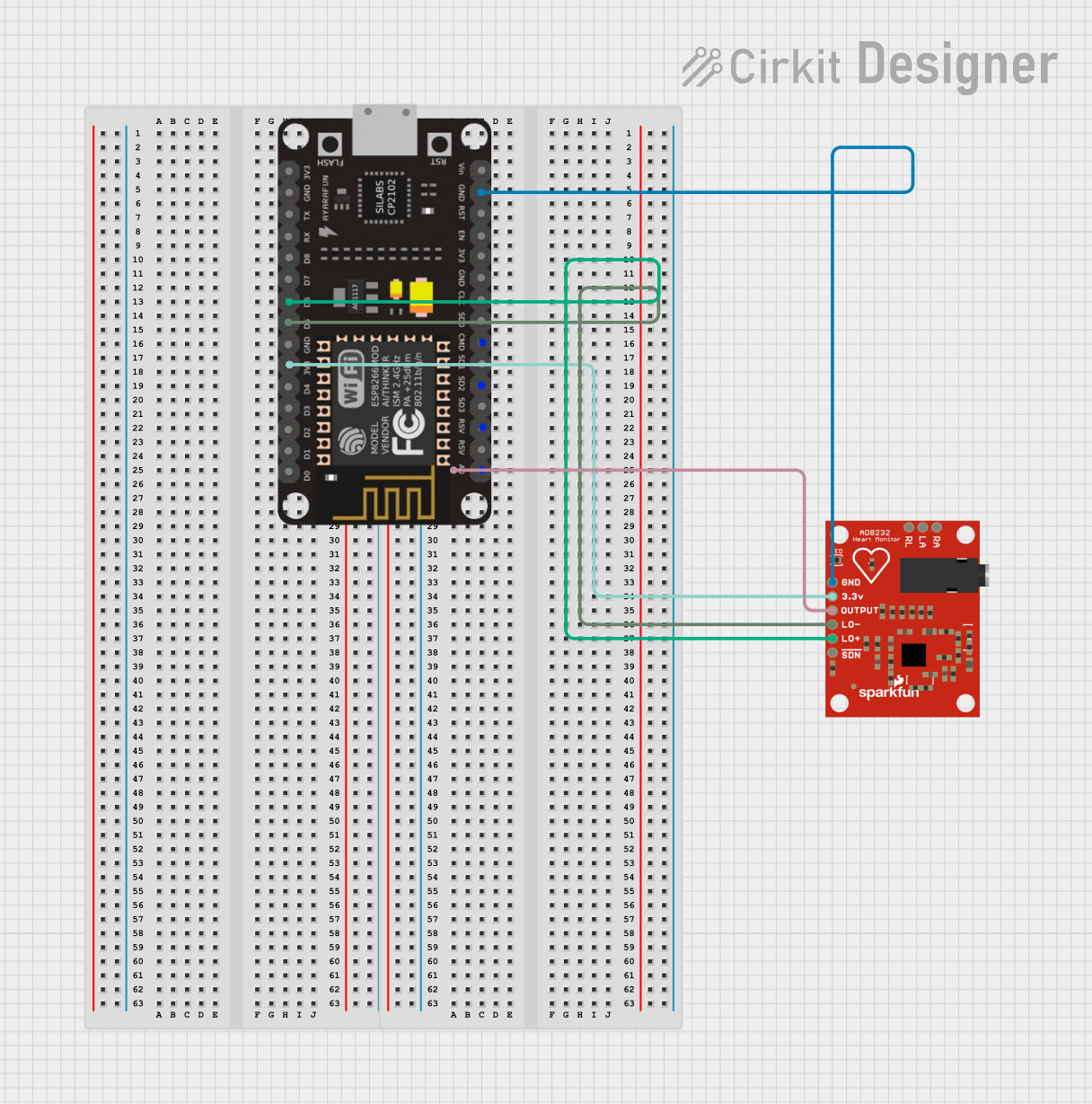
This circuit integrates an ESP-8266 microcontroller with an AD8232 Heart Rate Monitor. The ESP-8266 reads the heart rate data from the AD8232 and publishes it to the Ubidots cloud platform via MQTT. The ESP-8266 is connected to a WiFi network to facilitate this communication.
Component List
ESP-8266 Controller
- Description: A low-cost Wi-Fi microchip with full TCP/IP stack and microcontroller capability.
- Pins: A0, RSV, SD3, SD5, SD1, CMD, D0, D1, D2, D3, D4, 3V3, GND, D5, D6, SD0, CLK, RST, EN, D7, D8, RX, TX, Vin, 5V
AD8232 Heart Rate Monitor
- Description: An integrated signal conditioning block for ECG and other biopotential measurement applications.
- Pins: GND, 3.3v, OUTPUT, LO-, LO+, SDN, RA, LA, RL
Wiring Details
ESP-8266 Controller
- A0: Connected to OUTPUT of AD8232 Heart Rate Monitor
- 3V3: Connected to 3.3v of AD8232 Heart Rate Monitor
- D5: Connected to LO- of AD8232 Heart Rate Monitor
- D6: Connected to LO+ of AD8232 Heart Rate Monitor
- GND: Connected to GND of AD8232 Heart Rate Monitor
AD8232 Heart Rate Monitor
- OUTPUT: Connected to A0 of ESP-8266 Controller
- 3.3v: Connected to 3V3 of ESP-8266 Controller
- LO-: Connected to D5 of ESP-8266 Controller
- LO+: Connected to D6 of ESP-8266 Controller
- GND: Connected to GND of ESP-8266 Controller
Code Documentation
ESP-8266 Controller Code
#include <ESP8266WiFi.h>
#include <PubSubClient.h>

#define WIFISSID "Alexahome"                                // Put your WifiSSID here
#define PASSWORD "12345678"                                 // Put your wifi password here
#define TOKEN "BBFF-YKxITsj1YPeTMxw7mq8lvYFBpXnCxD"         // Put your Ubidots' TOKEN
#define MQTT_CLIENT_NAME "myecgsensor"                       // MQTT client Name, please enter your own 8-12 alphanumeric character ASCII string;
                                                            //it should be a random and unique ascii string and different from all other devices

/****************************************
 * Define Constants
 ****************************************/
#define VARIABLE_LABEL "myecg" // Assing the variable label
#define DEVICE_LABEL "esp8266" // Assig the device label

#define SENSOR A0 // Set the A0 as SENSOR

char mqttBroker[]  = "industrial.api.ubidots.com";
char payload[100];
char topic[150];
// Space to store values to send
char str_sensor[10];

/****************************************
 * Auxiliar Functions
 ****************************************/
WiFiClient ubidots;
PubSubClient client(ubidots);

void callback(char* topic, byte* payload, unsigned int length) {
  char p[length + 1];
  memcpy(p, payload, length);
  p[length] = NULL;
  Serial.write(payload, length);
  Serial.println(topic);
}

void reconnect() {
  // Loop until we're reconnected
  while (!client.connected()) {
    Serial.println("Attempting MQTT connection...");

    // Attemp to connect
    if (client.connect(MQTT_CLIENT_NAME, TOKEN, "")) {
      Serial.println("Connected");
    } else {
      Serial.print("Failed, rc=");
      Serial.print(client.state());
      Serial.println(" try again in 2 seconds");
      // Wait 2 seconds before retrying
      delay(2000);
    }
  }
}

/****************************************
 * Main Functions
 ****************************************/
void setup() {
  Serial.begin(115200);
  WiFi.begin(WIFISSID, PASSWORD);
  // Assign the pin as INPUT
  pinMode(SENSOR, INPUT);

  Serial.println();
  Serial.print("Waiting for WiFi...");

  while (WiFi.status() != WL_CONNECTED) {
    Serial.print(".");
    delay(500);
  }

  Serial.println("");
  Serial.println("WiFi Connected");
  Serial.println("IP address: ");
  Serial.println(WiFi.localIP());
  client.setServer(mqttBroker, 1883);
  client.setCallback(callback);
}

void loop() {
  if (!client.connected()) {
    reconnect();
  }

  sprintf(topic, "%s%s", "/v1.6/devices/", DEVICE_LABEL);
  sprintf(payload, "%s", ""); // Cleans the payload
  sprintf(payload, "{\"%s\":", VARIABLE_LABEL);

  float myecg = analogRead(SENSOR);

  /* 4 is mininum width, 2 is precision; float value is copied onto str_sensor*/
  dtostrf(myecg, 4, 2, str_sensor);

  sprintf(payload, "%s {\"value\": %s}}", payload, str_sensor); // Adds the value
  Serial.println("Publishing data to Ubidots Cloud");
  client.publish(topic, payload);
  client.loop();
  delay(10);
}
AD8232 Heart Rate Monitor Code
#include <ESP8266WiFi.h>
#include <PubSubClient.h>

#define WIFISSID "Alexahome"                                // Put your WifiSSID here
#define PASSWORD "12345678"                                 // Put your wifi password here
#define TOKEN "BBFF-YKxITsj1YPeTMxw7mq8lvYFBpXnCxD"         // Put your Ubidots' TOKEN
#define MQTT_CLIENT_NAME "myecgsensor"                       // MQTT client Name, please enter your own 8-12 alphanumeric character ASCII string;
                                                            //it should be a random and unique ascii string and different from all other devices

/****************************************
 * Define Constants
 ****************************************/
#define VARIABLE_LABEL "myecg" // Assing the variable label
#define DEVICE_LABEL "esp8266" // Assig the device label

#define SENSOR A0 // Set the A0 as SENSOR

char mqttBroker[]  = "industrial.api.ubidots.com";
char payload[100];
char topic[150];
// Space to store values to send
char str_sensor[10];

/****************************************
 * Auxiliar Functions
 ****************************************/
WiFiClient ubidots;
PubSubClient client(ubidots);

void callback(char* topic, byte* payload, unsigned int length) {
  char p[length + 1];
  memcpy(p, payload, length);
  p[length] = NULL;
  Serial.write(payload, length);
  Serial.println(topic);
}

void reconnect() {
  // Loop until we're reconnected
  while (!client.connected()) {
    Serial.println("Attempting MQTT connection...");

    // Attemp to connect
    if (client.connect(MQTT_CLIENT_NAME, TOKEN, "")) {
      Serial.println("Connected");
    } else {
      Serial.print("Failed, rc=");
      Serial.print(client.state());
      Serial.println(" try again in 2 seconds");
      // Wait 2 seconds before retrying
      delay(2000);
    }
  }
}

/****************************************
 * Main Functions
 ****************************************/
void setup() {
  Serial.begin(115200);
  WiFi.begin(WIFISSID, PASSWORD);
  // Assign the pin as INPUT
  pinMode(SENSOR, INPUT);

  Serial.println();
  Serial.print("Waiting for WiFi...");

  while (WiFi.status() != WL_CONNECTED) {
    Serial.print(".");
    delay(500);
  }

  Serial.println("");
  Serial.println("WiFi Connected");
  Serial.println("IP address: ");
  Serial.println(WiFi.localIP());
  client.setServer(mqttBroker, 1883);
  client.setCallback(callback);
}

void loop() {
  if (!client.connected()) {
    reconnect();
  }

  sprintf(topic, "%s%s", "/v1.6/devices/", DEVICE_LABEL);
  sprintf(payload, "%s", ""); // Cleans the payload
  sprintf(payload, "{\"%s\":", VARIABLE_LABEL);

  float myecg = analogRead(SENSOR);

  /* 4 is mininum width, 2 is precision; float value is copied onto str_sensor*/
  dtostrf(myecg, 4, 2, str_sensor);

  sprintf(payload, "%s {\"value\": %s}}", payload, str_sensor); // Adds the value
  Serial.println("Publishing data to Ubidots Cloud");
  client.publish(topic, payload);
  client.loop();
  delay(10);
}
This documentation provides a comprehensive overview of the circuit, including the components used, their wiring details, and the code running on the microcontrollers.