
Arduino UNO WiFi Weather Station with Adafruit MPL115A2 Sensor
View and Edit Project In Cirkit Designer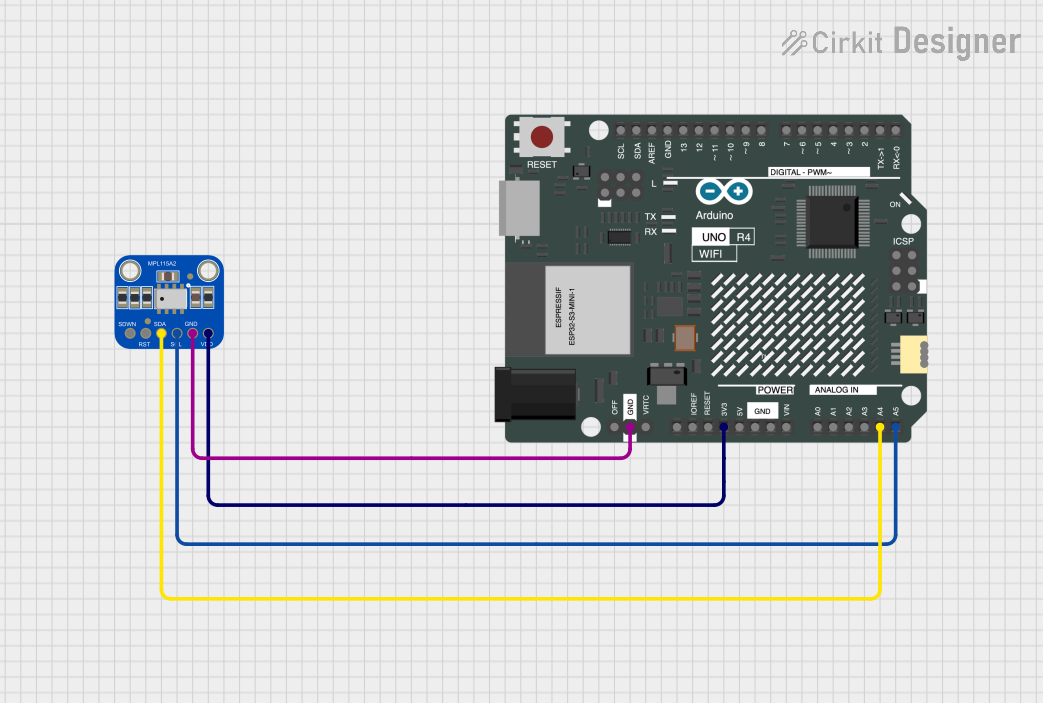
Circuit Documentation
Summary
This circuit involves an Arduino UNO R4 WiFi microcontroller interfaced with an Adafruit MPL115A2 I2C Barometric Pressure and Temperature Sensor. The sensor measures atmospheric pressure and temperature, and the data is processed and displayed using the Arduino.
Component List
Adafruit MPL115A2 I2C Barometric Pressure, Temperature Sensor
- Description: A sensor that measures barometric pressure and temperature.
- Pins: SDWN, RESET, SDA, SCL, GND, VDD
Arduino UNO R4 WiFi
- Description: A microcontroller board based on the ATmega328P, featuring WiFi connectivity.
- Pins: OFF, GND, VRTC, IIC0_SCL, IIC0_SDA, 3V3, GPIO 41, GPIO 0, GPIO 42, GPIO 43, GPIO 44, BOOT, IOREF, RESET, 5V, VIN, A0, A1, A2, A3, A4, A5, RSPCKA, CIPO, COPI, D0/RX, D1/TX, D2, D3, D4, D5, D6, D7, D8, D9, D10, D11, D12, D13, AREF, SDA, SCL
Wiring Details
Adafruit MPL115A2 I2C Barometric Pressure, Temperature Sensor
- SDA: Connected to Arduino UNO R4 WiFi pin A4
- SCL: Connected to Arduino UNO R4 WiFi pin A5
- GND: Connected to Arduino UNO R4 WiFi pin GND
- VDD: Connected to Arduino UNO R4 WiFi pin 3V3
Arduino UNO R4 WiFi
- A4: Connected to Adafruit MPL115A2 I2C Barometric Pressure, Temperature Sensor pin SDA
- A5: Connected to Adafruit MPL115A2 I2C Barometric Pressure, Temperature Sensor pin SCL
- GND: Connected to Adafruit MPL115A2 I2C Barometric Pressure, Temperature Sensor pin GND
- 3V3: Connected to Adafruit MPL115A2 I2C Barometric Pressure, Temperature Sensor pin VDD
Code Documentation
Arduino Code
#include <Adafruit_MPL115A2.h>
#include <Wire.h>

Adafruit_MPL115A2 mpl115a2; // Create an instance of the sensor

void setup() {
  Serial.begin(9600);
  mpl115a2.begin(); // Initialize the sensor
}

void loop() {
  float pressure = mpl115a2.getPressure(); // Get pressure in kPa
  float temperature = mpl115a2.getTemperature(); // Get temperature in degrees Celsius

  // Print the results to the serial monitor
  Serial.print("Pressure (kPa): ");
  Serial.print(pressure);
  Serial.print(" Temperature (C): ");
  Serial.println(temperature);

  delay(1000); // Wait for a second before reading again
}
This code initializes the Adafruit MPL115A2 sensor and reads the pressure and temperature values in a loop, printing the results to the serial monitor every second.