
Arduino UNO Thermocouple Temperature Monitor with I2C LCD Display
View and Edit Project In Cirkit Designer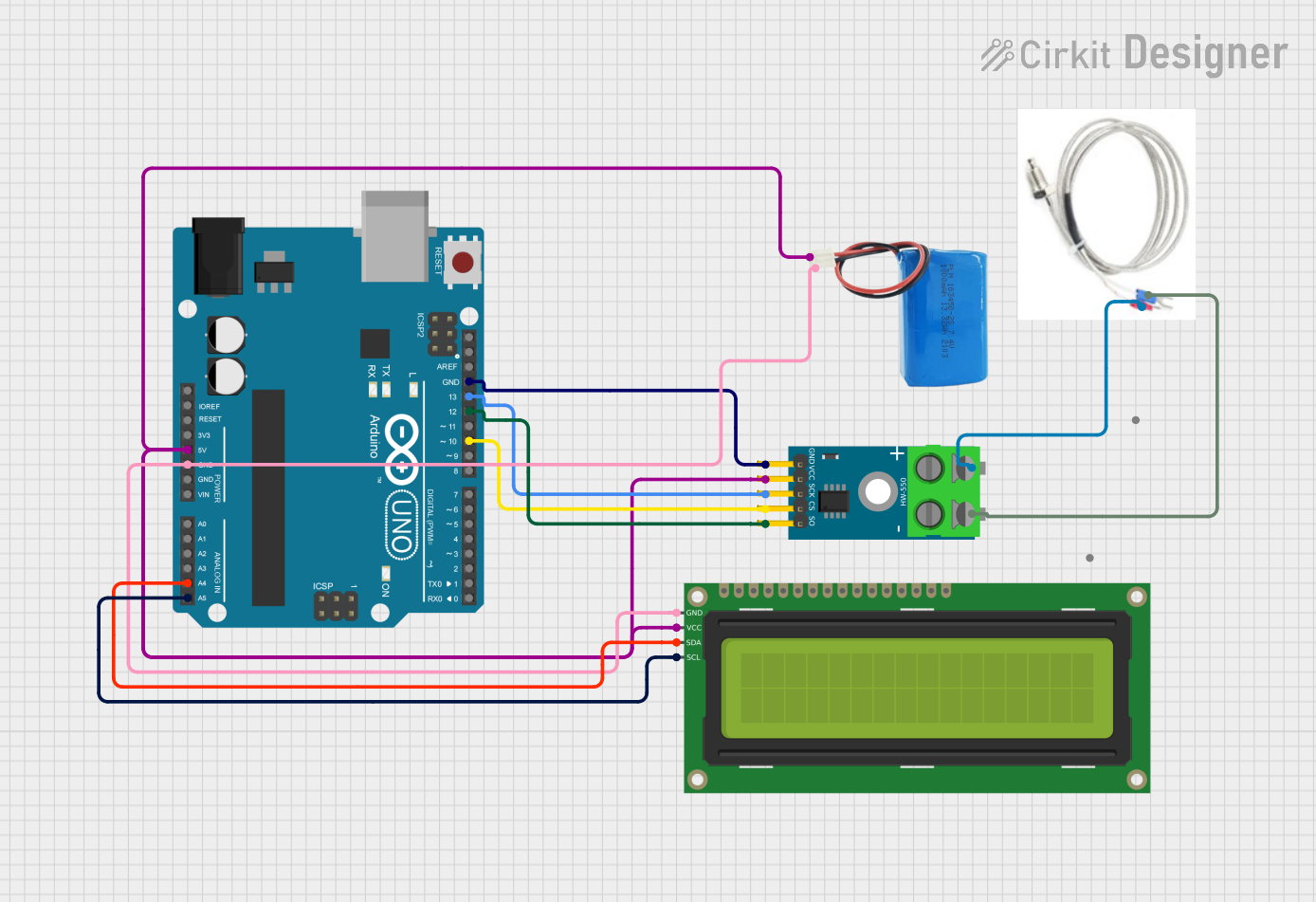
Circuit Documentation
Summary
This circuit is designed to measure temperature using a Type K thermocouple and display the readings on a 16x2 I2C LCD. The temperature data is processed by a MAX6675 module and an Arduino UNO microcontroller. The circuit is powered by a 5V battery.
Component List
16x2 I2C LCD
- Description: A 16x2 character LCD display with I2C interface.
- Pins: GND, VCC, SDA, SCL
5V Battery
- Description: A 5V power source.
- Pins: positive, negative
MAX6675 Module
- Description: A thermocouple-to-digital converter module.
- Pins: GND, VCC, SCK, CS, SO, -, +
Arduino UNO
- Description: A microcontroller board based on the ATmega328P.
- Pins: UNUSED, IOREF, Reset, 3.3V, 5V, GND, Vin, A0, A1, A2, A3, A4, A5, SCL, SDA, AREF, D13, D12, D11, D10, D9, D8, D7, D6, D5, D4, D3, D2, D1, D0
Thermocouple Type K
- Description: A Type K thermocouple for temperature measurement.
- Pins: -, +
Wiring Details
16x2 I2C LCD
- GND: Connected to Arduino UNO GND and 5V battery negative
- VCC: Connected to Arduino UNO 5V and 5V battery positive
- SDA: Connected to Arduino UNO A4
- SCL: Connected to Arduino UNO A5
5V Battery
- positive: Connected to Arduino UNO 5V and 16x2 I2C LCD VCC
- negative: Connected to Arduino UNO GND and 16x2 I2C LCD GND
MAX6675 Module
- GND: Connected to Arduino UNO GND
- VCC: Connected to Arduino UNO 5V and 5V battery positive
- SCK: Connected to Arduino UNO D13
- CS: Connected to Arduino UNO D10
- SO: Connected to Arduino UNO D12
- -: Connected to Thermocouple Type K -
- +: Connected to Thermocouple Type K +
Arduino UNO
- GND: Connected to MAX6675 Module GND, 5V battery negative, and 16x2 I2C LCD GND
- 5V: Connected to MAX6675 Module VCC, 5V battery positive, and 16x2 I2C LCD VCC
- D13: Connected to MAX6675 Module SCK
- D10: Connected to MAX6675 Module CS
- D12: Connected to MAX6675 Module SO
- A4: Connected to 16x2 I2C LCD SDA
- A5: Connected to 16x2 I2C LCD SCL
Thermocouple Type K
- -: Connected to MAX6675 Module -
- +: Connected to MAX6675 Module +
Documented Code
Arduino Sketch (sketch.ino)
#include <Wire.h>
#include <LiquidCrystal_I2C.h>
#include "max6675.h"

int thermoSO = 12; // Serial Out
int thermoCS = 10; // Chip Select
int thermoSCK = 13; // Serial Clock

MAX6675 thermocouple(thermoSCK, thermoCS, thermoSO);
LiquidCrystal_I2C lcd(0x27, 16, 2);

void setup() {
  Serial.begin(9600);
  lcd.begin();
  lcd.backlight();
  lcd.print("Thermocouple");
  delay(2000);
  lcd.clear();
}

void loop() {
  double tempC = thermocouple.readCelsius();
  double tempF = thermocouple.readFahrenheit();

  lcd.setCursor(0, 0);
  lcd.print("Temp C: ");
  lcd.print(tempC, 1);

  lcd.setCursor(0, 1);
  lcd.print("Temp F: ");
  lcd.print(tempF, 1);

  delay(1000);
}
Documentation (documentation.txt)
#include <Wire.h>
#include <LiquidCrystal_I2C.h>
#include "max6675.h"

// Define MAX6675 pins
int thermoSO = 12; // Serial Out
int thermoCS = 10; // Chip Select
int thermoSCK = 13; // Serial Clock

// Initialize MAX6675
MAX6675 thermocouple(thermoSCK, thermoCS, thermoSO);

// Initialize I2C LCD (Address 0x27, 16 chars, 2 lines)
LiquidCrystal_I2C lcd(0x27, 16, 2);

void setup() {
  Serial.begin(9600); // Serial monitor for debugging
  lcd.begin();
  lcd.backlight();
  lcd.print("Thermocouple");
  delay(2000);
  lcd.clear();
}

void loop() {
  double tempC = thermocouple.readCelsius();
  double tempF = thermocouple.readFahrenheit();

  lcd.setCursor(0, 0);
  lcd.print("Temp C: ");
  lcd.print(tempC, 1);

  lcd.setCursor(0, 1);
  lcd.print("Temp F: ");
  lcd.print(tempF, 1);

  delay(1000);
}