
ESP32-Based Smart Irrigation System with Soil Moisture Sensing and Wi-Fi Connectivity
View and Edit Project In Cirkit Designer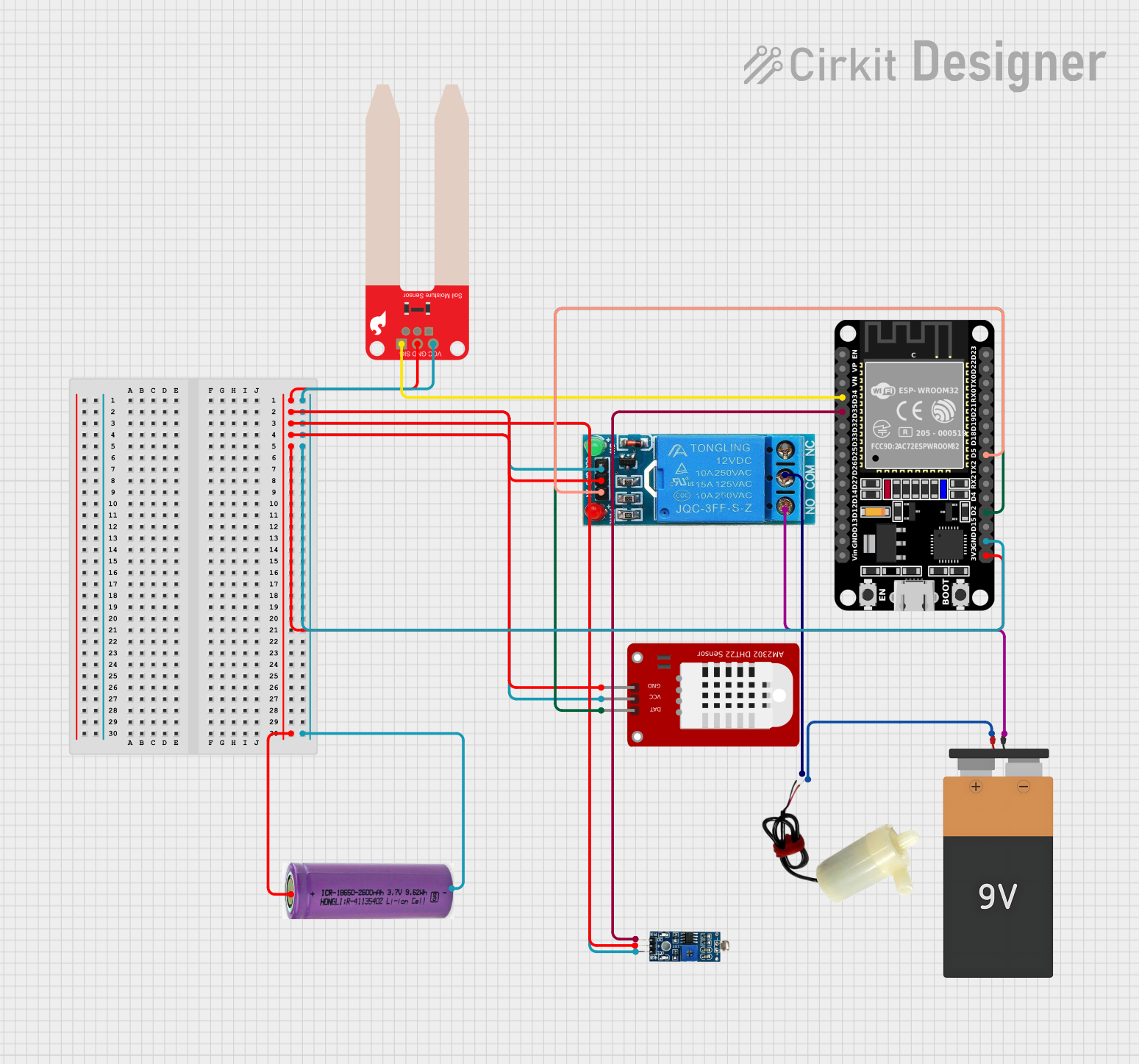
Circuit Documentation
Summary of the Circuit
This circuit is designed to monitor environmental parameters such as soil moisture, light intensity, temperature, and humidity. It utilizes a set of sensors including a SparkFun Soil Moisture Sensor, an LDR Module, and a DHT22 sensor for temperature and humidity readings. The ESP32 microcontroller is the central processing unit that reads data from the sensors, processes it, and can send it to a server via WiFi. A 12V single-channel relay is used to control a 5V mini water pump, which can be activated based on the sensor readings. Power is supplied by a 3.3V battery connected to the ESP32 and a 9V battery for the water pump.
Component List
DHT22
- Description: A digital temperature and humidity sensor.
- Pins: GND, VCC, DAT
12V Single Channel Relay
- Description: A relay module for controlling high power devices.
- Pins: NC, COM, NO, IN, GND, VCC
5V Mini Water Pump
- Description: A small water pump for fluid circulation.
- Pins: Positive pin, Negative pin
Battery 9V
- Description: A 9V battery for power supply.
- Pins: VCC, GND
3.3V Battery
- Description: A 3.3V battery for power supply.
- Pins: +, -
SparkFun Soil Moisture Sensor
- Description: A sensor for detecting the moisture level in soil.
- Pins: VCC, GND, SIG
ESP32 (30 pin)
- Description: A microcontroller with WiFi capability.
- Pins: EN, VP, VN, D34, D35, D32, D33, D25, D26, D27, D14, D12, D13, GND, Vin, D23, D22, TX0, RX0, D21, D19, D18, D5, TX2, RX2, D4, D2, D15, 3V3
LDR Module 3 pin
- Description: A light-dependent resistor module for measuring light intensity.
- Pins: VCC, GND, DO
Wiring Details
DHT22
- GND connected to common ground.
- VCC connected to 3.3V power supply.
- DAT connected to ESP32 pin D2.
12V Single Channel Relay
- GND connected to common ground.
- VCC connected to 3.3V power supply.
- IN connected to ESP32 pin D5.
- COM connected to the negative pin of the 5V mini water pump.
- NO connected to the GND of the 9V battery.
5V Mini Water Pump
- Positive pin connected to VCC of the 9V battery.
- Negative pin connected to COM of the 12V single-channel relay.
Battery 9V
- VCC connected to the positive pin of the 5V mini water pump.
- GND connected to NO of the 12V single-channel relay.
3.3V Battery
- + connected to 3V3 of ESP32.
- - connected to GND of ESP32.
SparkFun Soil Moisture Sensor
- VCC connected to 3.3V power supply.
- GND connected to common ground.
- SIG connected to ESP32 pin D34.
ESP32 (30 pin)
- 3V3 connected to + of the 3.3V battery.
- GND connected to common ground and - of the 3.3V battery.
- D34 connected to SIG of the SparkFun Soil Moisture Sensor.
- D35 connected to DO of the LDR Module.
- D5 connected to IN of the 12V single-channel relay.
- D2 connected to DAT of the DHT22.
LDR Module 3 pin
- VCC connected to 3.3V power supply.
- GND connected to common ground.
- DO connected to ESP32 pin D35.
Documented Code
#include <WiFi.h>
#include <HTTPClient.h>
#include <DHT.h>

// Define pins and constants
#define SOIL_MOISTURE_PIN 34  // Analog pin for soil moisture sensor
#define LIGHT_SENSOR_PIN 35   // Analog pin for light sensor
#define DHT_PIN 2             // Digital pin for DHT22 sensor
#define DHT_TYPE DHT22        // Define the DHT sensor type

// WiFi credentials
const char* ssid = "your_SSID";     // Replace with your WiFi SSID
const char* password = "your_PASSWORD";  // Replace with your WiFi password

DHT dht(DHT_PIN, DHT_TYPE);  // Initialize DHT sensor

void setup() {
  Serial.begin(115200);
  dht.begin();  // Start DHT sensor

  // Connect to WiFi
  WiFi.begin(ssid, password);
  while (WiFi.status() != WL_CONNECTED) {
    delay(1000);
    Serial.println("Connecting to WiFi...");
  }
  Serial.println("Connected to WiFi");
}

void loop() {
  // Read soil moisture
  int soilMoistureValue = analogRead(SOIL_MOISTURE_PIN);
  float soilMoisturePercent = map(soilMoistureValue, 4095, 0, 0, 100);

  // Read light intensity
  int lightValue = analogRead(LIGHT_SENSOR_PIN);
  float lightPercent = map(lightValue, 4095, 0, 0, 100);

  // Read temperature and humidity from DHT22
  float humidity = dht.readHumidity();
  float temperature = dht.readTemperature();

  if (isnan(humidity) || isnan(temperature)) {
    Serial.println("Failed to read from DHT sensor");
    return;
  }

  // Display readings on Serial Monitor
  Serial.print("Soil Moisture: ");
  Serial.print(soilMoisturePercent);
  Serial.println("%");

  Serial.print("Light Intensity: ");
  Serial.print(lightPercent);
  Serial.println("%");

  Serial.print("Temperature: ");
  Serial.print(temperature);
  Serial.println("°C");

  Serial.print("Humidity: ");
  Serial.print(humidity);
  Serial.println("%");

  // Send data to a server or cloud (optional)
  if (WiFi.status() == WL_CONNECTED) {
    HTTPClient http;
    String serverPath = "http://your-server.com/data";
    String data = "moisture=" + String(soilMoisturePercent) + "&light=" + String(lightPercent) + "&temperature=" + String(temperature) + "&humidity=" + String(humidity);

    http.begin(serverPath.c_str());
    http.addHeader("Content-Type", "application/x-www-form-urlencoded");

    int httpResponseCode = http.POST(data);

    if (httpResponseCode > 0) {
      Serial.print("HTTP Response code: ");
      Serial.println(httpResponseCode);
    } else {
      Serial.print("Error code: ");
      Serial.println(httpResponseCode);
    }
    http.end();
  }

  // Delay before taking the next set of readings
  delay(2000);
}
This code is designed to run on the ESP32 microcontroller. It initializes the sensors, connects to WiFi, reads sensor data, and outputs the readings to the Serial Monitor. It also includes an optional section to send the data to a server using HTTP POST requests. The pin definitions at the top of the code correspond to the wiring details provided in the previous section.