
Cirkit Designer
Your all-in-one circuit design IDE
Home /
Project Documentation
Arduino Nano GPS Location Tracker with Software Serial Communication
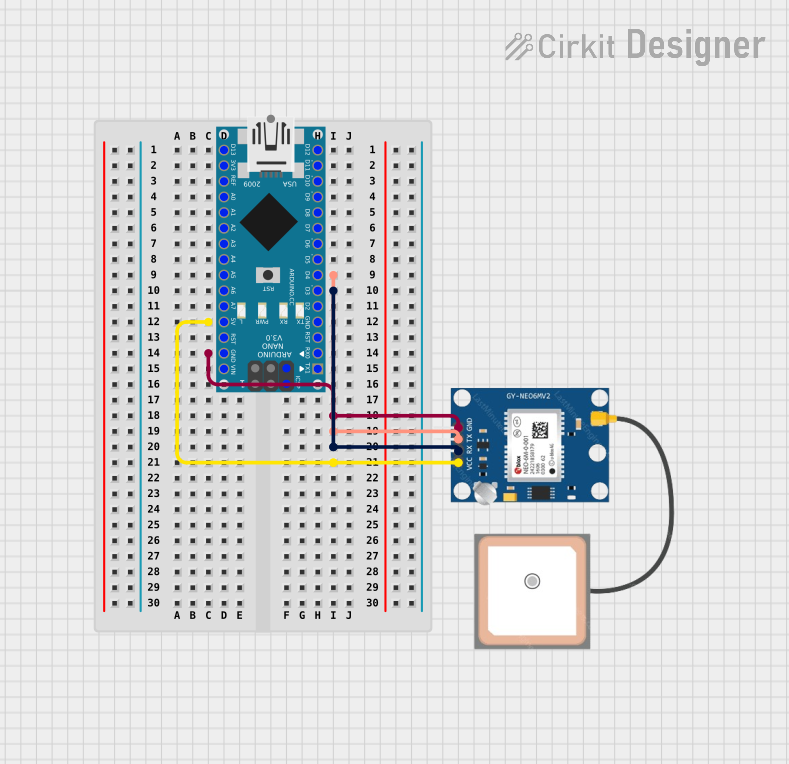
Circuit Documentation
Summary
This document provides a detailed overview of a GPS tracking circuit that utilizes an Arduino Nano microcontroller and a GPS NEO 6M module. The Arduino Nano is programmed to communicate with the GPS module to receive and process GPS data, which includes latitude, longitude, altitude, and the number of satellites in view. The processed data is then output to the Serial Monitor for real-time tracking.
Component List
Arduino Nano
- Description: A compact microcontroller board based on the ATmega328P.
- Pins: D1/TX, D0/RX, RESET, GND, D2, D3, D4, D5, D6, D7, D8, D9, D10, D11/MOSI, D12/MISO, VIN, 5V, A7, A6, A5, A4, A3, A2, A1, A0, AREF, 3V3, D13/SCK.
- Purpose: Acts as the central processing unit for the GPS tracking system, handling data communication with the GPS module and providing output to the Serial Monitor.
GPS NEO 6M
- Description: A GPS module that provides location data.
- Pins: VCC, RX, TX, GND.
- Purpose: Supplies the Arduino Nano with real-time GPS data, including coordinates and altitude information.
Wiring Details
Arduino Nano
- D4: Connected to GPS NEO 6M TX.
- D3: Connected to GPS NEO 6M RX.
- 5V: Supplies power to GPS NEO 6M VCC.
- GND: Common ground with GPS NEO 6M GND.
- D1/TX: Connected to Arduino Nano GND (loopback for testing purposes).
GPS NEO 6M
- TX: Transmits data to Arduino Nano D4.
- RX: Receives data from Arduino Nano D3.
- VCC: Powered by Arduino Nano 5V.
- GND: Common ground with Arduino Nano GND.
Documented Code
#include <TinyGPS++.h>
#include <SoftwareSerial.h>

// Create an instance of TinyGPS++
TinyGPSPlus gps;

// Define the pins for Software Serial (RX, TX)
SoftwareSerial gpsSerial(4, 3); // RX, TX

void setup() {
  // Initialize Serial Monitor for debugging
  Serial.begin(9600);
  // Initialize GPS Serial
  gpsSerial.begin(9600);

  Serial.println("GPS Location Tracker");
}

void loop() {
  // Check if GPS data is available
  while (gpsSerial.available() > 0) {
    // Feed GPS data into TinyGPS++
    gps.encode(gpsSerial.read());

    // If GPS location is updated, print it
    if (gps.location.isUpdated()) {
      Serial.print("Latitude: ");
      Serial.println(gps.location.lat(), 6);  // 6 decimal places for precision
      Serial.print("Longitude: ");
      Serial.println(gps.location.lng(), 6);  // 6 decimal places for precision
      Serial.print("Altitude: ");
      Serial.println(gps.altitude.meters());
      Serial.print("Satellites: ");
      Serial.println(gps.satellites.value());
    }
  }
}
File Name: sketch.ino
Description: This Arduino sketch initializes a SoftwareSerial connection to the GPS NEO 6M module on pins D4 and D3. It reads incoming GPS data and uses the TinyGPS++ library to parse the data. When a new location is available, it prints the latitude, longitude, altitude, and the number of satellites to the Serial Monitor.