
Arduino Nano-Based Turbofan Speed Controller with LCD Display and Rotary Encoder
View and Edit Project In Cirkit Designer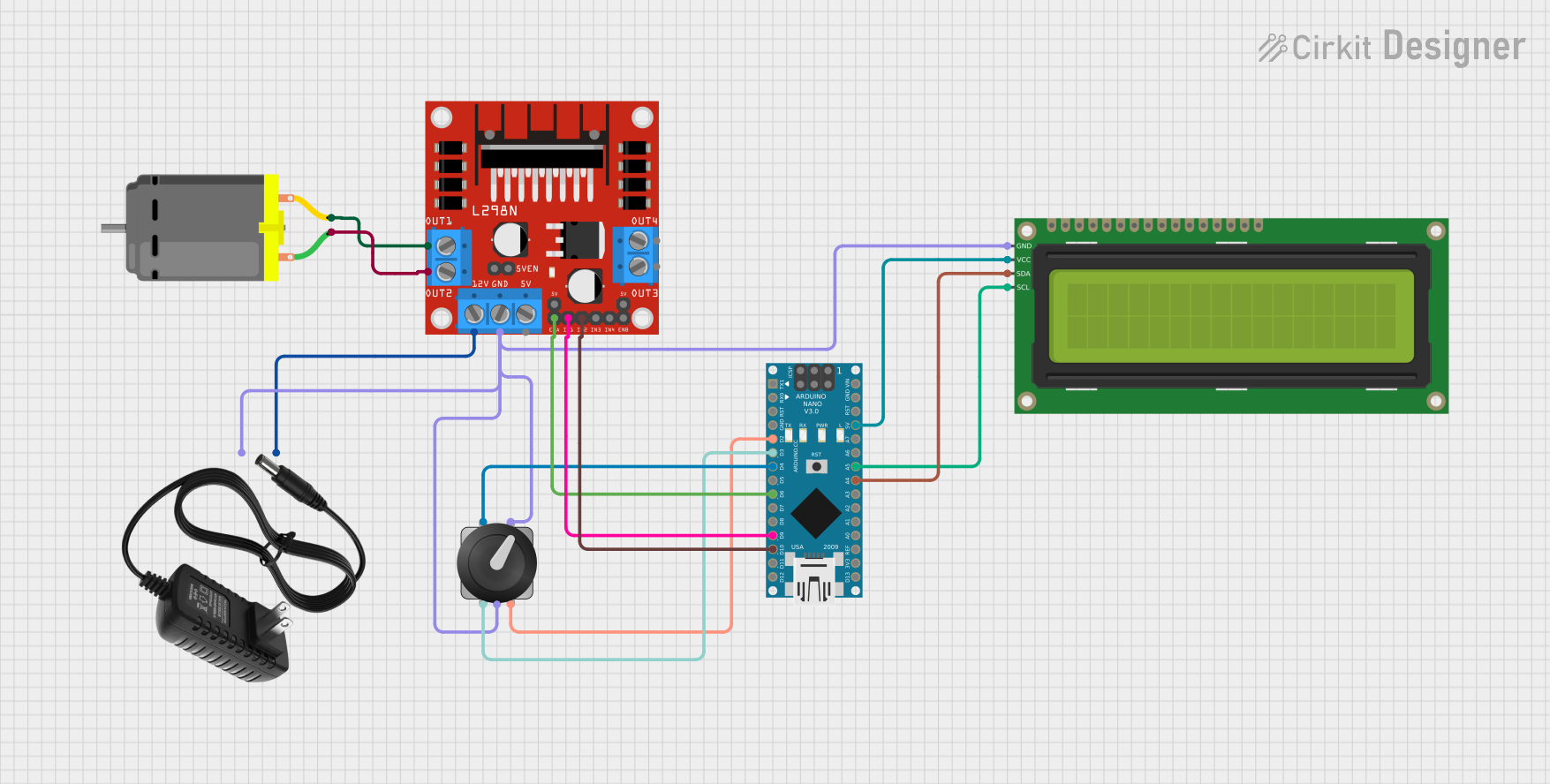
Circuit Documentation
Summary
This circuit is designed to control a DC motor using an Arduino Nano and an L298N motor driver. The motor speed is controlled via a rotary encoder, and the speed and voltage are displayed on a 16x2 I2C LCD. A 12V power supply is used to power the motor driver and the motor.
Component List
Arduino Nano
- Description: A small, complete, and breadboard-friendly board based on the ATmega328P.
- Pins: D1/TX, D0/RX, RESET, GND, D2, D3, D4, D5, D6, D7, D8, D9, D10, D11/MOSI, D12/MISO, VIN, 5V, A7, A6, A5, A4, A3, A2, A1, A0, AREF, 3V3, D13/SCK
L298N DC Motor Driver
- Description: A dual H-Bridge motor driver that allows speed and direction control of two DC motors.
- Pins: OUT1, OUT2, 12V, GND, 5V, OUT3, OUT4, 5V-ENA-JMP-I, 5V-ENA-JMP-O, +5V-J1, +5V-J2, ENA, IN1, IN2, IN3, IN4, ENB
DC Motor
- Description: A 12V DC motor.
- Pins: pin 1, pin 2
Rotary Encoder with Knob
- Description: A rotary encoder used to control the motor speed.
- Pins: no name yet
12V Power Supply
- Description: A power supply providing 12V DC.
- Pins: +, -
16x2 I2C LCD
- Description: A 16x2 character LCD with I2C interface.
- Pins: GND, VCC, SDA, SCL
Wiring Details
Arduino Nano
- D2: Connected to Rotary Encoder with Knob (no name yet)
- D3: Connected to Rotary Encoder with Knob (no name yet)
- D4: Connected to Rotary Encoder with Knob (no name yet)
- D6: Connected to L298N DC Motor Driver (ENA)
- D9: Connected to L298N DC Motor Driver (IN1)
- D10: Connected to L298N DC Motor Driver (IN2)
- 5V: Connected to 16x2 I2C LCD (VCC)
- A5: Connected to 16x2 I2C LCD (SCL)
- A4: Connected to 16x2 I2C LCD (SDA)
L298N DC Motor Driver
- ENA: Connected to Arduino Nano (D6)
- IN1: Connected to Arduino Nano (D9)
- IN2: Connected to Arduino Nano (D10)
- OUT1: Connected to DC Motor (pin 2)
- OUT2: Connected to DC Motor (pin 1)
- 12V: Connected to 12V Power Supply (+)
- GND: Connected to 16x2 I2C LCD (GND), 12V Power Supply (-), Rotary Encoder with Knob (no name yet)
DC Motor
- pin 1: Connected to L298N DC Motor Driver (OUT2)
- pin 2: Connected to L298N DC Motor Driver (OUT1)
Rotary Encoder with Knob
- no name yet: Connected to Arduino Nano (D2)
- no name yet: Connected to Arduino Nano (D3)
- no name yet: Connected to Arduino Nano (D4)
- no name yet: Connected to L298N DC Motor Driver (GND)
12V Power Supply
- +: Connected to L298N DC Motor Driver (12V)
- -: Connected to L298N DC Motor Driver (GND), 16x2 I2C LCD (GND), Rotary Encoder with Knob (no name yet)
16x2 I2C LCD
- GND: Connected to 12V Power Supply (-)
- VCC: Connected to Arduino Nano (5V)
- SDA: Connected to Arduino Nano (A4)
- SCL: Connected to Arduino Nano (A5)
Documented Code
/*
    This program used an L298N motor driver with a 12VDC motor.
    The 20x4 LCD displays motor speed, turbofan speed, and motor voltage.
    An encoder is used to control the motor speed.
    BUTTON INPUTS TO THE ENCODER:
      Press the button to set speed back to zero.
      Hold the button for 2 seconds to set the Maximum Fan speed.
      Hold the button for 5 seconds to reset the Maximum Fan speed to be uncapped.
    Maximum speed set is remembered inside the program even after power down.

    Visit https://www.thingiverse.com/thing:4743929 for the project directory
    Visit https://github.com/nairck/TurbofanDriver for the Github directory

    Written and designed by Adam B Johnson
    in British Columbia, Canada
    V1 - 15 January 2021
    V2 - 19 November 2022
    V3 - 9 August 2024
       - changed moving average window filter for voltage measurement to single pole RC type low-pass filter (simpler/better).
       - bug fix when turning encoder from higher value to zero wouldn't work. Encoder can bounce still, but zeroing now works a lot better.
       - bug fix where maximum pwm input was equal to maximum allowed minus the deadband
       - bug fixs for EEPROM code, setting new value would reset initialization sometimes or not work at all.
       - Serial monitor will now show encoder position and measured voltage at the sample rate for debugging purposes. Does not affect program when not in use.
       - i2c scanner built into program now, screen address not needed - it will be automatically scanned and used every power up. Included Wire library
       - Updated motor voltage equation to match better

*/

//#######################################  Adjust these values if needed #######################################
//#######################################  Adjust these values if needed #######################################
//#######################################  Adjust these values if needed #######################################
#define chB 2                           //***pin B of the rotary encoder (channel B should be pin 2). Can be non-interrupt capable pin, but will have lower performance
#define chA 3                           //***pin A of the rotary encoder (channel A should be pin 3). Can be non-interrupt capable pin, but will have lower performance
#define pushButton 4                    //***Button pin
#define motorPWM 6                      //***PWM pin to motor controller
#define motorDir1 9                     //***motor direction forward pin to driver
#define motorDir2 10                    //***motor direction reverse pin to driver
#define motorRPMperVolt (5000.0 / 12.0)         //***DC motor max RPM (4825) divided by max voltage (12VDC. Measure both paraments and adjust
//#######################################  End of adjustable parameters #######################################
//#######################################  End of adjustable parameters #######################################
//#######################################  End of adjustable parameters #######################################


// Libraries to include
#include <Encoder.h>                //Might need to download this library. Tools > Manage Libraries > Search for 'Encoder'
#include <LiquidCrystal_I2C.h>      //Might also need to download this one in the same way.
#include <EEPROM.h>                 //This should have been included when you installed Arduino IDE. No download needed
#include <Wire.h>


// &&&&&&&&&&&&&&&&&&&&&&& &&&&&&&&&&&&&&&&&&&&&&& &&&&&&&&&&&&&&&&&&&&&&&
// &&&&&&&&&&&&&&&&&&&&&&& PROGRAM CONSTANTS &&&&&&&&&&&&&&&&&&&&&&&
// &&&&&&&&&&&&&&&&&&&&&&& &&&&&&&&&&&&&&&&&&&&&&& &&&&&&&&&&&&&&&&&&&&&&&

LiquidCrystal_I2C lcd(0x00, 20, 4);     // Place holder LCD screen object
Encoder myEncoder(chA, chB);            // Encoder object

const float sampleR = 0.5; // 500ms sample rate

int eeAddress = 0;
int eeAddressForInitialization = 100;
byte initializationConst = 0;
byte pwmMax = 255;
int pwmVal = 0;
bool setFlag = false;

const float gearRatio = 2.27;       //fixed gear ratio
int fanSpeed = 0;                   //speed of the turbofan in RPM
int mtrSpeed = 0;                   //speed of the motor in RPM
int deadBand = 30;                  //minimum PWM signal for the motor to move
float vout = 0.0;                   //Voltage out of the motor
float