
Circuit Documentation
Summary
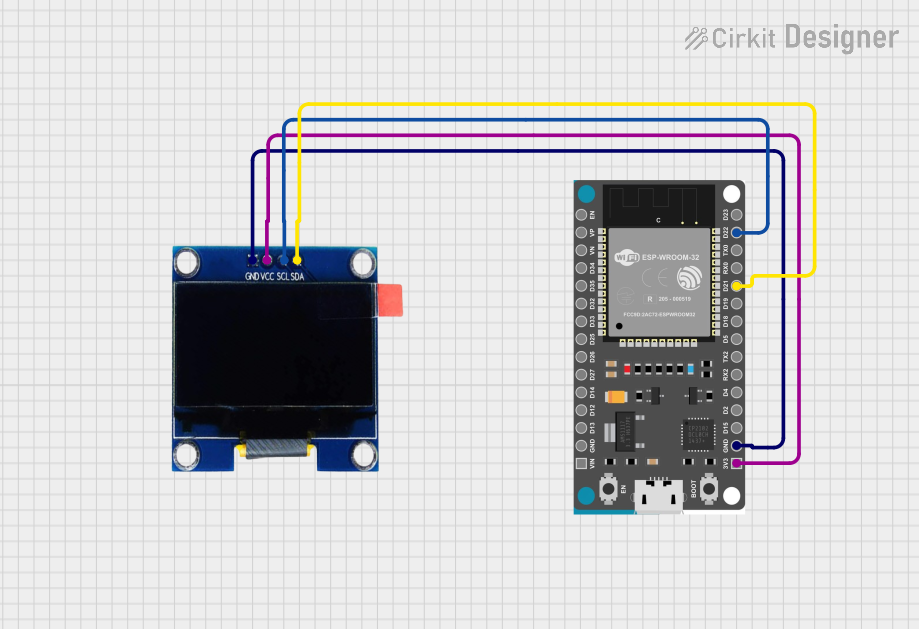
This circuit involves an ESP32 Devkit V1 microcontroller interfaced with a 1.3" OLED display. The ESP32 is responsible for driving the OLED display using the I2C communication protocol. The provided code initializes the display, clears the screen, and displays a predefined bitmap image.
Component List
ESP32 Devkit V1
- Description: A powerful microcontroller with built-in Wi-Fi and Bluetooth capabilities.
- Pins: 3V3, GND, D15, D2, D4, RX2, TX2, D5, D18, D19, D21, RX0, TX0, D22, D23, EN, VP, VN, D34, D35, D32, D33, D25, D26, D27, D14, D12, D13, VIN
OLED 1.3"
- Description: A 1.3-inch OLED display module using the SSD1306 driver.
- Pins: GND, VCC, SCL, SDA
Wiring Details
ESP32 Devkit V1
- 3V3: Connected to VCC of OLED 1.3"
- GND: Connected to GND of OLED 1.3"
- D21: Connected to SDA of OLED 1.3"
- D22: Connected to SCL of OLED 1.3"
OLED 1.3"
- GND: Connected to GND of ESP32 Devkit V1
- VCC: Connected to 3V3 of ESP32 Devkit V1
- SCL: Connected to D22 of ESP32 Devkit V1
- SDA: Connected to D21 of ESP32 Devkit V1
Code Documentation
Overview
This code is designed to interface an ESP32 Devkit V1 microcontroller with a 1.3" OLED display using the SSD1306 driver. The code initializes the display, clears the screen, and then displays a predefined bitmap image.
Libraries
- Wire.h: This library is used for I2C communication.
- Adafruit_GFX.h: This library provides graphics functions for drawing shapes, text, and images.
- Adafruit_SSD1306.h: This library is specifically for controlling SSD1306-based OLED displays.
Constants
- SCREEN_WIDTH: Defines the width of the OLED display in pixels (128 pixels).
- SCREEN_HEIGHT: Defines the height of the OLED display in pixels (64 pixels).
Global Variables
- Adafruit_SSD1306 display: An instance of the Adafruit_SSD1306 class, initialized with the screen width, height, and I2C interface.
- image_data_Saraarray: A static constant array containing the bitmap data to be displayed on the OLED screen.
Functions
void setup()
This function runs once when the microcontroller is powered on or reset.
Serial Communication Initialization:
Serial.begin(115200);Initializes serial communication at a baud rate of 115200 for debugging purposes.
Display Initialization:
if(!display.begin(SSD1306_SWITCHCAPVCC, 0x3C)) {
  Serial.println(F("SSD1306 allocation failed"));
  for(;;);
}
Initializes the OLED display with the I2C address 0x3C. If the initialization fails, an error message is printed to the serial monitor, and the program enters an infinite loop.
Delay:
delay(2000); // Pause for 2 secondsAdds a 2-second delay to allow the display to initialize properly.
Clear Display:
display.clearDisplay();Clears the display buffer.
Draw Bitmap:
display.drawBitmap(0, 0, image_data_Saraarray, 128, 64, 1);
display.display();
Draws the bitmap image stored in
image_data_Saraarrayat the top-left corner (0, 0) of the display and then updates the display to show the image.
void loop()
This function runs continuously after the setup() function.
The loop function is empty in this code, indicating that no continuous operations are required after the initial setup.
Bitmap Data
- image_data_Saraarray: This array contains the bitmap data to be displayed on the OLED screen. The data is in a format compatible with the
drawBitmapfunction of the Adafruit_SSD1306 library.
Example Output
When the code runs successfully, the OLED display will show the bitmap image defined in image_data_Saraarray.
Error Handling
If the display fails to initialize, the message "SSD1306 allocation failed" is printed to the serial monitor, and the program enters an infinite loop to prevent further execution.
This documentation provides a comprehensive overview of the code, its functionality, and its components. If you have any specific questions or need further details, feel free to ask!