
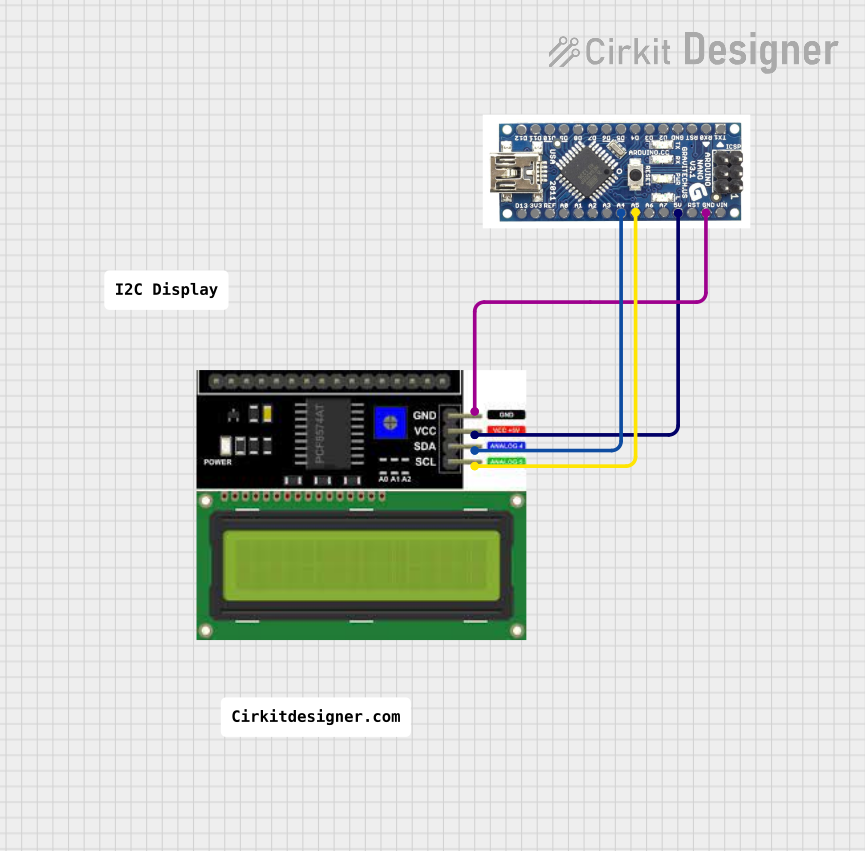
Circuit Documentation
Summary
This circuit integrates an Arduino Nano microcontroller with an LCD I2C display. The Arduino Nano serves as the central processing unit, controlling the display through the I2C communication protocol. The LCD display is used to show data or messages, which can be programmed via the Arduino Nano. The circuit is powered through the Arduino Nano's 5V output, which is connected to the VCC pin of the LCD display. Ground connections are shared between the two components to complete the circuit.
Component List
Arduino Nano
- Description: A compact microcontroller board based on the ATmega328P.
- Pins: D12, D11, D10, D9, D8, D7, D6, D5, D4, D3, D2, GND, RST, RX0, TX1, D13, 3V3, REF, A0, A1, A3, A4, A5, A6, A7, 5V, VIN
- Purpose: Acts as the main controller for the circuit, interfacing with the LCD I2C Display via I2C protocol.
LCD I2C Display
- Description: A liquid crystal display that communicates over the I2C protocol.
- Pins: GND, VCC, SDA, SCL
- Purpose: To display information as directed by the Arduino Nano.
Wiring Details
Arduino Nano
- A4 (SDA): Connected to the SDA pin of the LCD I2C Display for I2C data communication.
- A5 (SCL): Connected to the SCL pin of the LCD I2C Display for I2C clock signal.
- 5V: Provides power to the VCC pin of the LCD I2C Display.
- GND: Connected to the GND pin of the LCD I2C Display to complete the power circuit.
LCD I2C Display
- SDA: Connected to the A4 (SDA) pin of the Arduino Nano for I2C data communication.
- SCL: Connected to the A5 (SCL) pin of the Arduino Nano for I2C clock signal.
- VCC: Receives power from the 5V pin of the Arduino Nano.
- GND: Connected to the GND pin of the Arduino Nano to complete the power circuit.
Documented Code
No code has been provided for the microcontroller. To operate the circuit, code must be written and uploaded to the Arduino Nano to initialize and control the LCD I2C Display. The code should include the necessary libraries for I2C communication, setup routines for the Arduino Nano and the LCD display, and the main program loop where data to be displayed can be sent to the LCD.