
Arduino UNO Based Soil Nutrient and Moisture Analyzer with RS485 Communication
View and Edit Project In Cirkit Designer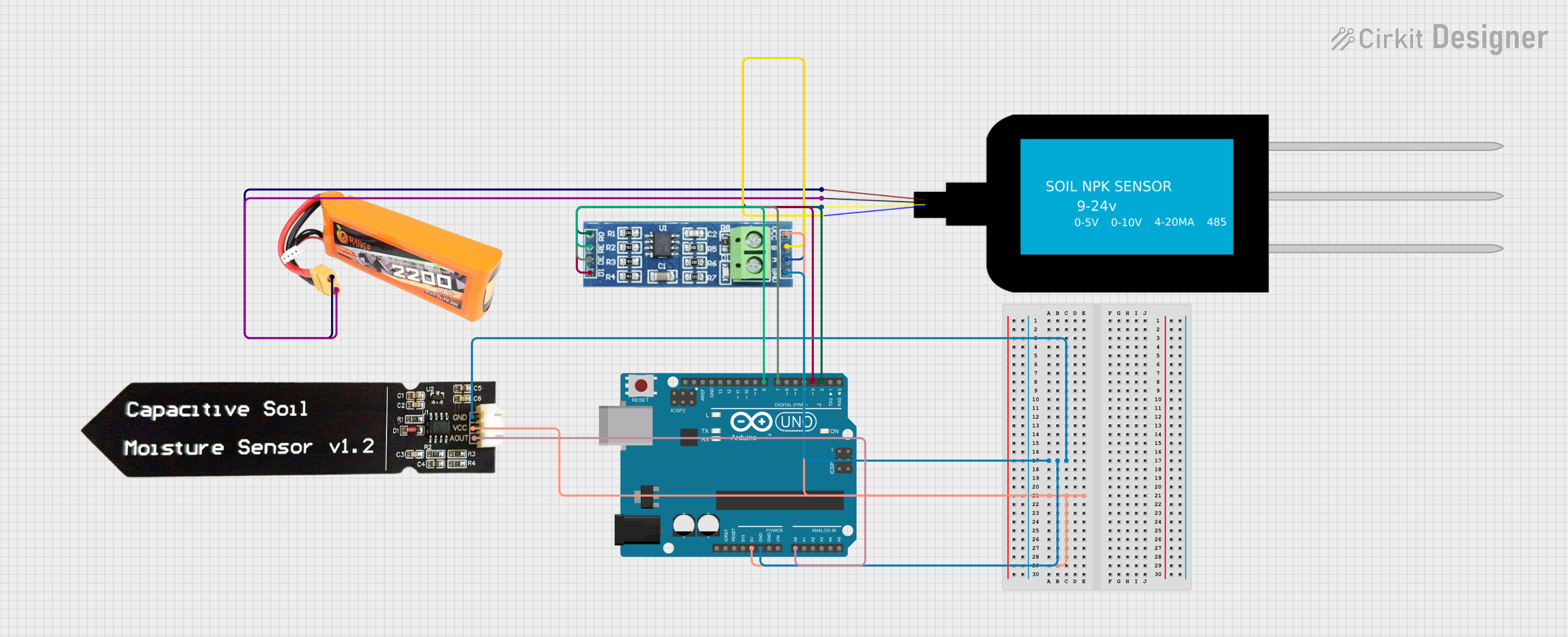
Circuit Documentation
Summary
The circuit in question is designed to monitor soil conditions using an Arduino UNO as the central processing unit. It interfaces with an NPK Soil Sensor and a Capacitive Soil Moisture Sensor V1.2 to measure the levels of Nitrogen, Phosphorus, and Potassium, as well as the moisture content of the soil. The data from the sensors is communicated to the Arduino UNO via an RS485 module for serial communication. The system is powered by a lipo battery with a capacity of 2200mAh at 30C.
Component List
Arduino UNO
- Description: A microcontroller board based on the ATmega328P.
- Purpose: Acts as the central processing unit for the circuit, reading sensor data and handling communication.
NPK Soil Sensor
- Description: A sensor that measures the levels of Nitrogen, Phosphorus, and Potassium in the soil.
- Purpose: Provides NPK values to the Arduino for soil analysis.
Lipo Battery 2200mAh 30C
- Description: A rechargeable battery providing a power source for the circuit.
- Purpose: Powers the circuit components.
RS485 Module
- Description: A module for serial communication using the RS485 standard.
- Purpose: Facilitates serial communication between the Arduino and the NPK Soil Sensor.
Capacitive Soil Moisture Sensor V1.2
- Description: A sensor that measures the moisture content of the soil via capacitance.
- Purpose: Provides soil moisture data to the Arduino.
Wiring Details
Arduino UNO
- 5V connected to RS485 VCC and Capacitive Soil Moisture Sensor V1.2 VCC.
- GND connected to RS485 GND and Capacitive Soil Moisture Sensor V1.2 GND.
- A0 connected to Capacitive Soil Moisture Sensor V1.2 AOUT.
- D8 connected to RS485 RE.
- D7 connected to RS485 DE.
- D3 connected to RS485 DI.
- D2 connected to RS485 RO.
NPK Soil Sensor
- VCC connected to Lipo Battery VCC.
- GND connected to Lipo Battery GND.
- A connected to RS485 A.
- B connected to RS485 B.
Lipo Battery 2200mAh 30C
- VCC connected to NPK Soil Sensor VCC.
- GND connected to NPK Soil Sensor GND.
RS485 Module
- VCC connected to Arduino UNO 5V.
- GND connected to Arduino UNO GND.
- A connected to NPK Soil Sensor A.
- B connected to NPK Soil Sensor B.
- RE connected to Arduino UNO D8.
- DE connected to Arduino UNO D7.
- DI connected to Arduino UNO D3.
- RO connected to Arduino UNO D2.
Capacitive Soil Moisture Sensor V1.2
- VCC connected to Arduino UNO 5V.
- GND connected to Arduino UNO GND.
- AOUT connected to Arduino UNO A0.
Documented Code
#include "SoftwareSerial.h"
#include "Wire.h"

/*
 * This Arduino Sketch reads values from an NPK Soil Sensor using RS485
 * communication and a Capacitive Soil Moisture Sensor. The sensor values for
 * Nitrogen, Phosphorous, and Potassium are read and printed to the Serial
 * Monitor. The RS485 module is connected to the Arduino UNO. The moisture
 * value is read from the Capacitive Soil Moisture Sensor and printed to the
 * Serial Monitor.
 */

#define RE 8
#define DE 7
#define MOISTURE_PIN A0

const byte nitro[] = {0x01, 0x03, 0x00, 0x1e, 0x00, 0x01, 0xe4, 0x0c};
const byte phos[] = {0x01, 0x03, 0x00, 0x1f, 0x00, 0x01, 0xb5, 0xcc};
const byte pota[] = {0x01, 0x03, 0x00, 0x20, 0x00, 0x01, 0x85, 0xc0};

byte values[11];
SoftwareSerial mod(2, 3);

void setup() {
  Serial.begin(9600);
  mod.begin(9600);
  pinMode(RE, OUTPUT);
  pinMode(DE, OUTPUT);
  delay(500);
}

void loop() {
  byte val1, val2, val3;
  val1 = nitrogen();
  delay(250);
  val2 = phosphorous();
  delay(250);
  val3 = potassium();
  delay(250);
  int moisture = analogRead(MOISTURE_PIN);

  Serial.print("Nitrogen: ");
  Serial.print(val1);
  Serial.println(" mg/kg");
  Serial.print("Phosphorous: ");
  Serial.print(val2);
  Serial.println(" mg/kg");
  Serial.print("Potassium: ");
  Serial.print(val3);
  Serial.println(" mg/kg");
  Serial.print("Moisture: ");
  Serial.println(moisture);
  delay(2000);
}

byte nitrogen() {
  digitalWrite(DE, HIGH);
  digitalWrite(RE, HIGH);
  delay(10);
  if (mod.write(nitro, sizeof(nitro)) == 8) {
    digitalWrite(DE, LOW);
    digitalWrite(RE, LOW);
    for (byte i = 0; i < 7; i++) {
      values[i] = mod.read();
      Serial.print(values[i], HEX);
    }
    Serial.println();
  }
  return values[4];
}

byte phosphorous() {
  digitalWrite(DE, HIGH);
  digitalWrite(RE, HIGH);
  delay(10);
  if (mod.write(phos, sizeof(phos)) == 8) {
    digitalWrite(DE, LOW);
    digitalWrite(RE, LOW);
    for (byte i = 0; i < 7; i++) {
      values[i] = mod.read();
      Serial.print(values[i], HEX);
    }
    Serial.println();
  }
  return values[4];
}

byte potassium() {
  digitalWrite(DE, HIGH);
  digitalWrite(RE, HIGH);
  delay(10);
  if (mod.write(pota, sizeof(pota)) == 8) {
    digitalWrite(DE, LOW);
    digitalWrite(RE, LOW);
    for (byte i = 0; i < 7; i++) {
      values[i] = mod.read();
      Serial.print(values[i], HEX);
    }
    Serial.println();
  }
  return values[4];
}
This code is responsible for initializing the serial communication, setting up the RS485 communication, and reading the values from the NPK Soil Sensor and the Capacitive Soil Moisture Sensor. It then prints these values to the Serial Monitor for analysis. The nitrogen(), phosphorous(), and potassium() functions handle the communication with the NPK Soil Sensor to retrieve the respective nutrient values. The moisture level is read directly from the analog pin A0 connected to the Capacitive Soil Moisture Sensor.