
ESP32-Based Smart Home Gas and Flame Detection System with Wi-Fi Control
View and Edit Project In Cirkit Designer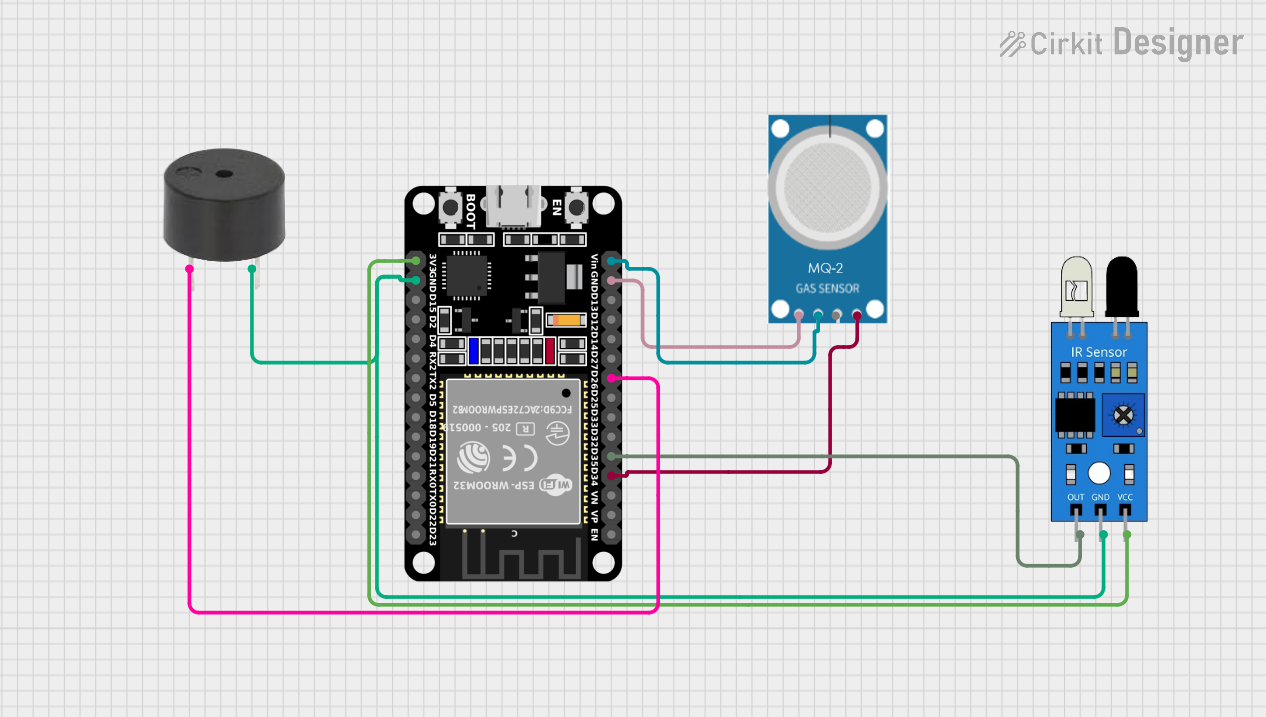
Circuit Documentation
Summary
This circuit is designed to monitor gas levels and detect flames using an ESP32 microcontroller. It includes a gas sensor (MQ-2), an IR sensor, and a buzzer. The ESP32 reads data from the sensors and controls the buzzer and a relay based on the sensor readings. Additionally, the ESP32 hosts a web server to display sensor data and control the relay and buzzer remotely.
Component List
ESP32 (30 pin)
- Description: A powerful microcontroller with built-in WiFi and Bluetooth capabilities.
- Pins: EN, VP, VN, D34, D35, D32, D33, D25, D26, D27, D14, D12, D13, GND, Vin, D23, D22, TX0, RX0, D21, D19, D18, D5, TX2, RX2, D4, D2, D15, 3V3
MQ-2
- Description: A gas sensor used to detect gas levels.
- Pins: GND, VCC, ANALOG, Digital
IR Sensor
- Description: An infrared sensor used to detect flames.
- Pins: out, gnd, vcc
Buzzer
- Description: An electronic component that produces sound.
- Pins: PIN, GND
Wiring Details
ESP32 (30 pin)
- D34: Connected to Digital pin of MQ-2
- D35: Connected to out pin of IR sensor
- D26: Connected to PIN of Buzzer
- GND: Connected to GND of MQ-2, GND of IR sensor, and GND of Buzzer
- Vin: Connected to VCC of MQ-2
- 3V3: Connected to vcc of IR sensor
MQ-2
- GND: Connected to GND of ESP32
- VCC: Connected to Vin of ESP32
- Digital: Connected to D34 of ESP32
IR Sensor
- out: Connected to D35 of ESP32
- gnd: Connected to GND of ESP32 and GND of Buzzer
- vcc: Connected to 3V3 of ESP32
Buzzer
- PIN: Connected to D26 of ESP32
- GND: Connected to GND of ESP32 and gnd of IR sensor
Documented Code
#include <WiFi.h>
#include <ESPAsyncWebServer.h>

#define GAS_SENSOR_PIN 34
#define FLAME_SENSOR_PIN 35
#define BUZZER_PIN 26
#define RELAY_PIN 27
#define WIFI_SSID "Priha"
#define WIFI_PASSWORD "12345678900"

AsyncWebServer server(80);

const int gasThreshold = 1000;
bool isGasDetected = false;
bool isFireDetected = false;
bool overrideMode = false;  // Flag for override mode

// Declare global variables for sensor readings
float gasLevel = 0;
bool flameStatus = false;
bool relayOverride = false;
bool buzzerOverride = false;

const float R0 = 10.0; // Baseline resistance of MQ-135 in clean air (in kOhms)
const float exponent = 1.6;  // Exponent value for MQ-135

// Function to convert ADC reading to PPM
float convertToPPM(int gasReading) {
  // Calculate the sensor's voltage
  float voltage = gasReading * (3.3 / 1023.0); // Assuming 3.3V reference and 10-bit ADC

  // Convert voltage to resistance (simplified model)
  float resistance = (3.3 - voltage) / voltage;  // Rough calculation for MQ sensors

  // Apply conversion formula to get PPM
  float ppm = pow((resistance / R0), -exponent) * 10;

  return ppm;
}

void setup() {
  // Pin configuration
  pinMode(GAS_SENSOR_PIN, INPUT);
  pinMode(FLAME_SENSOR_PIN, INPUT);
  pinMode(BUZZER_PIN, OUTPUT);
  pinMode(RELAY_PIN, OUTPUT);


  digitalWrite(BUZZER_PIN, LOW);
  digitalWrite(RELAY_PIN, HIGH);  // Relay OFF (active-low)

  // Initialize serial communication
  Serial.begin(115200);
  delay(2000);

  // Connect to WiFi
  WiFi.begin(WIFI_SSID, WIFI_PASSWORD);
  while (WiFi.status() != WL_CONNECTED) {
    delay(1000);
    Serial.println("Connecting to WiFi...");
  }
  Serial.println("Connected to WiFi");
  Serial.print("IP Address: ");
  Serial.println(WiFi.localIP());

  // Serve the web page
  server.on("/", HTTP_GET, [](AsyncWebServerRequest *request) {
    String html = R"rawliteral(
      <!DOCTYPE html>
      <html>
      <head>
        <title>Smart Home Control</title>
        <style>
          body {
            font-family: Arial, sans-serif;
            text-align: center;
            margin: 0;
            padding: 0;
            background-color: #f4f4f9;
          }
          .container {
            margin-top: 50px;
          }
          h1 {
            color: #333;
          }
          .button {
            display: inline-block;
            margin: 10px;
            padding: 15px 30px;
            font-size: 16px;
            color: #fff;
            background-color: #007bff;
            border: none;
            border-radius: 5px;
            text-decoration: none;
            cursor: pointer;
          }
          .button:hover {
            background-color: #0056b3;
          }
          .button.off {
            background-color: #dc3545;
          }
          .button.off:hover {
            background-color: #c82333;
          }
          .status-box {
            margin-top: 20px;
            font-size: 18px;
            padding: 10px;
            border: 1px solid #ddd;
            background-color: #fff;
          }
        </style>
        <script>
          function sendRequest(action) {
            fetch(action)
              .then(response => response.text())
              .then(data => {
                console.log(data); // For debugging
              })
              .catch(error => {
                console.error('Error:', error);
              });
          }

          function updateStatus() {
            fetch('/status')
              .then(response => response.json())
              .then(data => {
                document.getElementById('gasLevel').innerText = data.gasLevel;
                document.getElementById('flameStatus').innerText = data.flameStatus ? 'Fire Detected' : 'No Fire';
                document.getElementById('relayStatus').innerText = data.relayStatus ? 'ON' : 'OFF';
                document.getElementById('buzzerStatus').innerText = data.buzzerStatus ? 'ON' : 'OFF';
              })
              .catch(error => {
                console.error('Error:', error);
              });
          }

          setInterval(updateStatus, 1000); // Update status every second
        </script>
      </head>
      <body>
        <div class="container">
          <h1>Smart Home Control Panel</h1>
          <div>
            <button class="button" onclick="sendRequest('/relay/on')">Turn Relay ON</button>
            <button class="button off" onclick="sendRequest('/relay/off')">Turn Relay OFF</button>
          </div>
          <div>
            <button class="button" onclick="sendRequest('/buzzer/on')">Turn Buzzer ON</button>
            <button class="button off" onclick="sendRequest('/buzzer/off')">Turn Buzzer OFF</button>
          </div>
          <div class="status-box">
            <p>Gas Level (PPM): <span id="gasLevel">Loading...</span></p>
            <p>Flame Status: <span id="flameStatus">Loading...</span></p>
            <p>Relay Status: <span id="relayStatus">Loading...</span></p>
            <p>Buzzer Status: <span id="buzzerStatus">Loading...</span></p>
          </div>
        </div>
      </body>
      </html>
    )rawliteral";
    request->send(200, "text/html", html);
  });

  server.on("/status", HTTP_GET, [](AsyncWebServerRequest *request) {
    String json = "{";
    json += "\"gasLevel\":" + String(gasLevel) + ","; // Actual gas sensor reading (PPM)
    json += "\"flameStatus\":" + String(flameStatus) + ","; // Actual flame status
    json += "\"relayStatus\":" + String(digitalRead(RELAY_PIN) == LOW) + ","; // Relay status
    json += "\"buzzerStatus\":" + String(digitalRead(BUZZER_PIN) == HIGH); // Buzzer status
    json += "}";
    request->send(200, "application/json", json);
  });

  server.on("/relay/on", HTTP