
Arduino UNO-Based RFID Security System with LCD Display and Solenoid Lock
View and Edit Project In Cirkit Designer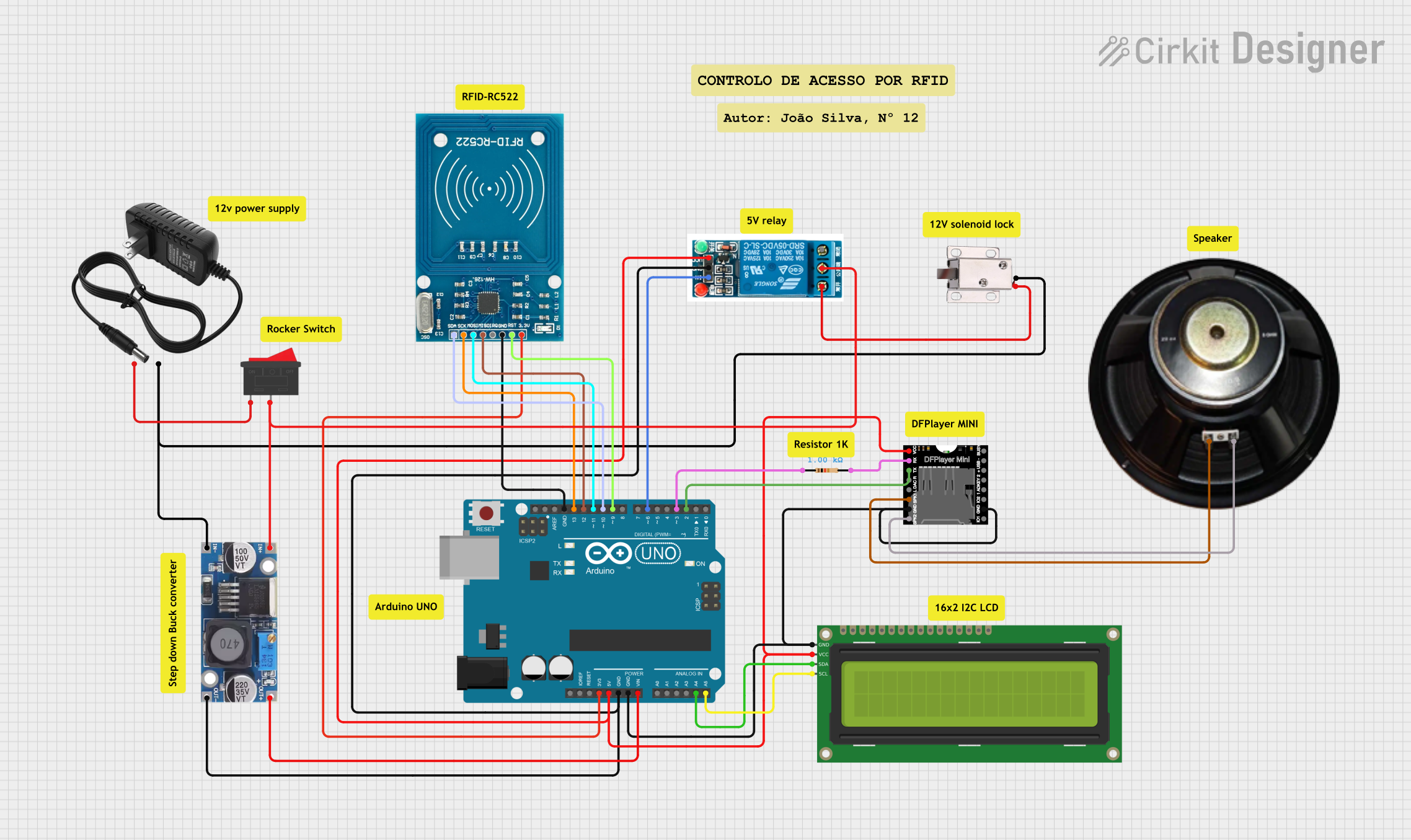
Circuit Documentation
Summary
This circuit is designed to integrate various components including an Arduino UNO, a 12V solenoid lock, a 16x2 I2C LCD, a DFPlayer MINI, an RFID-RC522 module, a 5V relay, a step-down buck converter, a speaker, and a 12V power supply. The circuit is intended to control a solenoid lock using an RFID reader, display information on an LCD, and play audio through a speaker.
Component List
Arduino UNO
- Description: A microcontroller board based on the ATmega328P.
- Pins: UNUSED, IOREF, Reset, 3.3V, 5V, GND, Vin, A0, A1, A2, A3, A4, A5, SCL, SDA, AREF, D13, D12, D11, D10, D9, D8, D7, D6, D5, D4, D3, D2, D1, D0
12V Solenoid Lock
- Description: An electromechanical lock that operates on 12V.
- Pins: VCC, GND
16x2 I2C LCD
- Description: A 16x2 character LCD with I2C interface.
- Pins: GND, VCC, SDA, SCL
12V Power Supply
- Description: A power supply providing 12V output.
- Pins: +, -
5V Relay
- Description: A relay module that operates on 5V.
- Pins: Normally Open, Common terminal, Normally Closed, In, GND, VCC
DFPlayer MINI
- Description: A small MP3 player module.
- Pins: VCC, BUSY, RX, USB -, TX, USB +, DAC_R, K2/ADC_KEY, DAC_L, K1/ADC_KEY, SPK1, IO 2, GND, SPK2, IO 1
Speaker
- Description: A speaker for audio output.
- Pins: +, -
Resistor
- Description: A resistor with a resistance of 1000 Ohms.
- Pins: pin1, pin2
RFID-RC522
- Description: An RFID reader module.
- Pins: VCC (3.3V), RST, GND, IRQ, MISO, MOSI, SCK, SDA
Step Down Buck Converter
- Description: A buck converter to step down voltage.
- Pins: IN +, IN - GND, OUT +, OUT - GND
Rocker Switch
- Description: A switch to control the power supply.
- Pins: 1, 2
Wiring Details
Arduino UNO
- 3.3V connected to RFID-RC522 VCC (3.3V)
- 5V connected to DFPlayer MINI VCC, 5V relay VCC, 16x2 I2C LCD VCC
- GND connected to 5V relay GND, Step down Buck converter OUT - GND, DFPlayer MINI GND, 16x2 I2C LCD GND, RFID-RC522 GND
- Vin connected to Step down Buck converter OUT +
- A4 connected to 16x2 I2C LCD SDA
- A5 connected to 16x2 I2C LCD SCL
- D13 connected to RFID-RC522 SCK
- D12 connected to RFID-RC522 MISO
- D11 connected to RFID-RC522 MOSI
- D10 connected to RFID-RC522 SDA
- D9 connected to RFID-RC522 RST
- D6 connected to 5V relay In
- D3 connected to Resistor pin1
- D2 connected to DFPlayer MINI TX
12V Solenoid Lock
- VCC connected to 5V relay Normally Open
- GND connected to 12V power supply -, Step down Buck converter IN - GND
16x2 I2C LCD
- GND connected to Arduino UNO GND
- VCC connected to Arduino UNO 5V
- SDA connected to Arduino UNO A4
- SCL connected to Arduino UNO A5
12V Power Supply
- + connected to Rocker Switch pin 1
- - connected to 12V solenoid lock GND, Step down Buck converter IN - GND
5V Relay
- VCC connected to Arduino UNO 5V
- GND connected to Arduino UNO GND
- In connected to Arduino UNO D6
- Normally Open connected to 12V solenoid lock VCC
- Common terminal connected to Rocker Switch pin 2, Step down Buck converter IN +
DFPlayer MINI
- VCC connected to Arduino UNO 5V
- GND connected to Arduino UNO GND
- TX connected to Arduino UNO D2
- RX connected to Resistor pin2
- SPK1 connected to Speaker +
- SPK2 connected to Speaker -
Speaker
- + connected to DFPlayer MINI SPK1
- - connected to DFPlayer MINI SPK2
Resistor
- pin1 connected to Arduino UNO D3
- pin2 connected to DFPlayer MINI RX
RFID-RC522
- VCC (3.3V) connected to Arduino UNO 3.3V
- GND connected to Arduino UNO GND
- SCK connected to Arduino UNO D13
- MISO connected to Arduino UNO D12
- MOSI connected to Arduino UNO D11
- SDA connected to Arduino UNO D10
- RST connected to Arduino UNO D9
Step Down Buck Converter
- IN + connected to 5V relay Common terminal, Rocker Switch pin 2
- IN - GND connected to 12V power supply -, 12V solenoid lock GND
- OUT + connected to Arduino UNO Vin
- OUT - GND connected to Arduino UNO GND, 5V relay GND
Rocker Switch
- pin 1 connected to 12V power supply +
- pin 2 connected to 5V relay Common terminal, Step down Buck converter IN +
Code Documentation
Arduino UNO Code
sketch.ino
void setup() {
  // put your setup code here, to run once:

}

void loop() {
  // put your main code here, to run repeatedly:

}
documentation.txt