
Arduino UNO Controlled Environment Monitoring System with Servo and Sensors
View and Edit Project In Cirkit Designer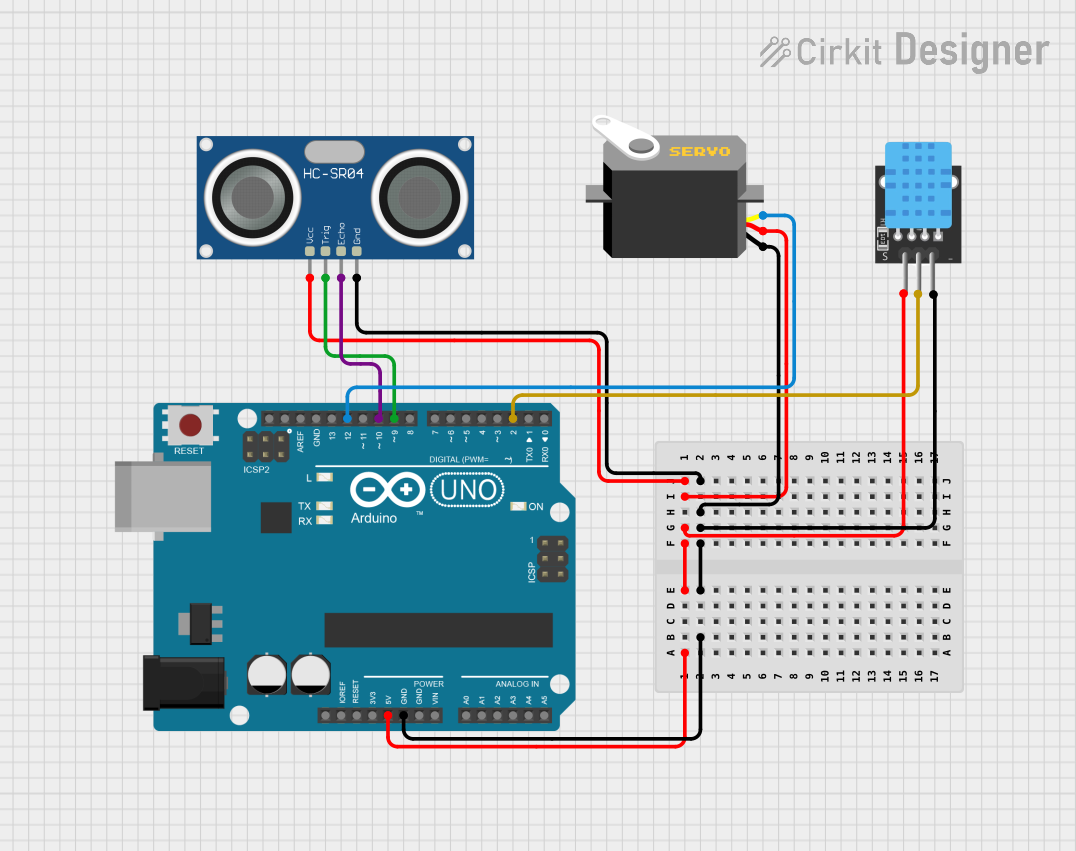
Circuit Documentation
Summary of the Circuit
This circuit is designed to interface an Arduino UNO with an HC-SR04 Ultrasonic Sensor, a DHT11 temperature and humidity sensor, and a Servo motor. The Arduino UNO acts as the central processing unit, controlling the Servo motor and reading data from the HC-SR04 and DHT11 sensors. The HC-SR04 is used for distance measurement, the DHT11 sensor is used for measuring temperature and humidity, and the Servo motor is controlled to perform mechanical movements based on the sensor inputs.
Component List
HC-SR04 Ultrasonic Sensor
- Description: A sensor that measures distance by emitting ultrasonic waves and measuring the time taken for the echo to return.
- Pins: VCC, TRIG, ECHO, GND
DHT11
- Description: A sensor that measures ambient temperature and humidity.
- Pins: 5V, S, GND
Servo
- Description: An actuator that can be precisely controlled to rotate to different angles.
- Pins: gnd, vcc, pulse
Arduino UNO
- Description: A microcontroller board based on the ATmega328P, widely used for building digital devices and interactive objects that can sense and control objects in the physical world.
- Pins: UNUSED, IOREF, Reset, 3.3V, 5V, GND, Vin, A0-A5, SCL, SDA, AREF, D0-D13
Wiring Details
HC-SR04 Ultrasonic Sensor
- VCC: Connected to Arduino UNO 5V
- TRIG: Connected to Arduino UNO D9
- ECHO: Connected to Arduino UNO D10
- GND: Connected to Arduino UNO GND
DHT11
- 5V: Connected to Arduino UNO 5V
- S: Connected to Arduino UNO D2
- GND: Connected to Arduino UNO GND
Servo
- gnd: Connected to Arduino UNO GND
- vcc: Connected to Arduino UNO 5V
- pulse: Connected to Arduino UNO D12
Arduino UNO
- 5V: Provides power to HC-SR04, DHT11, and Servo
- GND: Common ground for HC-SR04, DHT11, and Servo
- D2: Receives signal from DHT11
- D9: Sends trigger signal to HC-SR04
- D10: Receives echo signal from HC-SR04
- D12: Sends control pulse to Servo
Documented Code
The code for the Arduino UNO is provided below. It is a template with setup and loop functions defined, ready for the implementation of the logic to control the Servo and read data from the HC-SR04 and DHT11 sensors.
void setup() {
  // put your setup code here, to run once:

}

void loop() {
  // put your main code here, to run repeatedly:

}
The code is saved in a file named sketch.ino, which can be opened and uploaded to the Arduino UNO using the Arduino IDE. Additional code should be added to initialize the sensors and Servo, read sensor data, and control the Servo based on the sensor inputs. The setup() function is used for initialization, and the loop() function will contain the main logic that runs continuously.