
Arduino UNO Controlled ESC for Brushless Motor with Joystick Interface
View and Edit Project In Cirkit Designer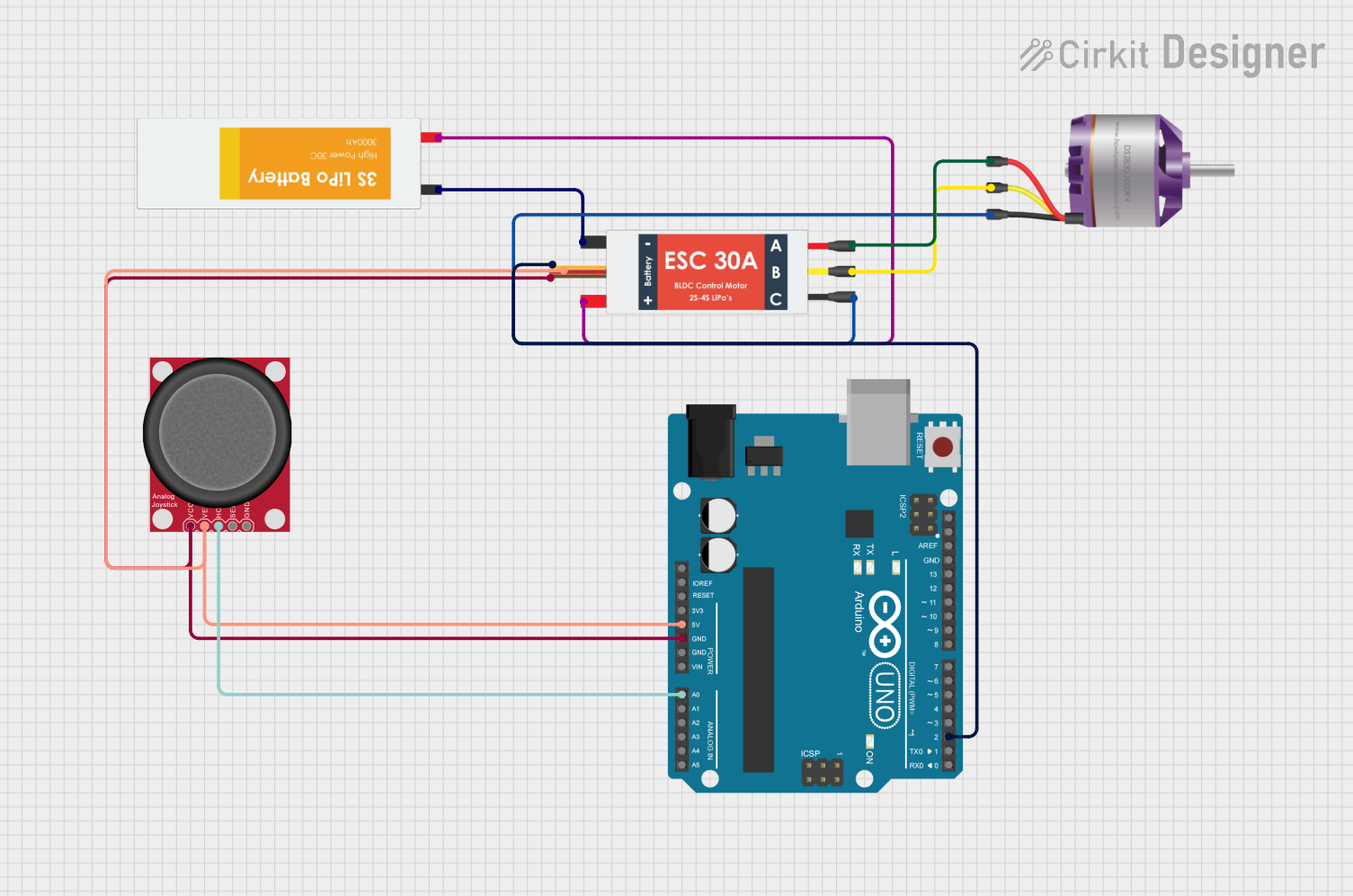
Circuit Documentation
Summary of the Circuit
This circuit is designed to control a brushless motor using an Arduino UNO microcontroller and an Electronic Speed Controller (ESC). The motor's speed is regulated by a signal generated by the Arduino, which is influenced by the position of an analog joystick. The joystick's vertical movement is used to determine the motor's speed. The ESC receives power from a Lipo battery and also provides a regulated 5V output that powers the Arduino UNO and the joystick. The ESC interfaces with the motor through its motor output pins and controls the motor's speed based on the signal from the Arduino.
Component List
Arduino UNO
- Microcontroller board based on the ATmega328P
- Provides a range of digital and analog I/O pins
- Can be powered via USB or an external power source
Electronic Speed Controller (ESC)
- Interfaces between the microcontroller and the brushless motor
- Controls the speed of the motor based on input signal
- Provides power output for peripheral components
Lipo Battery
- Rechargeable battery that provides power to the ESC
- Typically has a high energy density and is used for high-power applications
Brushless Motor
- A type of electric motor that is commonly used in drones and RC vehicles
- Operates on three-phase power, controlled by the ESC
Analog Joystick (Wokwi Compatible)
- Provides analog input based on the position of the joystick
- Used to control the motor's speed in this circuit
Wiring Details
Arduino UNO
5Vconnected to the 5V output from the ESCGNDconnected to the GND output from the ESCA0connected to theHORZpin of the Analog JoystickD2connected to theSignalpin of the ESC
Electronic Speed Controller (ESC)
Battery VCCconnected to theVCCpin of the Lipo BatteryBattery GNDconnected to theGNDpin of the Lipo BatterySignalconnected to pinD2on the Arduino UNO5v outconnected to the5Vpin on the Arduino UNO andVCCpin of the Analog JoystickGND outconnected to theGNDpin on the Arduino UNO andGNDpin of the Analog JoystickM1,M2,M3connected toL1,L2,L3pins of the Brushless Motor respectively
Lipo Battery
VCCconnected to theBattery VCCpin of the ESCGNDconnected to theBattery GNDpin of the ESC
Brushless Motor
L1,L2,L3connected toM1,M2,M3pins of the ESC respectively
Analog Joystick (Wokwi Compatible)
VCCconnected to the5v outfrom the ESCGNDconnected to theGND outfrom the ESCVERTnot used in this circuitHORZconnected toA0on the Arduino UNOSELnot used in this circuit
Documented Code
#include<Servo.h>

#define ESC_PIN 2

Servo esc;

int joyStickpin  = A1; // Not used in the current setup
int joyStickValue = 0; // Not used in the current setup
int EscPin       = 9;  // Not used in the current setup
void setup() {
  // Attach the ESC to pin D2 and set the initial signal range
  esc.attach(ESC_PIN,  1000, 2000);
  // Initialize the motor's speed to 0
  esc.write(0);
  // Allow the ESC to initialize
  delay(2000);
}

void loop() {
  // Read the joystick value from the analog pin A0
  int joystickValue = analogRead(A0);
  // Constrain the joystick value to the upper half from the center
  joystickValue = constrain(joystickValue, 550, 1023);
  // Map the joystick value to a range suitable for the ESC
  int motorSpeed = map(joystickValue, 550, 1023, 0, 180);
  // Write the mapped value to the ESC, controlling the motor speed
  esc.write(motorSpeed);
}
The code provided is for an Arduino sketch that reads the position of an analog joystick and translates it into a speed control signal for a brushless motor via an ESC. The Servo library is used to generate the control signal, and the joystick's horizontal axis is used to determine the motor's speed. The code includes setup and loop functions that initialize the ESC and continuously read the joystick position to control the motor speed.