
Arduino Nano-Based Flex Sensor Motion Tracker with Bluetooth Connectivity
View and Edit Project In Cirkit Designer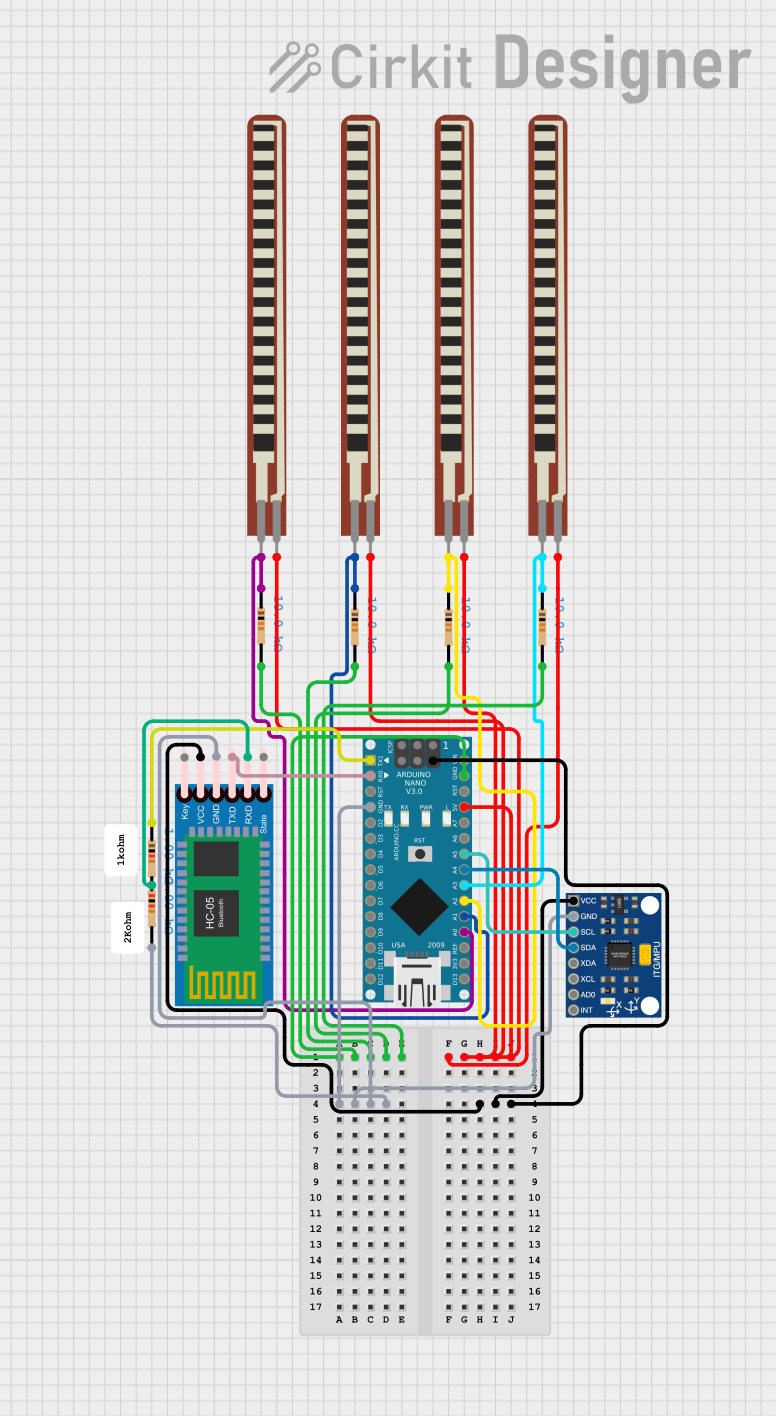
Circuit Documentation
Summary
This document provides a detailed overview of a circuit that includes an Arduino Nano, multiple resistors, a Bluetooth module, a motion sensor, and several flex resistors. The circuit is designed to interface with various sensors and modules, providing both analog and digital inputs and outputs.
Component List
2.2 inch Basic Flex Resistor
- Pins: Pin 1, Pin 2
- Description: A flexible resistor used to measure bending or flexing.
Arduino Nano
- Pins: D1/TX, D0/RX, RESET, GND, D2, D3, D4, D5, D6, D7, D8, D9, D10, D11/MOSI, D12/MISO, VIN, 5V, A7, A6, A5, A4, A3, A2, A1, A0, AREF, 3V3, D13/SCK
- Description: A small, complete, and breadboard-friendly board based on the ATmega328P.
InvenSense MPU6050
- Pins: VCC, GND, SCL, SDA, XDA, XCL, AD0, INT
- Description: A 6-axis motion tracking device that combines a 3-axis gyroscope and a 3-axis accelerometer.
HC-05 Bluetooth Module
- Pins: Key, VCC, TXD, RXD, State, GND
- Description: A Bluetooth module used for wireless communication.
Resistor (10k Ohms)
- Pins: pin1, pin2
- Description: A resistor with a resistance of 10k Ohms.
Resistor (2k Ohms)
- Pins: pin1, pin2
- Description: A resistor with a resistance of 2k Ohms.
Resistor (1k Ohms)
- Pins: pin1, pin2
- Description: A resistor with a resistance of 1k Ohms.
Comment
- Description: Placeholder for comments or notes in the circuit.
Wiring Details
2.2 inch Basic Flex Resistor
Flex Resistor 1
- Pin 1: Connected to 5V (Arduino Nano)
- Pin 2: Connected to A0 (Arduino Nano) and pin1 (10k Ohm Resistor)
Flex Resistor 2
- Pin 1: Connected to 5V (Arduino Nano)
- Pin 2: Connected to A1 (Arduino Nano) and pin1 (10k Ohm Resistor)
Flex Resistor 3
- Pin 1: Connected to 5V (Arduino Nano)
- Pin 2: Connected to A2 (Arduino Nano) and pin1 (10k Ohm Resistor)
Flex Resistor 4
- Pin 1: Connected to 5V (Arduino Nano)
- Pin 2: Connected to A3 (Arduino Nano) and pin1 (10k Ohm Resistor)
Arduino Nano
- GND: Connected to pin2 (10k Ohm Resistor), pin2 (2k Ohm Resistor), GND (MPU6050), and GND (HC-05 Bluetooth Module)
- 5V: Connected to VCC (MPU6050), VCC (HC-05 Bluetooth Module), and pin1 (Flex Resistors)
- A0: Connected to pin1 (10k Ohm Resistor) and Pin 2 (Flex Resistor 1)
- A1: Connected to pin1 (10k Ohm Resistor) and Pin 2 (Flex Resistor 2)
- A2: Connected to pin1 (10k Ohm Resistor) and Pin 2 (Flex Resistor 3)
- A3: Connected to pin1 (10k Ohm Resistor) and Pin 2 (Flex Resistor 4)
- A4: Connected to SDA (MPU6050)
- A5: Connected to SCL (MPU6050)
- D0/RX: Connected to TXD (HC-05 Bluetooth Module)
- D1/TX: Connected to pin1 (1k Ohm Resistor)
InvenSense MPU6050
- VCC: Connected to 5V (Arduino Nano)
- GND: Connected to GND (Arduino Nano)
- SCL: Connected to A5 (Arduino Nano)
- SDA: Connected to A4 (Arduino Nano)
HC-05 Bluetooth Module
- VCC: Connected to 5V (Arduino Nano)
- GND: Connected to GND (Arduino Nano)
- TXD: Connected to D0/RX (Arduino Nano)
- RXD: Connected to pin2 (1k Ohm Resistor)
Resistors
10k Ohm Resistors
- pin1: Connected to A0, A1, A2, A3 (Arduino Nano)
- pin2: Connected to GND (Arduino Nano)
2k Ohm Resistor
- pin1: Not connected
- pin2: Connected to GND (Arduino Nano)
1k Ohm Resistor
- pin1: Connected to D1/TX (Arduino Nano)
- pin2: Connected to RXD (HC-05 Bluetooth Module)
Documented Code
Arduino Nano Code
void setup() {
  // put your setup code here, to run once:

}

void loop() {
  // put your main code here, to run repeatedly:

}
This code is a basic template for the Arduino Nano, with setup and loop functions defined but not yet implemented.