
ESP32-Based Interactive LED Game with WS2812B LEDs and OLED Displays
View and Edit Project In Cirkit Designer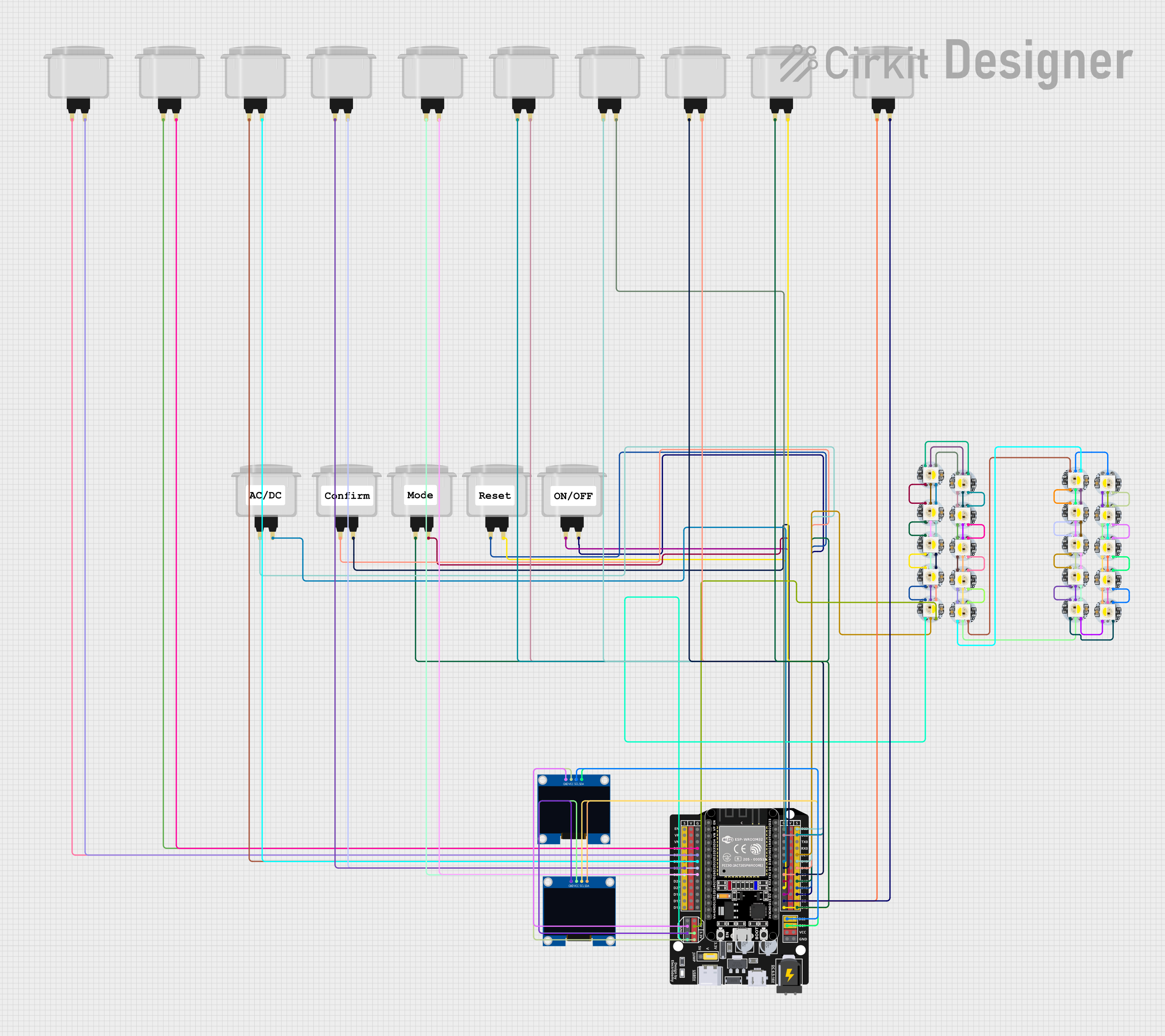
Circuit Documentation
Summary
This circuit is designed to control a series of WS2812B White LEDs and arcade buttons using an ESP32 microcontroller. The circuit also includes two 128x64 OLED displays for visual feedback. The ESP32 is programmed to handle various game modes, sensor inputs, and button interactions.
Component List
WS2812B White LED
- Description: Individually addressable RGB LED.
- Pins: 5V, GND, DIn, DOut
Arcade Button (white)
- Description: Simple push button for user input.
- Pins: NO (Normally Open), COM (Common)
ESP32 - Expansion Board
- Description: Microcontroller with Wi-Fi and Bluetooth capabilities.
- Pins: +, -, EN, VP, VN, D34, D32, D33, D25, D26, D27, D14, D12, D13, D23, D22, TX0, RX0, D21, D19, D18, D5, D17, D16, D4, D2, D15, VCC, G, 5V, 3.3V, V
128x64 OLED Display (I2C IIC SPI Serial)
- Description: Monochrome display for visual feedback.
- Pins: GND, SDA, SCL, VCC
Wiring Details
WS2812B White LED
- 5V: Connected to 5V pin of the ESP32.
- GND: Connected to G pin of the ESP32.
- DIn: Connected to D21 pin of the ESP32.
- DOut: Connected to DIn of the next WS2812B LED in the series.
Arcade Button (white)
- NO: Connected to various digital pins of the ESP32 (D4, D17, D18, D16, D34, D32, D33, D25, D23, D22, D19, D5, D2, D15).
- COM: Connected to G pin of the ESP32.
ESP32 - Expansion Board
- 5V: Supplies power to the WS2812B LEDs.
- G: Ground connection for all components.
- D21: Data input for the first WS2812B LED.
- D4, D17, D18, D16, D34, D32, D33, D25, D23, D22, D19, D5, D2, D15: Connected to NO pins of the arcade buttons.
- 3.3V: Supplies power to the OLED displays.
- G: Ground connection for the OLED displays.
- D22: SCL pin for the OLED displays.
- D21: SDA pin for the OLED displays.
128x64 OLED Display (I2C IIC SPI Serial)
- GND: Connected to G pin of the ESP32.
- SDA: Connected to D21 pin of the ESP32.
- SCL: Connected to D22 pin of the ESP32.
- VCC: Connected to 3.3V pin of the ESP32.
Code Documentation
sketch.ino
#include <Wire.h>
#include <Adafruit_GFX.h>
#include <Adafruit_SSD1306.h>
#include <Adafruit_NeoPixel.h>
#include <Bounce2.h>

// Define number of LEDs and sensors
#define NUM_LEDS 20
#define NUM_SENSORS 10

// Define pins for LEDs, displays, and buttons
#define LED_PIN 21
#define BUTTON_PIN_START 4
#define BUTTON_PIN_RESET 16
#define BUTTON_PIN_MODE 17
#define BUTTON_PIN_CONFIRM 18
#define BUTTON_PIN_ONOFF 19

// Create objects for LEDs, displays, and buttons
Adafruit_NeoPixel leds = Adafruit_NeoPixel(NUM_LEDS, LED_PIN, NEO_GRB + NEO_KHZ800);
Adafruit_SSD1306 display1(128, 64, &Wire, -1);
Adafruit_SSD1306 display2(128, 64, &Wire, -1);
Bounce startButton = Bounce();
Bounce resetButton = Bounce();
Bounce modeButton = Bounce();
Bounce confirmButton = Bounce();
Bounce onoffButton = Bounce();

// Sensor pins
int sensorPins[NUM_SENSORS] = {2, 15, 5, 23, 22, 34, 32, 33, 25, 26};

// Variables for game
int currentLED = -1;
int score = 0;
unsigned long startTime;
unsigned long gameTime = 60000; // 60 seconds
bool gameRunning = false;
int gameMode = 0; // 0: standard, 1: speed, 2: precision
bool systemOn = false;

void setup() {
  // Initialize LEDs
  leds.begin();
  leds.show();

  // Initialize OLED displays
  if(!display1.begin(SSD1306_I2C_ADDRESS, 0x3C)) {
    Serial.println(F("SSD1306 allocation failed"));
    for(;;);
  }
  if(!display2.begin(SSD1306_I2C_ADDRESS, 0x3D)) {
    Serial.println(F("SSD1306 allocation failed"));
    for(;;);
  }
  display1.display();
  display2.display();
  delay(2000); // Pause for 2 seconds

  display1.clearDisplay();
  display2.clearDisplay();
  display1.setTextSize(1);
  display1.setTextColor(SSD1306_WHITE);
  display2.setTextSize(1);
  display2.setTextColor(SSD1306_WHITE);

  // Initialize buttons
  startButton.attach(BUTTON_PIN_START, INPUT_PULLUP);
  startButton.interval(25);
  resetButton.attach(BUTTON_PIN_RESET, INPUT_PULLUP);
  resetButton.interval(25);
  modeButton.attach(BUTTON_PIN_MODE, INPUT_PULLUP);
  modeButton.interval(25);
  confirmButton.attach(BUTTON_PIN_CONFIRM, INPUT_PULLUP);
  confirmButton.interval(25);
  onoffButton.attach(BUTTON_PIN_ONOFF, INPUT_PULLUP);
  onoffButton.interval(25);

  // Initialize sensors
  for (int i = 0; i < NUM_SENSORS; i++) {
    pinMode(sensorPins[i], INPUT_PULLUP);
  }

  // Display initial score and time
  display1.setCursor(0, 0);
  display1.print("Score: ");
  display1.print(score);
  display1.display();
  display2.setCursor(0, 0);
  display2.print("Time: ");
  display2.print(gameTime / 1000);
  display2.display();
}

void loop() {
  // Update buttons
  startButton.update();
  resetButton.update();
  modeButton.update();
  confirmButton.update();
  onoffButton.update();

  // Handle on/off button
  if (onoffButton.fell()) {
    systemOn = !systemOn;
    if (!systemOn) {
      stopGame();
      display1.clearDisplay();
      display2.clearDisplay();
      display1.display();
      display2.display();
    } else {
      display1.setCursor(0, 0);
      display1.print("Score: ");
      display1.print(score);
      display1.display();
      display2.setCursor(0, 0);
      display2.print("Time: ");
      display2.print(gameTime / 1000);
      display2.display();
    }
  }

  if (!systemOn) {
    return;
  }

  // Handle start button
  if (startButton.fell()) {
    if (!gameRunning) {
      startGame();
    } else {
      stopGame();
    }
  }

  // Handle reset button
  if (resetButton.fell()) {
    resetGame();
  }

  // Handle mode button
  if (modeButton.fell()) {
    changeMode();
  }

  // Handle confirm button
  if (confirmButton.fell()) {
    confirmSelection();
  }

  // If the game is running, check sensors and update time
  if (gameRunning) {
    checkSensors();
    updateTime();
  }
}

void startGame() {
  gameRunning = true;
  score = 0;
  startTime = millis();
  display1.setCursor(0, 0);
  display1.print("Score: ");
  display1.print(score);
  display1.display();
  display2.setCursor(0, 0);
  display2.print("Time: ");
  display2.print(gameTime / 1000);
  display2.display();
  lightRandomLED();
}

void stopGame() {
  gameRunning = false;
  leds.clear();
  leds.show();
}

void resetGame() {
  stopGame();
  score = 0;
  display1.setCursor(0, 0);
  display1.print("Score: ");
  display1.print(score);
  display1.display();
  display2.setCursor(0, 0);
  display2.print("Time: ");
  display2.print(gameTime / 1000);
  display2.display();
}

void changeMode() {
  gameMode = (gameMode + 1) % 3;
  // Update display or LEDs to show current game mode
}

void confirmSelection() {
  //