
Arduino-Controlled Bluetooth Robotic Car with L298N Motor Driver
View and Edit Project In Cirkit Designer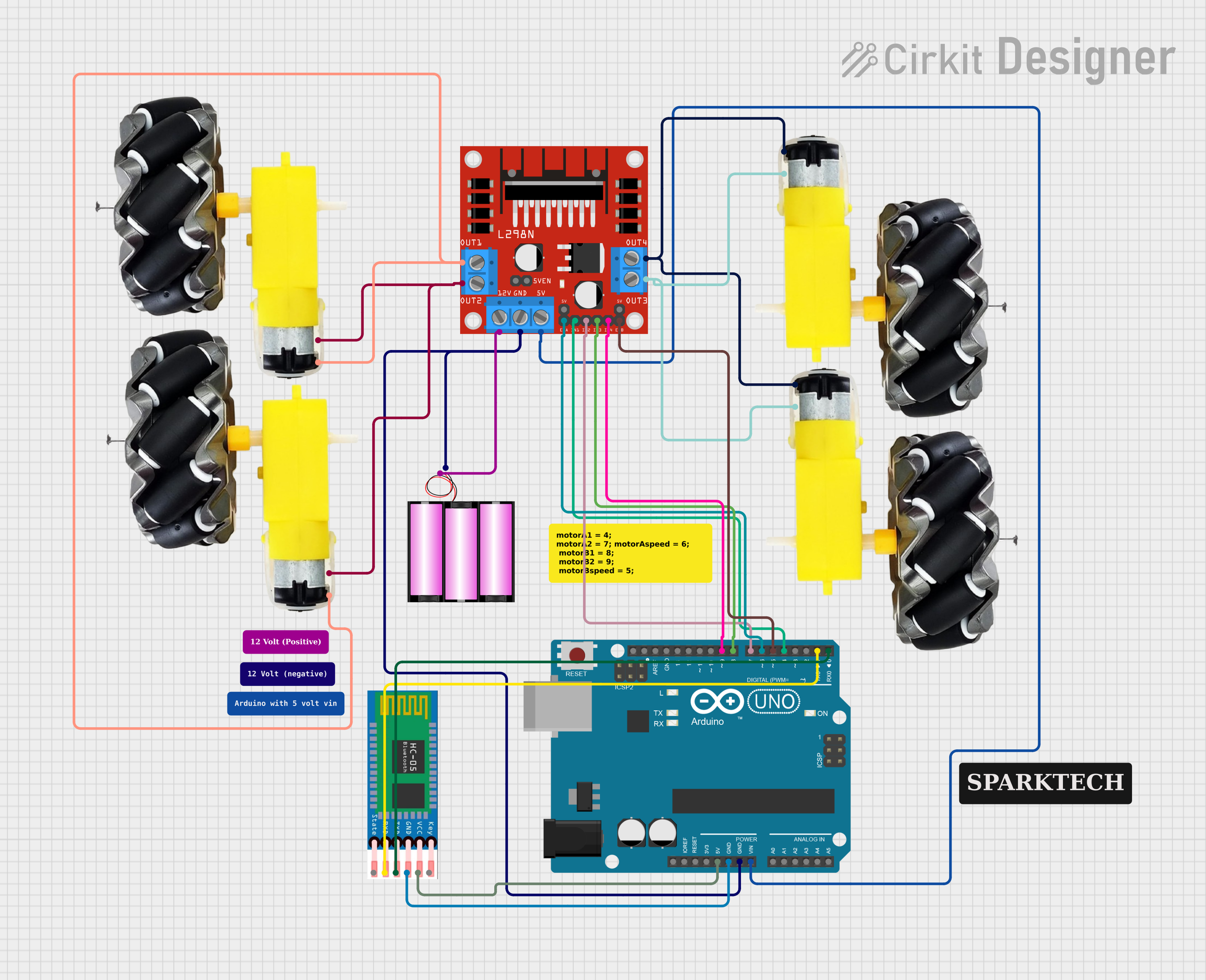
Circuit Documentation
Summary
This circuit is designed to control a four-wheeled vehicle using an Arduino UNO microcontroller and a Bluetooth module (HC-05) for wireless communication. The vehicle's motion is driven by four DC motors, which are managed by an L298N DC motor driver. The Arduino UNO receives commands via Bluetooth and controls the motor driver to move the vehicle forward, backward, turn left, or turn right. The motor driver is powered by a 12V battery, which also supplies power to the Arduino through a voltage regulator.
Component List
L298N DC Motor Driver
- Description: A module capable of driving up to two DC motors with control over speed and direction.
- Pins: OUT1, OUT2, 12V, GND, 5V, OUT3, OUT4, ENA, IN1, IN2, IN3, IN4, ENB
Arduino UNO
- Description: A microcontroller board based on the ATmega328P, widely used for prototyping and educational purposes.
- Pins: IOREF, Reset, 3.3V, 5V, GND, Vin, A0-A5, SCL, SDA, AREF, D0-D13
HC-05 Bluetooth Module
- Description: A Bluetooth module for serial communication, commonly used for wireless data transfer.
- Pins: EN, VCC, GND, TXD, RXD, STATE
12V Battery
- Description: A power source for the circuit, providing the necessary voltage to drive the motors and the motor driver.
- Pins: +, -
Motor and Wheels (x4)
- Description: DC motors connected to wheels, providing the motion for the vehicle.
- Pins: VCC, GND
Wiring Details
L298N DC Motor Driver
- OUT1, OUT2: Connected to two motors (motor and wheels).
- 12V: Connected to the positive terminal of the 12V battery.
- GND: Common ground with Arduino UNO and the negative terminal of the 12V battery.
- 5V: Connected to the Vin pin of the Arduino UNO.
- OUT3, OUT4: Connected to the other two motors (motor and wheels).
- ENA, ENB: Connected to digital pins D6 and D5 of the Arduino UNO for enabling the motor driver.
- IN1, IN2, IN3, IN4: Connected to digital pins D4, D7, D8, and D9 of the Arduino UNO for motor direction control.
Arduino UNO
- GND: Common ground with L298N DC motor driver and HC-05 Bluetooth module.
- Vin: Connected to the 5V output of the L298N DC motor driver.
- D0-D9: Used for communication with the HC-05 Bluetooth module and controlling the L298N DC motor driver.
- 5V: Provides power to the HC-05 Bluetooth module.
HC-05 Bluetooth Module
- VCC: Connected to the 5V output of the Arduino UNO.
- GND: Common ground with Arduino UNO.
- TXD, RXD: Connected to digital pins D0 and D1 of the Arduino UNO for serial communication.
12V Battery
- +: Connected to the 12V input of the L298N DC motor driver.
- -: Common ground with the L298N DC motor driver.
Motor and Wheels
- VCC: Connected to the output pins OUT1 and OUT3 of the L298N DC motor driver.
- GND: Connected to the output pins OUT2 and OUT4 of the L298N DC motor driver.
Documented Code
//Arduino Bluetooth Controlled Car
//Before uploading the code you have to install the necessary library
//AFMotor Library https://learn.adafruit.com/adafruit-motor-shield/library-install
//Now You Can Upload the Code without any problem but make sure the bt module isn't connected with Arduino while uploading code

#include <AFMotor.h>

//initial motors pin
AF_DCMotor motor1(1, MOTOR12_1KHZ);
AF_DCMotor motor2(2, MOTOR12_1KHZ);
AF_DCMotor motor3(3, MOTOR34_1KHZ);
AF_DCMotor motor4(4, MOTOR34_1KHZ);

char command;

void setup()
{
  Serial.begin(9600);  //Set the baud rate to your Bluetooth module.
}

void loop(){
  if(Serial.available() > 0){
    command = Serial.read();
    Stop(); //initialize with motors stopped
    //Change pin mode only if new command is different from previous.
    switch(command){
    case 'F':
      forward();
      break;
    case 'B':
       back();
      break;
    case 'L':
      left();
      break;
    case 'R':
      right();
      break;
    }
  }
}

void forward()
{
  motor1.setSpeed(255); //Define maximum velocity
  motor1.run(FORWARD); //rotate the motor clockwise
  motor2.setSpeed(255); //Define maximum velocity
  motor2.run(FORWARD); //rotate the motor clockwise
  motor3.setSpeed(255);//Define maximum velocity
  motor3.run(FORWARD); //rotate the motor clockwise
  motor4.setSpeed(255);//Define maximum velocity
  motor4.run(FORWARD); //rotate the motor clockwise
}

void back()
{
  motor1.setSpeed(255); //Define maximum velocity
  motor1.run(BACKWARD); //rotate the motor anti-clockwise
  motor2.setSpeed(255); //Define maximum velocity
  motor2.run(BACKWARD); //rotate the motor anti-clockwise
  motor3.setSpeed(255); //Define maximum velocity
  motor3.run(BACKWARD); //rotate the motor anti-clockwise
  motor4.setSpeed(255); //Define maximum velocity
  motor4.run(BACKWARD); //rotate the motor anti-clockwise
}

void left()
{
  motor1.setSpeed(255); //Define maximum velocity
  motor1.run(BACKWARD); //rotate the motor anti-clockwise
  motor2.setSpeed(255); //Define maximum velocity
  motor2.run(BACKWARD); //rotate the motor anti-clockwise
  motor3.setSpeed(255); //Define maximum velocity
  motor3.run(FORWARD);  //rotate the motor clockwise
  motor4.setSpeed(255); //Define maximum velocity
  motor4.run(FORWARD);  //rotate the motor clockwise
}

void right()
{
  motor1.setSpeed(255); //Define maximum velocity
  motor1.run(FORWARD); //rotate the motor clockwise
  motor2.setSpeed(255); //Define maximum velocity
  motor2.run(FORWARD); //rotate the motor clockwise
  motor3.setSpeed(255); //Define maximum velocity
  motor3.run(BACKWARD); //rotate the motor anti-clockwise
  motor4.setSpeed(255); //Define maximum velocity
  motor4.run(BACKWARD); //rotate the motor anti-clockwise
}

void Stop()
{
  motor1.setSpeed(0); //Define minimum velocity
  motor1.run(RELEASE); //stop the motor when release the button
  motor2.setSpeed(0); //Define minimum velocity
  motor2.run(RELEASE); //stop the motor when release the button
  motor3.setSpeed(0); //Define minimum velocity
  motor3.run(RELEASE); //stop the motor when release the button
  motor4.setSpeed(0); //Define minimum velocity
  motor4.run(RELEASE); //stop the motor when release the button
}
This code is designed to be uploaded to an Arduino UNO microcontroller. It includes a library for controlling DC motors, defines the motors connected to the L298N motor driver, and sets up serial communication with the HC-05 Bluetooth module. The loop function listens for commands sent over Bluetooth and controls the motors accordingly to move the vehicle.